Barcode Technology

Barcode History

Barcode Label Paper

Barcode Printer

Barcode Application

Inventory Management

AI Barcode QRCode

Barcode Scanner

Barcode Software

Barcode Software B

Barcode Software C

Barcode Software D

Barcode Software E

New Technology A

New Technology B

Robot Technology

Barcode Types

Barcode Types B

Barcode Types C

Barcode Types D

Barcode Types E

Barcode Types F

Electronic Technology

Psychology at Work

Barcode Technology and Barcode Software Related   <<< Back to Directory <<<

Using barcodes for Employee Tracking

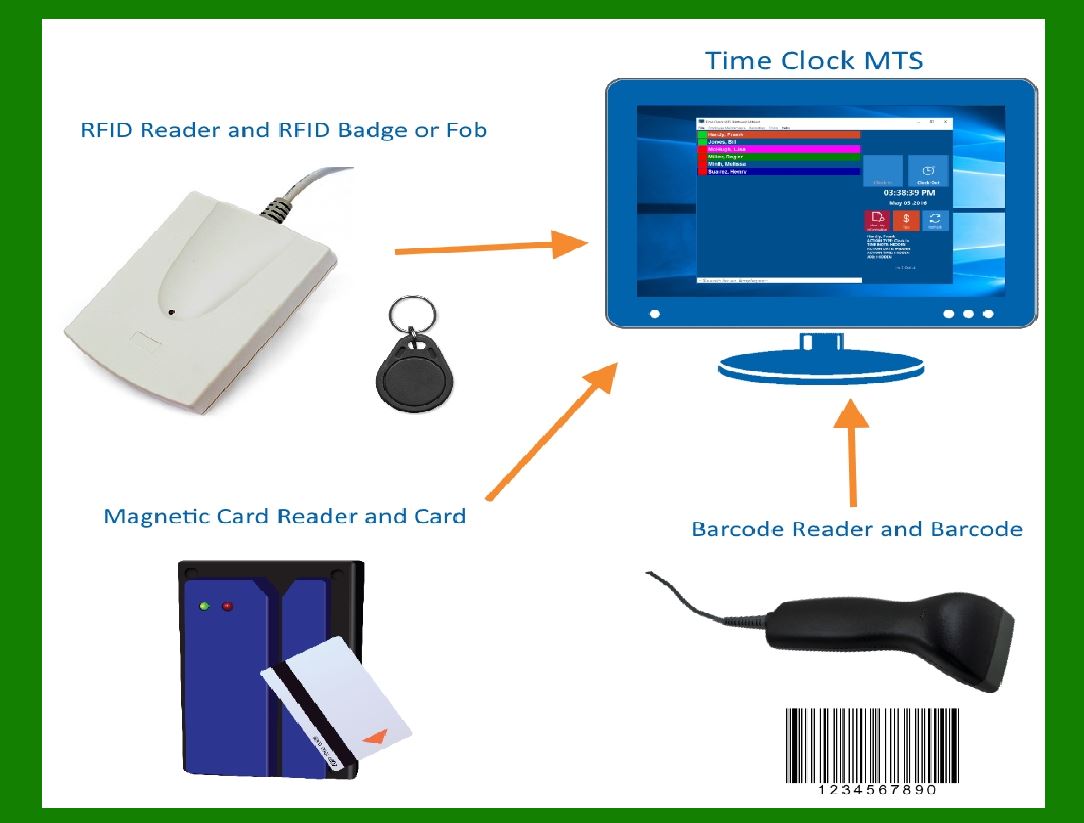
Using barcodes for employee tracking can be an efficient and effective method for managing attendance, productivity, and access control. Here's an overview of how it can be implemented and its potential benefits and drawbacks:

A. Implementation Steps

1. Barcode Generation:

Generate unique barcodes for each employee. This can be done using software that creates barcodes in various formats (e.g., QR codes, Code 128).

2. Barcode Distribution:

Assign barcodes to employees. These can be printed on ID cards, badges, or integrated into mobile applications.

3. Scanning Infrastructure:

Install barcode scanners at key points, such as entrances, exits, and workstations. Handheld scanners, stationary scanners, or mobile devices with scanning capabilities can be used.

4. Integration with Management Systems:

Integrate the barcode scanning system with your existing employee management or HR software to ensure seamless data transfer and processing.

5. Employee Training:

Train employees on how to use the barcode system, including how to scan their codes properly and understand the importance of accurate scanning for attendance and tracking.

6. Data Management:

Establish protocols for data collection, storage, and analysis. Ensure data privacy and compliance with relevant regulations.

B. Benefits

1. Accurate Time Tracking:

Automates the process of logging attendance, reducing errors and fraudulent timekeeping.

2. Improved Productivity:

Allows managers to monitor employee movements and activities, helping identify areas for efficiency improvements.

3. Enhanced Security:

Controls access to specific areas within the workplace, ensuring only authorized personnel can enter sensitive zones.

4. Cost-Effective:

Barcodes are inexpensive to produce and implement compared to other tracking methods like RFID or biometric systems.

5. Data-Driven Decisions:

Provides valuable data for workforce analytics, helping in decision-making regarding staffing, scheduling, and resource allocation.

C. Drawbacks

1. Privacy Concerns:

Employees might feel uncomfortable with constant tracking, potentially leading to privacy concerns and decreased morale.

2. Implementation Cost:

Initial setup costs for hardware and software, as well as training, can be significant.

3. Technical Issues:

Scanners or barcodes can malfunction, leading to potential disruptions in tracking.

4. Dependence on Scanning Compliance:

The system relies on employees consistently scanning their barcodes, which might not always happen, leading to incomplete data.

D. Best Practices

1. Clear Communication:

Explain the purpose and benefits of the tracking system to employees to gain their buy-in and cooperation.

2. Data Privacy Measures:

Implement strict data privacy measures and ensure compliance with data protection laws to safeguard employee information.

3. Regular Maintenance:

Regularly maintain and update the barcode scanners and software to prevent technical issues.

4. Alternative Solutions:

Have backup methods for attendance tracking to mitigate disruptions in case of system failures.

5. Feedback Mechanism:

Establish a feedback mechanism for employees to voice their concerns and suggestions regarding the tracking system.

By carefully implementing and managing a barcode-based employee tracking system, organizations can enhance operational efficiency, improve security, and make informed management decisions while addressing potential challenges and concerns.


EasierSoft Barcode Label Design & Bulk Printing Software

---- Use Excel Data to Batch Print Barcodes on Label Sheets or Roll Labels  

---- How to use this barcode software

Download:  Free Barcode Software + Barcode Label Designer

Download Free Barcode Software at Softonic

     Download at CNET

Once you obtain a GS1/UPC/EAN barcode, or other barcode type and QR code, you can use our free software to batch print barcode labels onto Roll label paper using a professional label printer, or to batch print barcodes onto Avery 5160 label sheets using a regular laser or inkjet printer. Our software has free and paid versions.

The free version fully meets your needs for batch printing GS1/UPC/EAN barcodes. The paid version can import data from Excel and databases to batch print barcode labels with different values.

How to Start

Input Data

Import Excel Data

Print Barcode

Barcode Format

Label Designer

All Screen Shot

Export Barcode Image

Save Template

Output Word Excel

How to Use & FAQ:

Load Excel data (pro)

Manually copy data from Excel files

Filter some data for printing

Edit imported barcode data

Input data (Pro)

Label Designer

Edit data in Label designer

Label Designer - Add new label

Label Designer - Printing

Set the barcode label format to be printed

Other Barcode Label Format Settings

Barcode types supported by this program

Barcode Label Font Settings

Configuring the Barcode Print Rotation

Text Alignment for Barcode Labels

Automatically Adjusting Barcode Width

Text Beneath the Barcode

Configuring Barcode Size

Auto Calculate the Barcode Size

Export Barcode images

Export Barcode Image Format

File Names for Exported Barcode

Resolution of Exported Barcode Images

Fixed Folder for Exporting Barcode

Default Barcode Image Export Format

Print bulk barcodes quickly

Print barcodes to Avery 5160 label

How to bulk Barcode Printing

Sample - Avery 5162 (2x7) Label Sheet

Example: Print barcodes to 5*3cm roll

Example: Print barcodes to 5161 label

Example: Print barcodes to 5162 label

Example: Print barcodes to 5163 label

Example: Print barcodes to 5164 label

Example: Print portrait orientation 5164

Example: Print barcodes to 5167 label

Example: Print barcodes to 5168 label

Example: Print portrait orientation 5168

Example: Print barcodes to 5169 label

Example: Print barcodes to 5660 label

Example: Print barcodes to 5661 label

Example: Print barcodes to 5662 label

Example: Print barcodes to 5663 label

Example: Print barcodes to 5664 label

Example: Print portrait orientation 5664

Example: Print barcodes to 5873 label

Example: Print barcodes to 5874 label

Two ways to import Excel data

Import Excel Data - Pro Edition

Import Excel Data - Std Edition

Highlights

Excel integration: Import data directly from Excel to generate and print barcodes in bulk.

Label designer: Create complex labels with multiple barcodes, text, logos, and shapes.

Batch printing: Print thousands of barcodes at once using standard inkjet/laser printers or professional barcode printers.


Flexible editions:

Standard Edition: Simple batch printing with Excel data.

Professional Edition: Adds command-line automation for workflow integration.

Label Designer Edition: Advanced design features for complex labels.


Why Choose Our Barcode Solutions?

Cost-effective: Free online generator and permanent free desktop version available.

Easy to use: No technical expertise required—just input data and print.

Versatile: Supports nearly all 1D and 2D barcode types, including QR codes.

Trusted: Recommended by CNET and widely downloaded by users worldwide.


Suitable Use Cases

Small businesses and startups needing quick barcode labels for products.

Retailers and online sellers managing inventory with batch barcode printing.

Manufacturers requiring sequential or custom barcode labels for packaging.

Educational and testing environments where barcodes are used for tracking.


CONTACT

cs@easiersoft.com

If you have any question, please feel free to email us.


https://free-barcode.com


<<< Back to Directory <<<     Barcode Generator     Barcode Freeware     Privacy Policy