1. Introduction to Anoto Dot Pattern and Digital Paper |
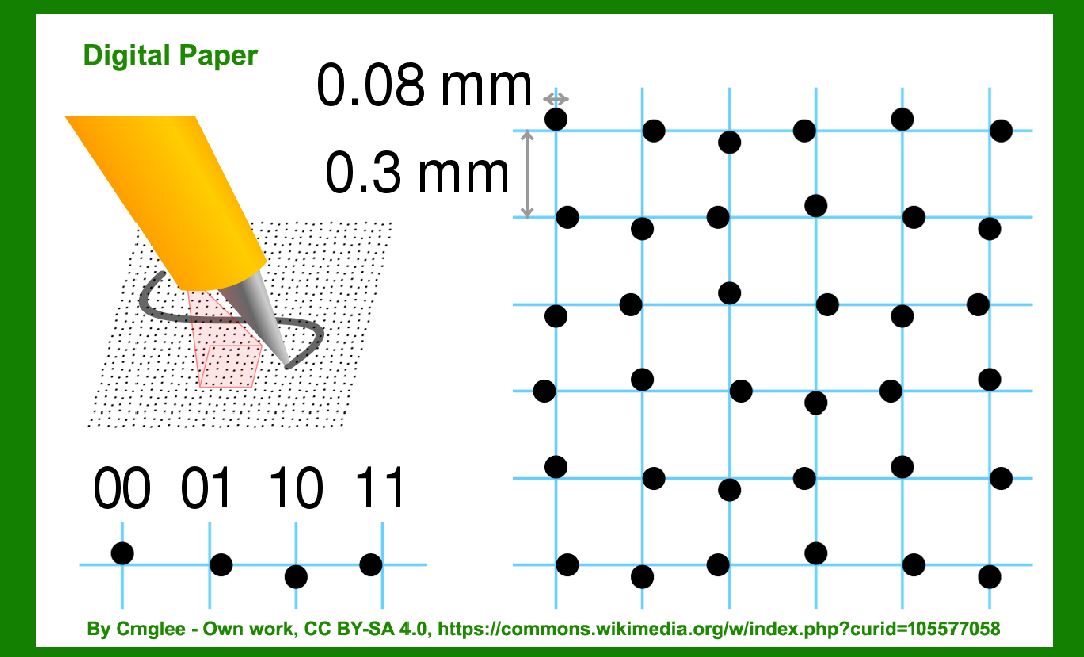
Anoto Dot Pattern and Digital Paper represent a significant technological advancement in the realm of paper-based data capture and digital integration. The Anoto technology enables the digitization of handwritten information through a unique dot pattern printed on paper. This pattern, combined with a special pen, allows for the precise capture of handwritten notes and drawings, translating them into digital formats. The history of this technology reflects a trajectory of innovation in both hardware and software, leading to its current applications in various fields. |
|
2. The Origins of Anoto Technology (1999-2001) |
2.1 Early Development (1999-2000) |
The conceptual groundwork for Anoto Dot Pattern began in the late 1990s. In 1999, Anoto Group AB, a Swedish technology company, was founded by a team of engineers and entrepreneurs led by Martin K?llstr?m, Per Andersson, and Joakim J?nsson. The primary goal was to develop a technology that would bridge the gap between paper and digital data. The team was inspired by the limitations of traditional paper forms and the potential for digitizing handwritten information. |
During this period, the team developed the core idea of using a pattern of microdots to encode positional information on paper. This pattern, when combined with a special pen equipped with a camera, would allow for precise tracking of writing or drawing activities on the paper. |
2.2 Initial Patent and Prototype Development (2000-2001) |
By 2000, Anoto had developed an initial prototype of their dot pattern technology. This prototype consisted of a grid of microdots printed on paper, which was designed to be read by a pen with a built-in camera and sensors. The key innovation was the ability to encode positional information within the dot pattern, allowing for the accurate tracking of every point on the page. |
In 2001, Anoto filed for a patent for their dot pattern technology, which was granted later that year. The patent covered the unique method of embedding positional information into the dot pattern and the corresponding system for reading and interpreting this information. |

|
3. Commercialization and Early Applications (2002-2005) |
3.1 Launch of Digital Pen and Paper (2002-2003) |
In 2002, Anoto officially launched its Digital Pen and Paper system. This system included the Anoto Digital Pen, which used optical sensors to read the dot pattern on specially printed paper. The pen was capable of capturing handwritten notes and transmitting them to a digital device for processing. The first commercial applications were in sectors like healthcare, where digital forms replaced traditional paper forms, and in education, where the technology facilitated note-taking and assignments. |
3.2 Early Adoption and Market Expansion (2004-2005) |
The initial success of Anoto's technology led to its adoption in various industries. In 2004, Anoto entered into partnerships with major companies to integrate their technology into business solutions. For instance, in the healthcare sector, digital forms enabled more efficient patient data management and reduced paperwork. In education, the technology supported interactive learning environments by allowing students to capture and digitize handwritten notes. |

|
4. Technological Advancements and Industry Adoption (2006-2010) |
4.1 Enhancements in Dot Pattern Technology (2006-2007) |
During this period, Anoto continued to refine their dot pattern technology. They introduced improvements in the resolution and accuracy of the dot pattern, which enhanced the precision of data capture. Additionally, advancements in the digital pen's capabilities allowed for faster processing and better integration with various digital platforms. |
4.2 Expansion into New Markets (2008-2010) |
By 2008, Anoto had expanded its technology into new markets, including logistics and field service. For example, the technology was used in field service applications where technicians could capture and transmit work orders and inspections in real-time. In logistics, digital forms streamlined inventory management and tracking processes. Anoto also explored partnerships with manufacturers of digital pens and paper products to broaden the availability of their technology. |

|
5. Integration with Mobile and Cloud Technologies (2011-2015) |
5.1 Integration with Mobile Devices (2011-2012) |
The rise of mobile technology in the early 2010s led to significant developments in the Anoto ecosystem. In 2011, Anoto integrated their dot pattern technology with mobile devices, allowing handwritten notes and forms to be captured and transmitted via smartphones and tablets. This integration enhanced the versatility of the technology and made it more accessible to a broader audience. |
5.2 Cloud-Based Solutions and Data Management (2013-2015) |
Anoto's technology continued to evolve with the introduction of cloud-based solutions. By 2013, Anoto had developed cloud-based platforms for managing and storing digitized data. This development allowed users to access and share their handwritten notes and forms from any internet-connected device. The integration of cloud technology improved the efficiency of data management and collaboration in various sectors, including education, healthcare, and business. |

|
6. Recent Developments and Future Prospects (2016-Present) |
6.1 Advanced Features and Innovations (2016-2018) |
In recent years, Anoto has introduced advanced features to their dot pattern technology. These include enhanced security measures for protecting sensitive data and improved accuracy for complex forms and documents. Additionally, Anoto has focused on developing new applications for their technology, such as integrating it with augmented reality (AR) and virtual reality (VR) platforms. |
6.2 Ongoing Research and Development (2019-Present) |
Anoto continues to invest in research and development to further enhance their technology. Recent efforts include exploring new materials for digital paper and improving the integration of their technology with emerging digital tools and platforms. The company's ongoing research aims to expand the potential applications of Anoto's dot pattern technology and address evolving market needs. |
6.3 Future Prospects |
Looking ahead, Anoto envisions expanding its technology into new areas, such as smart packaging and interactive media. The company's commitment to innovation suggests that the Anoto Dot Pattern and Digital Paper will continue to play a significant role in bridging the gap between physical and digital information in the years to come. |

|
7. Conclusion |
The history of Anoto Dot Pattern and Digital Paper reflects a journey of technological innovation and adaptation. From its inception in the late 1990s to its current state, Anoto's technology has evolved to meet the needs of various industries and applications. The continued advancements in dot pattern technology and its integration with digital platforms highlight its ongoing relevance and potential for future development. |

|
 cs@easiersoft.com