1.Introduction to Aztec Code Aztec Code, also known simply as Aztec, is a 2D matrix barcode symbol developed in 1995 by the American software engineer, Peter F. Flanagan, who was working for the company, O'Neil & Associates. Aztec Code stands out due to its compact size, high data density, and robustness in terms of error correction and readability under various conditions. Unlike linear barcodes, Aztec Code uses a grid pattern to encode data, making it suitable for applications where space is limited and reliability is crucial. | 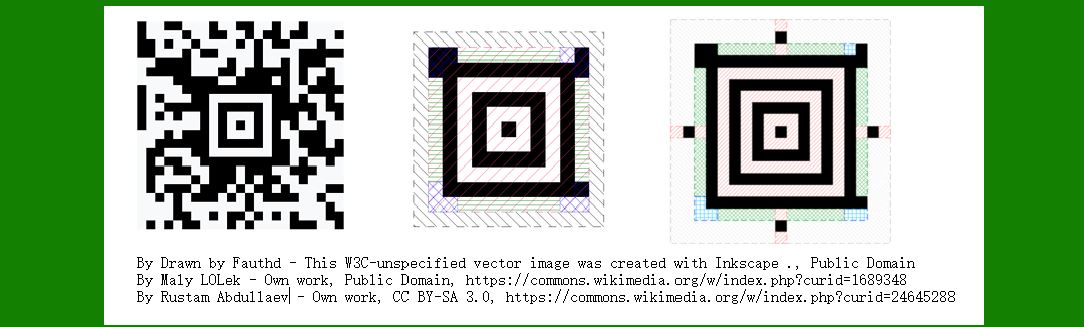
| 2.Early Development and Patent The development of Aztec Code began in the early 1990s when Peter Flanagan recognized the need for a more efficient and compact barcode system. He was driven by the challenges faced with existing barcodes, especially their limitations in terms of data capacity and error correction. By 1995, Flanagan and O'Neil & Associates had successfully created Aztec Code, which was characterized by a central square pattern known as the 'Aztec Finder' or 'Aztec Symbol' that facilitates error correction and localization. The Aztec Code was officially patented in the same year, solidifying its place in the field of barcode technology. | 
| 3.1995: Initial Release and Adoption Upon its release in 1995, Aztec Code quickly gained attention due to its distinctive features. The central finder pattern allowed it to be read even when only a portion of the code was visible, making it useful in various practical scenarios where codes might be damaged or obscured. This robustness led to early adoption in industries such as transportation and logistics, where accurate and reliable data capture was critical. | 
| 4.1996: Standardization and Industry Recognition In 1996, Aztec Code was recognized and standardized by international organizations. The code was included in ISO/IEC 24778:2006, which provided detailed specifications for the Aztec Code symbol and its application. This standardization helped in promoting the use of Aztec Code across different sectors and ensured its interoperability with other barcode systems. Industry recognition also came with its inclusion in various barcode scanners and software solutions, making it more accessible to businesses and developers. | 5.1999: Early Adoption in Healthcare and Retail By the late 1990s, Aztec Code began to see increased adoption in the healthcare and retail sectors. In healthcare, the code was used for tracking pharmaceuticals and medical supplies, where its high data density and error correction capabilities were particularly beneficial. In retail, it was used for inventory management and product labeling, offering a compact and efficient solution for encoding product information. | 
| 6.2000s: Expansion and Global Usage During the 2000s, Aztec Code continued to expand its presence globally. It was adopted by major companies and organizations for various applications, including ticketing, travel, and logistics. One notable example was its use in the UK's National Rail system for electronic ticketing, where the Aztec Code provided a reliable way to encode and decode travel information. The code's compact size made it suitable for printing on small ticket surfaces, while its robustness ensured accurate scanning even with wear and tear. | 7.2003: Integration into Mobile Technology As mobile technology advanced, Aztec Code found its way into mobile applications. In 2003, the code was integrated into mobile phone applications for use in marketing and consumer engagement. It allowed businesses to encode promotional information, URLs, or special offers into a small, scannable code that could be easily read by mobile devices. This integration helped in driving the adoption of Aztec Code in the consumer market, where it was used for various interactive and promotional purposes. | 
| 8.2006: Official ISO/IEC Standard In 2006, Aztec Code was officially standardized as ISO/IEC 24778:2006. This formal recognition by the International Organization for Standardization (ISO) provided a comprehensive set of guidelines for the code's implementation and usage. The standardization process helped in ensuring consistency and interoperability across different systems and applications, further solidifying Aztec Code's position in the barcode industry. | 9.2010s: Advancements in Technology and Applications Throughout the 2010s, advancements in technology continued to drive the evolution of Aztec Code. The code saw increased use in various fields, including event management, transportation, and healthcare. In particular, its application in event ticketing and access control became more prominent. Aztec Code was used for encoding event tickets, providing a secure and efficient method for managing large crowds and ensuring smooth entry processes. | 
| 10.2014: Integration with IoT and Smart Devices In 2014, Aztec Code began to be integrated with Internet of Things (IoT) and smart devices. The code's high data density and error correction capabilities made it suitable for encoding information related to connected devices and sensors. For example, Aztec Code was used to encode data on smart packaging and connected products, allowing users to access detailed information about product usage, maintenance, and connectivity. | 11.2018: Adoption in Government and Public Services By 2018, Aztec Code was adopted in various government and public services. It was used for encoding identification information, such as driver's licenses and national ID cards. The code's robustness and compact size made it ideal for encoding sensitive information in a secure and reliable manner. This adoption marked a significant milestone in the code's history, demonstrating its versatility and effectiveness in diverse applications. | 
| 12.2020s: Continued Innovation and Use As the 2020s progressed, Aztec Code continued to evolve and adapt to new technologies and applications. It saw increased use in digital and contactless solutions, particularly in response to the COVID-19 pandemic. The code was used for encoding health-related information, such as vaccination records and health passes, providing a secure and convenient way to manage and verify health data. | 13.Recent Developments and Future Outlook In recent years, Aztec Code has continued to be a key player in the barcode industry, with ongoing developments and innovations. The code's adaptability and robustness make it well-suited for emerging technologies and applications. Looking ahead, Aztec Code is expected to play a significant role in the evolution of data encoding and decoding technologies, particularly in areas such as digital identity, supply chain management, and smart technology integration. | 
| 14.Conclusion The history of Aztec Code reflects its evolution from a novel barcode system to a widely adopted and standardized technology. From its inception in 1995 to its current applications in various fields, Aztec Code has demonstrated its value through its high data density, error correction capabilities, and adaptability. As technology continues to advance, Aztec Code is likely to remain a crucial component in the world of data encoding, providing reliable and efficient solutions for a range of applications. | 
|
|
 cs@easiersoft.com