The History of Bokode: Revolutionizing Data Tagging Beyond Barcodes |
1.Introduction to Bokode: Genesis and Initial Concept |
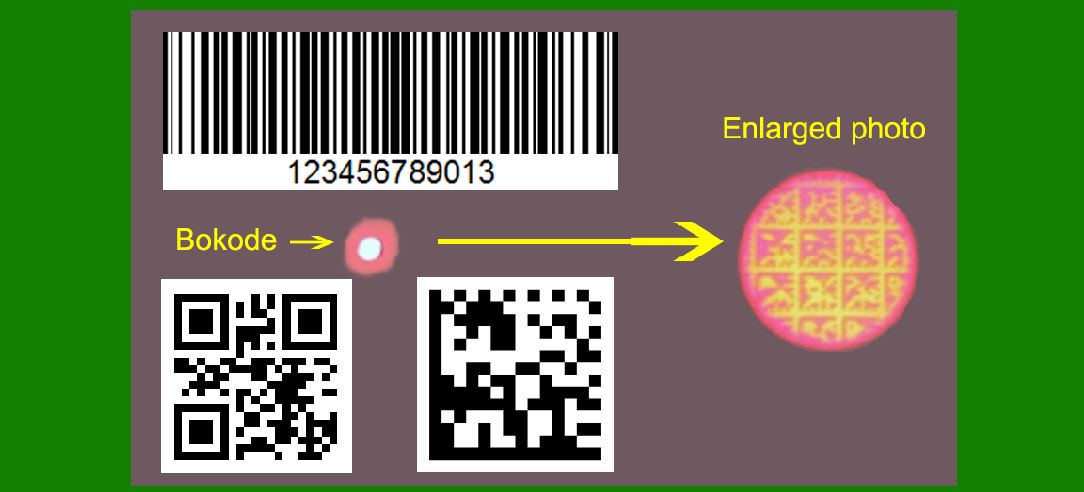
The Bokode, a revolutionary optical data tag, was introduced by the MIT Media Lab in 2009. Unlike traditional barcodes and QR codes, Bokodes utilize a novel method of data encoding, which leverages light modulation and lens optics to store and transmit information. The term 'Bokode' derives from the combination of 'bokeh,' referring to the aesthetic quality of the out-of-focus areas in photographs, and 'barcode,' indicating its purpose as a data tag. |
|
2.The Technological Innovation Behind Bokode |
The innovation of Bokode lies in its use of a tiny light source, covered by a mask and a lens. This combination allows Bokodes to store much more data in a significantly smaller area compared to traditional barcodes. The light source in Bokodes is modulated to encode information, and the lens helps project this information in a way that it can be read from various angles and distances. This technological advancement marked a significant leap in data tagging, providing higher density and more flexible data capture capabilities. |

|
3.Early Research and Development (2008-2009) |
The concept of Bokode began as a research project at the MIT Media Lab under the supervision of Ramesh Raskar, an associate professor of Media Arts and Sciences. In 2008, Raskar and his team explored new ways to overcome the limitations of existing barcode systems, particularly their low data capacity and limited readability at a distance. The team's research focused on optical tags that could be read from a distance and at various angles while maintaining a high data density. |

|
4.Prototype Development and Demonstration (2009) |
By mid-2009, the MIT Media Lab team had developed a working prototype of the Bokode. They presented their findings at SIGGRAPH 2009, an annual conference on computer graphics and interactive techniques. The demonstration showcased the potential of Bokodes to replace traditional barcodes and QR codes in various applications, including retail, inventory management, and augmented reality. |

|
5.Bokode's Unique Capabilities and Advantages |
The unique capabilities of Bokodes stem from their small size and high data density. Bokodes can be as small as a few millimeters in diameter, yet they can store significantly more information than a standard barcode. Furthermore, Bokodes can be read from a distance of several meters using a standard camera with a defocused lens, making them highly versatile in various environments. This capability addresses one of the major limitations of traditional barcodes, which require close proximity and precise alignment for accurate reading. |
|
6.Potential Applications and Industry Interest (2009-2011) |
Following the initial demonstration, there was considerable interest in Bokodes from various industries. Retailers saw potential in using Bokodes for smart shelves, where products could be tracked and managed more efficiently. The healthcare industry explored the use of Bokodes for patient identification and medication tracking, given their ability to store extensive information in a compact form. Additionally, Bokodes were considered for use in augmented reality applications, where they could provide detailed information about objects in a user's environment. |

|
7.Challenges and Further Development (2011-2014) |
Despite the initial excitement, several challenges needed to be addressed before Bokodes could be widely adopted. One major challenge was the cost and complexity of producing Bokodes, as they required precise fabrication techniques. Additionally, the technology needed to be refined to ensure reliable and accurate reading in various lighting conditions and environments. During this period, the MIT Media Lab continued to refine the technology, working on improving the fabrication process and enhancing the readability of Bokodes. |

|
8.Commercialization Efforts and Industry Collaborations (2014-2016) |
In the mid-2010s, efforts to commercialize Bokode technology gained momentum. MIT Media Lab collaborated with various industry partners to explore practical applications and develop standards for Bokode usage. These collaborations aimed to address the production and implementation challenges, making Bokodes more accessible and cost-effective for widespread use. Additionally, the team worked on integrating Bokode readers into existing camera systems, further simplifying the adoption process. |

|
9.Emergence of Competing Technologies and Impact on Bokode Adoption (2016-2018) |
As Bokode technology continued to develop, other data tagging technologies also emerged, including advancements in QR codes, RFID, and NFC. These competing technologies offered their own unique advantages, such as ease of implementation and lower costs. The presence of these alternatives impacted the adoption rate of Bokodes, as businesses evaluated the cost-benefit ratio of transitioning to a new system. |

|
10.Continued Research and Specialized Applications (2018-Present) |
Despite the competition, research and development on Bokode technology continued, particularly in specialized applications where its unique capabilities offered distinct advantages. For example, in laboratory environments, Bokodes were used to track biological samples and laboratory equipment with high precision. Additionally, Bokodes found niche applications in the field of robotics, where they were used to provide detailed environmental data to autonomous systems. |

|
11.Integration with Emerging Technologies (2020-Present) |
In recent years, Bokode technology has been explored in conjunction with emerging technologies such as the Internet of Things (IoT) and artificial intelligence (AI). By integrating Bokodes with IoT devices, businesses can achieve more sophisticated inventory management and asset tracking systems. Similarly, AI algorithms have been developed to enhance the decoding and interpretation of Bokode data, further expanding their potential applications. |

|
12.Current State and Future Prospects |
As of today, Bokode technology remains a promising innovation with potential applications across various industries. While it has not achieved the same level of ubiquity as traditional barcodes or QR codes, ongoing research and development continue to explore new ways to leverage its unique capabilities. Future advancements in fabrication techniques and integration with other technologies may further enhance the adoption of Bokodes, solidifying their place in the world of data tagging and beyond. |
 cs@easiersoft.com