1. Introduction to Code 11 |
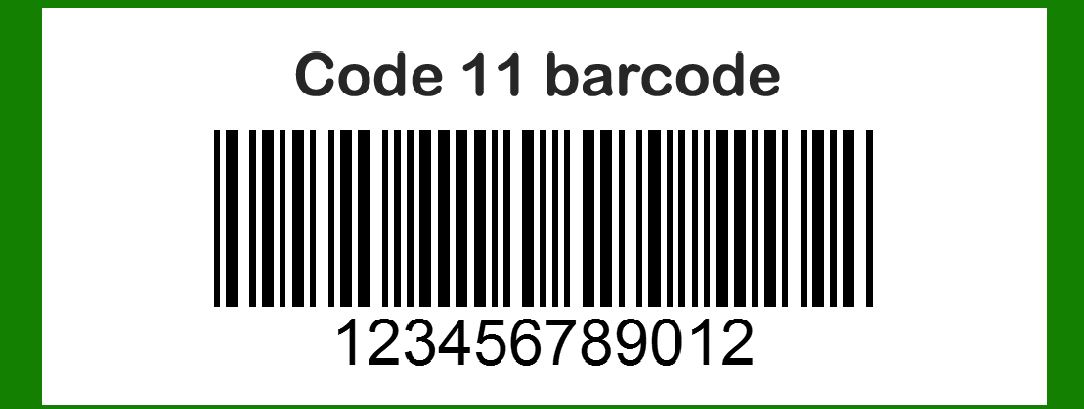
Code 11 is a high-density, discrete, and variable-length barcode symbology designed specifically for encoding numeric digits. It was developed by Intermec Corporation in 1977. The primary purpose of Code 11 was to provide a barcode that could be used in telecommunication equipment labeling, such as labeling equipment racks, cabling, and components. The need for such a barcode emerged from the requirement for a compact, reliable method of encoding numerical data, which is a critical aspect of telecommunications infrastructure. |
|
2. Creation and Development in 1977 |
In the late 1970s, Intermec Corporation was a prominent player in the barcode industry. The company's engineers, recognizing a gap in the market for a numeric barcode with high data density, set out to develop Code 11. In 1977, Code 11 was officially introduced to the market. It was immediately noted for its capability to encode any length of numeric string, making it particularly useful for telecommunications and other industries that dealt primarily with numeric data. |
3. Adoption by the Telecommunications Industry |
One of the first significant adopters of Code 11 was the telecommunications industry. During the late 1970s and early 1980s, telecommunications companies were expanding their infrastructure rapidly. They needed a reliable and compact way to label and track their equipment. Code 11's ability to encode long strings of numeric data with a high level of accuracy made it an ideal choice. Companies began using Code 11 to label everything from individual cables to entire racks of equipment. |

|
4. Technical Specifications and Characteristics |
Code 11's design includes the digits 0-9 and the dash (-) character. It also includes two check characters to ensure data integrity. The symbology uses a series of narrow and wide bars and spaces to represent each character. Each character in Code 11 consists of five bars and four spaces, where the narrow elements are one unit wide, and the wide elements are two units wide. The inclusion of check characters made Code 11 highly reliable, which was a crucial factor for its adoption in industries where accuracy was paramount. |
5. Expanding Use Cases in the 1980s |
As the 1980s progressed, the use of Code 11 expanded beyond telecommunications. Industries such as electronics, inventory management, and transportation began to adopt Code 11 for various applications. Its high data density and reliability made it suitable for a wide range of uses. For example, electronics manufacturers used Code 11 to label components and assemblies, ensuring that each part could be tracked through the production process and into the final product. |

|
6. Competitive Landscape and Market Position |
Despite its advantages, Code 11 faced competition from other barcode symbologies, such as Code 39 and Code 128, which were also gaining popularity during the same period. However, Code 11 carved out a niche for itself in applications where numeric data was predominant. Its compact design and the ability to handle variable-length data gave it an edge in specific use cases, particularly in the telecommunications and electronics industries. |
7. Standardization Efforts and Industry Support |
In the late 1980s and early 1990s, efforts were made to standardize barcode symbologies to ensure compatibility and interoperability across different systems and industries. Code 11 benefited from these standardization efforts, as it was recognized and supported by various industry groups and standards organizations. This support helped to further cement Code 11's position in the market and ensured its continued use in critical applications. |

|
8. Technological Advancements and Evolution |
As barcode technology evolved, so did Code 11. Advances in barcode scanning technology, including the development of laser scanners and CCD scanners, improved the readability and accuracy of Code 11 barcodes. These technological advancements made it easier for companies to implement Code 11 in their operations, further driving its adoption. |
9. Integration with Computer Systems |
The integration of barcode systems with computer databases and inventory management systems became a significant trend in the 1990s. Code 11, with its ability to encode long numeric strings, was well-suited for these applications. Companies could use Code 11 barcodes to track inventory, manage assets, and streamline their operations. The integration with computer systems also enabled more efficient data collection and analysis, leading to improved decision-making and operational efficiency. |

|
10. Adoption in Inventory and Asset Management |
Throughout the 1990s and early 2000s, Code 11 continued to be a popular choice for inventory and asset management. Companies in various industries, including manufacturing, warehousing, and logistics, utilized Code 11 to label and track their assets. Its high data density allowed for the encoding of detailed information, such as serial numbers and part numbers, making it an effective tool for managing complex inventories. |
11. Examples of Code 11 in Use |
One notable example of Code 11's application is in the labeling of telecommunications equipment. A telecommunications company might use Code 11 to label each piece of equipment in a network rack. The barcode would include a unique identifier for each piece of equipment, allowing technicians to quickly and accurately identify and track each component. This level of detail and accuracy was crucial for maintaining and troubleshooting complex telecommunications networks. |
Another example is in the electronics manufacturing industry. An electronics manufacturer might use Code 11 to label individual components, such as circuit boards and chips. The barcode would encode the component's part number, serial number, and other relevant information, ensuring that each component could be tracked through the production process and into the final product. This tracking capability was essential for quality control and warranty management. |

|
12. Ongoing Use and Relevance |
Despite the emergence of newer barcode symbologies, Code 11 remains relevant in specific applications. Its simplicity, high data density, and reliability continue to make it a valuable tool for encoding numeric data. Industries that require the encoding of long numeric strings, such as telecommunications and electronics, still use Code 11 for various purposes. |
13. Modern Applications and Adaptations |
In modern applications, Code 11 is often used in conjunction with other barcode symbologies and technologies. For example, a company might use Code 11 for specific applications while using QR codes or Data Matrix codes for others. This approach allows companies to leverage the strengths of different barcode types to meet their specific needs. |

|
14. Code 11 in the Digital Age |
As digital transformation continues to reshape industries, the role of barcodes, including Code 11, is evolving. Companies are increasingly integrating barcode systems with advanced technologies such as the Internet of Things (IoT) and blockchain. These integrations enhance the capabilities of barcode systems, providing real-time visibility and traceability of assets and inventory. |
15. Legacy and Impact |
Code 11 has had a lasting impact on the barcode industry. Its development and adoption in the late 1970s and 1980s helped to address a critical need for high-density numeric encoding. The symbology's reliability and flexibility have ensured its continued use in various applications. Code 11's legacy is evident in its ongoing relevance and the role it has played in advancing barcode technology. |

|
16. Summary |
In summary, Code 11's history is marked by its creation in 1977 by Intermec Corporation, its adoption by the telecommunications industry, and its expansion into other sectors. The symbology's high data density, reliability, and ability to encode long numeric strings have made it a valuable tool for various applications. Despite competition from other barcode symbologies, Code 11 has maintained its relevance and continues to be used in specific industries. Its legacy is evident in its lasting impact on the barcode industry and its role in advancing barcode technology. |
17. Final Thoughts |
The history of Code 11 illustrates the evolution of barcode technology and its adaptation to meet the needs of various industries. From its inception in the late 1970s to its ongoing use today, Code 11 has demonstrated its value as a reliable and flexible barcode symbology. Its ability to encode numeric data with high density and accuracy has made it a critical tool for industries that rely on precise data encoding and tracking. As technology continues to evolve, Code 11's legacy will likely continue to influence the development of new barcode symbologies and applications. |

|
 cs@easiersoft.com