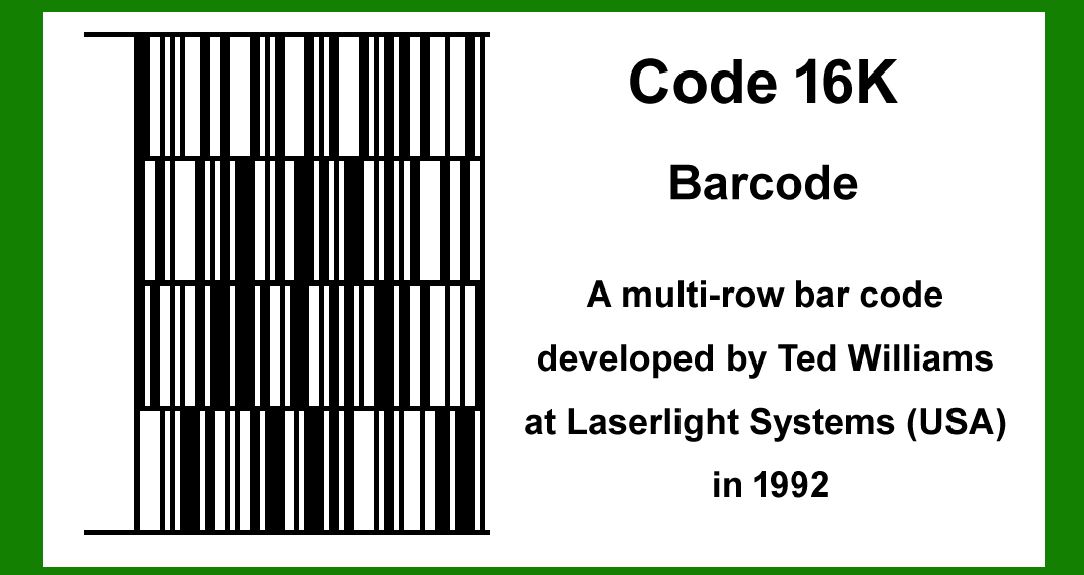
1.Introduction and Inception (1980s): Code 16K barcode is a two-dimensional (2D) barcode symbology that was developed in the 1980s by Ted Williams, a noted figure in the field of barcode technology. The development of Code 16K was motivated by the need for a more efficient and compact barcode that could encode a substantial amount of data while maintaining a small physical footprint. |
|
2.Development and Design Philosophy: The primary goal behind the creation of Code 16K was to address the limitations of existing one-dimensional (1D) barcodes, which could only store a limited amount of information. By extending the capabilities of the traditional barcode, Code 16K aimed to provide a solution for applications requiring higher data density. The design of Code 16K incorporated elements of both linear and stacked barcodes, combining the advantages of each. |
3.Technical Specifications: Code 16K is essentially a stacked symbology consisting of multiple rows of code. Each row is a linear barcode similar to Code 128, and up to 16 rows can be stacked on top of each other. This structure allows Code 16K to encode a significant amount of data while maintaining a compact size. The symbology uses a set of 77 unique characters, including the entire ASCII character set, which makes it highly versatile for encoding various types of data. |

|
4.Patents and Intellectual Property: Ted Williams, the creator of Code 16K, was granted several patents related to the design and encoding mechanisms of this barcode symbology. These patents provided a legal framework that protected the intellectual property and ensured that the technology could be commercially developed and deployed without unauthorized replication. |
5.Initial Applications and Adoption: Upon its development, Code 16K was primarily targeted at applications that required the encoding of large amounts of data in a compact space. Early adopters included industries such as logistics, inventory management, and healthcare, where efficient data storage and retrieval were critical. The ability to encode detailed information, such as product descriptions, serial numbers, and batch numbers, made Code 16K particularly useful in these sectors. |

|
6.Enhancements and Standardization (1990s): Throughout the 1990s, Code 16K underwent several enhancements to improve its robustness and readability. One significant improvement was the incorporation of error correction mechanisms, which increased the barcode's reliability in environments where damage or degradation of the printed barcode was likely. These enhancements contributed to the broader acceptance and standardization of Code 16K in various industries. |
7.Comparison with Other 2D Barcodes: Code 16K was often compared to other 2D barcode symbologies such as PDF417 and Data Matrix. While PDF417 offered similar data capacity and error correction capabilities, Code 16K's stacked linear structure provided certain advantages in specific applications. For instance, its linear component made it easier to integrate with existing barcode scanning technologies that were initially designed for 1D barcodes. |

|
8.Case Studies and Examples: One notable example of Code 16K's application was in the pharmaceutical industry. Drug manufacturers adopted Code 16K to encode detailed information on medication packaging, including dosage instructions, expiration dates, and batch numbers. This facilitated better tracking and verification processes, enhancing patient safety and regulatory compliance. |
Another example is in the postal services industry, where Code 16K was used to encode detailed address and sorting information on mail items. This allowed for more efficient automated sorting and delivery processes, reducing the likelihood of errors and improving overall service efficiency. |

|
9.Integration with Emerging Technologies (2000s): As the technology landscape evolved in the 2000s, Code 16K found new applications in conjunction with emerging technologies such as radio-frequency identification (RFID) and Internet of Things (IoT). The ability to encode and retrieve large amounts of data using Code 16K complemented the data collection and processing capabilities of these new technologies, enabling more sophisticated tracking and monitoring solutions. |
10.Challenges and Limitations: Despite its advantages, Code 16K faced certain challenges and limitations. One of the main challenges was the complexity of its encoding and decoding processes, which required more sophisticated scanning equipment compared to simpler 1D barcodes. Additionally, the physical size of the barcode, although compact for the amount of data it could store, was still larger than some of the newer 2D symbologies that emerged in the late 1990s and 2000s. |

|
11.Decline and Legacy (2010s and Beyond): With the advent of newer 2D barcode symbologies such as QR codes and Data Matrix, which offered even higher data capacity and smaller physical sizes, the use of Code 16K began to decline. However, its legacy remains significant as it paved the way for the development of more advanced barcode technologies. The principles and innovations introduced by Code 16K influenced subsequent designs and contributed to the overall evolution of barcode symbology. |
12.Modern Usage and Niche Applications: While Code 16K is not as widely used today as it once was, it still finds niche applications in certain industries where its specific advantages are relevant. For example, some logistics and warehousing operations continue to use Code 16K for internal tracking and inventory management, benefiting from its ability to encode detailed information in a format that is compatible with their existing scanning infrastructure. |

|
13.Conclusion: The history of Code 16K barcode is a testament to the continuous innovation in the field of data encoding and barcode technology. From its inception in the 1980s by Ted Williams, through its adoption and enhancement in the 1990s, to its integration with emerging technologies in the 2000s, Code 16K has played a crucial role in shaping the landscape of barcode symbologies. Its development highlights the importance of balancing data capacity, physical size, and readability in creating effective and efficient barcode solutions. |

|
14.Key Milestones: |
1980s: Development of Code 16K by Ted Williams. 1980s-1990s: Initial adoption in logistics, inventory management, and healthcare. 1990s: Enhancements including error correction mechanisms. 2000s: Integration with RFID and IoT technologies. 2010s: Decline in usage with the rise of newer 2D barcodes. 2020s: Continued niche applications and legacy influence on barcode technology. |

|
15.Impact on Barcode Technology: Code 16K's innovative approach to data encoding and its successful applications in various industries demonstrate the ongoing need for efficient and compact barcode solutions. Its development and history offer valuable lessons for future advancements in the field, emphasizing the importance of adaptability and continuous improvement in meeting the evolving demands of data storage and retrieval. |
 cs@easiersoft.com