Barcode Technology

Barcode History

Barcode Label Paper

Barcode Printer

Barcode Application

Inventory Management

AI Barcode QRCode

Barcode Scanner

Barcode Software

Barcode Software B

Barcode Software C

Barcode Software D

Barcode Software E

New Technology A

New Technology B

Robot Technology

Barcode Types

Barcode Types B

Barcode Types C

Barcode Types D

Barcode Types E

Barcode Types F

Electronic Technology

Psychology at Work

Barcode Technology and Barcode Software Related   <<< Back to Directory <<<

The history of Code 25 barcode

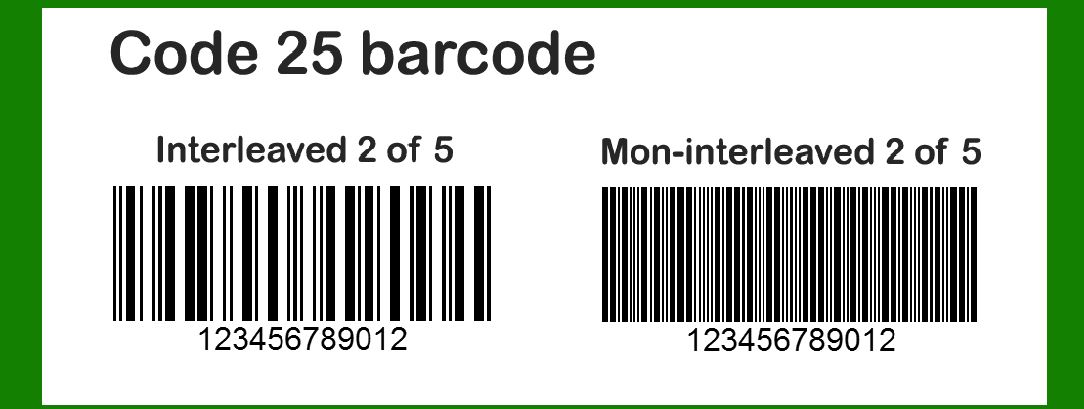
1.Introduction to Code 25 Barcode: The Code 25 barcode, also known as Interleaved 2 of 5, is a linear barcode symbology that encodes numeric data. Its inception and evolution trace back to the mid-20th century, when the need for more efficient data entry and inventory management systems drove technological advancements. Understanding the history of the Code 25 barcode involves examining its development, adoption, and impact across various industries.

2.Early Development and Origins (1960s-1970s): The concept of barcode technology emerged in the 1960s, inspired by the need to automate the process of data collection. Among the earliest barcode symbologies was the Interleaved 2 of 5 (Code 25), which encoded numeric data by interleaving pairs of digits. Each digit was represented by five bars or spaces, with two out of the five always being wide and three being narrow. The innovation of interleaving allowed for more compact and efficient encoding.

3.First Implementations and Use Cases (1970s): Code 25 began to gain traction in the early 1970s. Its primary application was in the industrial sector, particularly in warehouses and distribution centers. The barcode's ability to encode numeric data efficiently made it ideal for labeling and tracking inventory items. For example, manufacturers could label boxes and pallets with Code 25 barcodes, allowing for quick and accurate scanning during the shipping and receiving processes.

4.Adoption in the Retail Industry (Late 1970s-Early 1980s): Although initially prominent in industrial applications, Code 25 started to be adopted in the retail industry by the late 1970s. Retailers recognized the benefits of using barcodes for inventory management, and Code 25's numeric encoding was sufficient for many applications. Grocery stores and other retail outlets began to use Code 25 barcodes for internal stock management, although the Universal Product Code (UPC) became more dominant for consumer-facing applications.

5.Standardization and Formal Recognition (1980s): The 1980s saw a push towards standardizing barcode symbologies to ensure compatibility and interoperability across different systems and industries. Code 25 was standardized by organizations such as the American National Standards Institute (ANSI) and the International Organization for Standardization (ISO). These standards helped formalize the specifications for Code 25 barcodes, ensuring consistency in encoding and decoding processes.

6.Technological Advancements and Enhanced Capabilities (1980s-1990s): As barcode technology continued to evolve, improvements in scanner technology and data processing capabilities further enhanced the utility of Code 25 barcodes. High-speed and high-accuracy scanners became more widely available, allowing for faster and more reliable data capture. Additionally, advancements in computer systems enabled more complex inventory management and data analysis, leveraging the data encoded in Code 25 barcodes.

7.Expansion to Global Markets (1990s): By the 1990s, the use of Code 25 barcodes had expanded globally. Companies in various industries, including logistics, manufacturing, and retail, adopted Code 25 for their inventory and asset tracking needs. The barcode's ability to be read in various orientations and its robustness in different environmental conditions contributed to its widespread acceptance. For example, international shipping companies used Code 25 barcodes to track packages and shipments across borders, improving efficiency and accuracy in global logistics.

8.Integration with Other Technologies (2000s): The 2000s saw the integration of Code 25 barcodes with other emerging technologies. Radio Frequency Identification (RFID) and Internet of Things (IoT) technologies began to complement traditional barcoding systems. While RFID provided additional capabilities such as real-time tracking and wireless communication, Code 25 remained a reliable and cost-effective solution for many applications. Hybrid systems emerged, combining the strengths of barcodes and RFID for enhanced data capture and tracking.

9.Continued Use in Specific Industries (2010s-Present): Despite the emergence of more advanced barcode symbologies and data capture technologies, Code 25 remains in use today, particularly in specific industries where its numeric encoding is advantageous. For instance, the pharmaceutical industry often uses Code 25 barcodes for labeling and tracking medication packages. The simplicity and reliability of Code 25 make it a preferred choice for applications where numeric data needs to be encoded efficiently and accurately.

10.Conclusion and Legacy of Code 25: The history of the Code 25 barcode is a testament to the evolution of data capture and inventory management technologies. From its early development in the 1960s to its widespread adoption across various industries, Code 25 has played a crucial role in improving efficiency and accuracy in numerous applications. While newer technologies continue to emerge, the legacy of Code 25 endures, demonstrating the enduring value of this pioneering barcode symbology.

By understanding the detailed history of Code 25, we gain insights into the broader narrative of technological innovation and its impact on industries worldwide. This timeline highlights the key milestones and developments that have shaped the journey of Code 25 from its inception to its present-day applications.


EasierSoft Barcode Label Design & Bulk Printing Software

---- Use Excel Data to Batch Print Barcodes on Label Sheets or Roll Labels  

---- How to use this barcode software

Download:  Free Barcode Software + Barcode Label Designer

Download Free Barcode Software at Softonic

     Download at CNET

Once you obtain a GS1/UPC/EAN barcode, or other barcode type and QR code, you can use our free software to batch print barcode labels onto Roll label paper using a professional label printer, or to batch print barcodes onto Avery 5160 label sheets using a regular laser or inkjet printer. Our software has free and paid versions.

The free version fully meets your needs for batch printing GS1/UPC/EAN barcodes. The paid version can import data from Excel and databases to batch print barcode labels with different values.

How to Start

Input Data

Import Excel Data

Print Barcode

Barcode Format

Label Designer

All Screen Shot

Export Barcode Image

Save Template

Output Word Excel

How to Use & FAQ:

Generate ISBN barcode

Predefined label templates

Printing setup

Save settings

Serial number generator

The supported barcode types

Load Excel data (pro)

Manually copy data from Excel files

Filter some data for printing

Edit imported barcode data

Input data (Pro)

Label Designer

Edit data in Label designer

Label Designer - Add new label

Label Designer - Printing

Set the barcode label format to be printed

Other Barcode Label Format Settings

Barcode types supported by this program

Barcode Label Font Settings

Configuring the Barcode Print Rotation

Text Alignment for Barcode Labels

Automatically Adjusting Barcode Width

Text Beneath the Barcode

Configuring Barcode Size

Auto Calculate the Barcode Size

Export Barcode images

Export Barcode Image Format

File Names for Exported Barcode

Resolution of Exported Barcode Images

Fixed Folder for Exporting Barcode

Default Barcode Image Export Format

Print bulk barcodes quickly

Print barcodes to Avery 5160 label

How to bulk Barcode Printing

Sample - Avery 5162 (2x7) Label Sheet

Example: Print barcodes to 5*3cm roll

Example: Print barcodes to 5161 label

Example: Print barcodes to 5162 label

Example: Print barcodes to 5163 label

Example: Print barcodes to 5164 label

Example: Print portrait orientation 5164

Example: Print barcodes to 5167 label

Example: Print barcodes to 5168 label

Example: Print portrait orientation 5168

Example: Print barcodes to 5169 label

Example: Print barcodes to 5660 label

Example: Print barcodes to 5661 label

Example: Print barcodes to 5662 label

Example: Print barcodes to 5663 label

Example: Print barcodes to 5664 label

Highlights

Excel integration: Import data directly from Excel to generate and print barcodes in bulk.

Label designer: Create complex labels with multiple barcodes, text, logos, and shapes.

Batch printing: Print thousands of barcodes at once using standard inkjet/laser printers or professional barcode printers.


Flexible editions:

Standard Edition: Simple batch printing with Excel data.

Professional Edition: Adds command-line automation for workflow integration.

Label Designer Edition: Advanced design features for complex labels.


Why Choose Our Barcode Solutions?

Cost-effective: Free online generator and permanent free desktop version available.

Easy to use: No technical expertise required—just input data and print.

Versatile: Supports nearly all 1D and 2D barcode types, including QR codes.

Trusted: Recommended by CNET and widely downloaded by users worldwide.


Suitable Use Cases

Small businesses and startups needing quick barcode labels for products.

Retailers and online sellers managing inventory with batch barcode printing.

Manufacturers requiring sequential or custom barcode labels for packaging.

Educational and testing environments where barcodes are used for tracking.


CONTACT

cs@easiersoft.com

If you have any question, please feel free to email us.


https://free-barcode.com


<<< Back to Directory <<<     Barcode Generator     Barcode Freeware     Privacy Policy