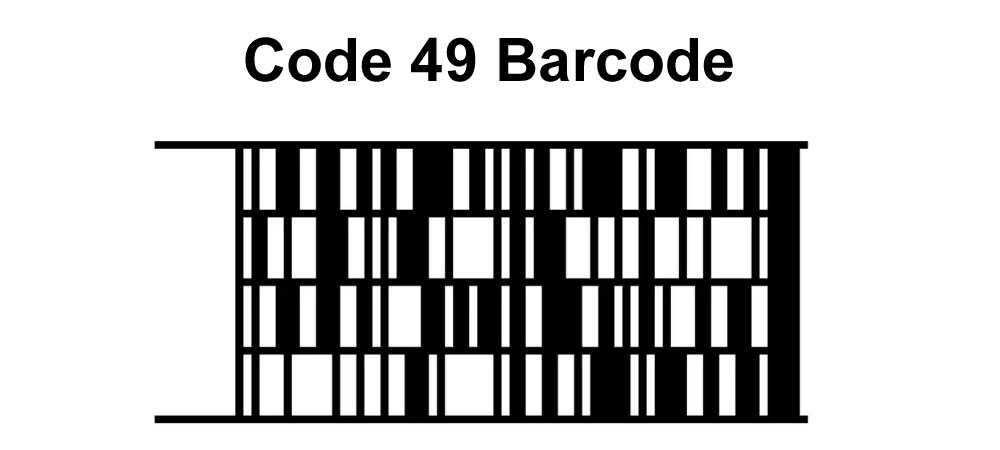
1.Introduction to Code 49 Barcode Code 49 is a 2D barcode symbology invented by Dr. David Allais in 1987 at Intermec Corporation. It was developed as a solution to the increasing demand for a barcode that could encode a large amount of information within a small area, making it suitable for applications where space was limited and more data was required to be encoded. |
|
2.Background and Development The late 1980s saw rapid advancements in technology and a corresponding need for more efficient ways to encode and manage data. Traditional linear barcodes, while effective for simple applications, were limited in the amount of data they could encode. The need for a more compact, high-density barcode that could encode alphanumeric characters, special characters, and control characters led to the development of Code 49. |
3.1987: Inception and Design In 1987, Dr. David Allais, a pioneer in barcode technology, conceptualized and designed Code 49 at Intermec Corporation. The barcode was designed to be a stacked symbology consisting of multiple rows of smaller barcodes stacked on top of each other. This design allowed Code 49 to encode significantly more data in a smaller space compared to traditional linear barcodes. |

|
4.Features of Code 49 Code 49 was notable for its ability to encode up to 49 characters in a single symbol, including alphanumeric characters and special symbols. It supported error detection and correction mechanisms, which made it robust against damage and partial occlusion. The barcode also featured start and stop patterns for each row, which facilitated easy scanning and decoding. |
5.Early Applications In the late 1980s and early 1990s, Code 49 found applications in various industries where space was at a premium, and there was a need to encode more information. It was used in the labeling of small electronic components, healthcare for patient identification and medical records, and in the logistics industry for package tracking and inventory management. |

|
6.Adoption in the Defense Industry One of the significant early adopters of Code 49 was the defense industry. The U.S. Department of Defense adopted Code 49 for the marking of small parts and components. The ability to encode a large amount of information in a small space was critical for the defense industry, where parts were often small, and traceability was essential for maintenance and logistics. |
7.Development of Scanning Technology The development and adoption of Code 49 also spurred advancements in scanning technology. Traditional barcode scanners were not equipped to read the stacked symbology of Code 49. This led to the development of new scanners capable of reading 2D barcodes, including Code 49. These new scanners used imaging technology to capture the entire barcode and decode it using sophisticated algorithms. |

|
8.Challenges and Competition Despite its advantages, Code 49 faced several challenges. The complexity of the symbology and the need for specialized scanners limited its widespread adoption. Additionally, other 2D barcode symbologies, such as PDF417 and Data Matrix, were developed around the same time and offered similar benefits. These competing technologies often overshadowed Code 49 in terms of popularity and adoption. |
9.Integration with Other Technologies In the 1990s, as technology continued to advance, Code 49 was integrated with other systems and technologies. For example, it was used in conjunction with RFID (Radio Frequency Identification) to enhance tracking and inventory management systems. The combination of Code 49's data density and RFID's tracking capabilities provided a powerful solution for various industries. |

|
10.Decline in Popularity By the late 1990s and early 2000s, the popularity of Code 49 began to decline. The emergence of newer 2D barcode symbologies that were easier to implement and read contributed to this decline. Symbologies like Data Matrix and QR Code became the preferred choices for many applications, offering similar or better data capacity and error correction features. |
11.Legacy and Impact Despite its decline in popularity, Code 49 left a significant legacy in the world of barcode technology. It demonstrated the potential of 2D barcodes and paved the way for the development of more advanced symbologies. The innovations introduced by Code 49, particularly in terms of data density and error correction, influenced the design of subsequent barcode technologies. |

|
12.Examples of Code 49 in Use During its peak, Code 49 was used in various practical applications. For example, in the healthcare industry, hospitals used Code 49 for patient wristbands, ensuring that all relevant patient information was easily accessible and reducing the risk of errors in patient care. In manufacturing, Code 49 was used to label small electronic components, allowing for detailed information to be encoded in a minimal space, which was critical for assembly and quality control processes. |
13.Standardization Efforts Efforts were made to standardize Code 49 to facilitate its adoption across different industries. Standards organizations like AIM (Automatic Identification and Mobility) included Code 49 in their specifications, promoting its use and ensuring compatibility with other barcode technologies. These standardization efforts helped to establish Code 49 as a recognized and reliable barcode symbology during its time. |

|
14.Educational and Training Materials To support the adoption and implementation of Code 49, educational and training materials were developed. Manuals, guides, and training programs were created to educate businesses and individuals on how to generate, print, and scan Code 49 barcodes. These resources played a crucial role in promoting the use of Code 49 and ensuring its correct implementation in various applications. |
15.Influence on Future Technologies The principles and technologies introduced by Code 49 influenced the development of future barcode symbologies. The concept of stacking rows of barcodes to increase data density was adopted and refined in later symbologies. Code 49's approach to error detection and correction also set a precedent for future 2D barcodes, contributing to their robustness and reliability. |

|
16.Revival in Niche Applications While Code 49 was overshadowed by other 2D barcodes in mainstream applications, it found a niche in specific sectors where its unique features were particularly advantageous. For instance, in certain manufacturing processes, the compact size and high data capacity of Code 49 made it an ideal choice for labeling small parts and components. In these niche applications, Code 49 continued to be used effectively even as other symbologies became more popular. |
17.Case Study: Aerospace Industry The aerospace industry provides an interesting case study for the use of Code 49. In this industry, the ability to trace parts and components through their lifecycle is crucial for safety and maintenance. Code 49 was used to label aerospace components, providing detailed information about each part, including manufacturing details, serial numbers, and maintenance records. This ensured that all relevant data was readily available, facilitating efficient and accurate maintenance and repairs. |

|
18.Technological Advancements and Adaptations As technology advanced, adaptations of Code 49 were developed to meet specific needs. For example, variations of Code 49 were created to enhance its readability under different conditions, such as low light or high-speed scanning environments. These adaptations extended the usability of Code 49 in specialized applications, showcasing its flexibility and adaptability. |
19.Documentation and Patents The development of Code 49 was accompanied by extensive documentation and patents. Dr. David Allais and his team documented the design principles, encoding methods, and applications of Code 49 in detail. These documents provided a comprehensive understanding of the symbology and served as valuable references for researchers and developers working on barcode technologies. |

|
20.Code 49 in Academic Research Academic research on barcode technologies often cited Code 49 as a significant milestone in the evolution of 2D barcodes. Studies analyzed its design, efficiency, and applications, comparing it with other symbologies and exploring its potential improvements. This academic interest contributed to the broader understanding and appreciation of Code 49's contributions to the field of automatic identification and data capture (AIDC). |
21.Transition to Modern Barcode Symbologies As industries transitioned to modern barcode symbologies like QR Codes and Data Matrix, Code 49 gradually became less common in new applications. However, the knowledge and experience gained from using Code 49 helped smooth the transition to these newer technologies. Businesses that had implemented Code 49 were well-prepared to adopt more advanced symbologies, leveraging their existing infrastructure and expertise. |

|
22.Retrospective Analyses Retrospective analyses of Code 49 highlighted its strengths and weaknesses. Industry experts and researchers examined its impact on various sectors, evaluating its performance and identifying areas where it excelled or faced limitations. These analyses provided valuable insights for the ongoing development and refinement of barcode technologies. |
23.Code 49 in Archival Systems In some archival systems, Code 49 remains in use due to its historical significance and the existing infrastructure. Libraries, museums, and archival organizations that adopted Code 49 for cataloging and inventory management continue to use it, preserving its legacy and demonstrating its enduring utility in specific contexts. |

|
24.Conclusion: The Legacy of Code 49 Code 49's legacy is one of innovation and influence. Although it was eventually surpassed by other 2D barcode symbologies, its contributions to the field of barcode technology are undeniable. Code 49 demonstrated the feasibility and advantages of high-density, stacked barcodes, paving the way for future advancements. Its design principles and technological innovations continue to inspire and inform the development of new automatic identification technologies. |
25.Acknowledgments and Contributions The development and success of Code 49 were made possible by the contributions of numerous individuals and organizations. Dr. David Allais and his team at Intermec Corporation played a pivotal role in its creation and implementation. The support from industry partners, standards organizations, and users also contributed to its adoption and impact. These collective efforts ensured that Code 49 became a notable chapter in the history of barcode technology. |

|
26.Historical Documentation and Preservation Efforts to document and preserve the history of Code 49 have been undertaken by various institutions and organizations. Historical archives, technical libraries, and industry publications have captured the story of Code 49, ensuring that its development, applications, and impact are recorded for future generations. These efforts help maintain an appreciation for the innovations and advancements that Code 49 brought to the field of barcode technology. |
 cs@easiersoft.com