1.Introduction to Code 93 Barcode Code 93 is a continuous, variable-length symbology introduced by Intermec in 1982. It was designed to provide a higher density and data security enhancement over Code 39. Code 93 is capable of encoding 47 different characters including upper case letters, numeric digits, and several special characters. |
|
2.Predecessor: Code 39 Before the introduction of Code 93, Code 39 was one of the most widely used barcode symbologies. Developed in 1974 by Intermec, Code 39 was revolutionary for its ability to encode alphanumeric characters. However, Code 39 had certain limitations, including lower data density and a higher probability of errors. |
3.Birth of Code 93 In 1982, in response to the limitations of Code 39, Intermec introduced Code 93. This new symbology was designed to offer better data security and greater information density. Code 93 aimed to address the needs of industries requiring a more compact barcode with improved error detection capabilities. |

|
4.Key Features of Code 93 Code 93 introduced several key features that distinguished it from its predecessor: |
Higher Density: Code 93 allows for more information to be encoded in a smaller space, making it more efficient for labeling smaller items. Error Detection: Code 93 includes two modulo-47 check characters, which significantly enhance its error detection capabilities. Extended Character Set: Code 93 can represent the full ASCII character set using combinations of special shift characters, expanding its utility beyond the capabilities of Code 39. |
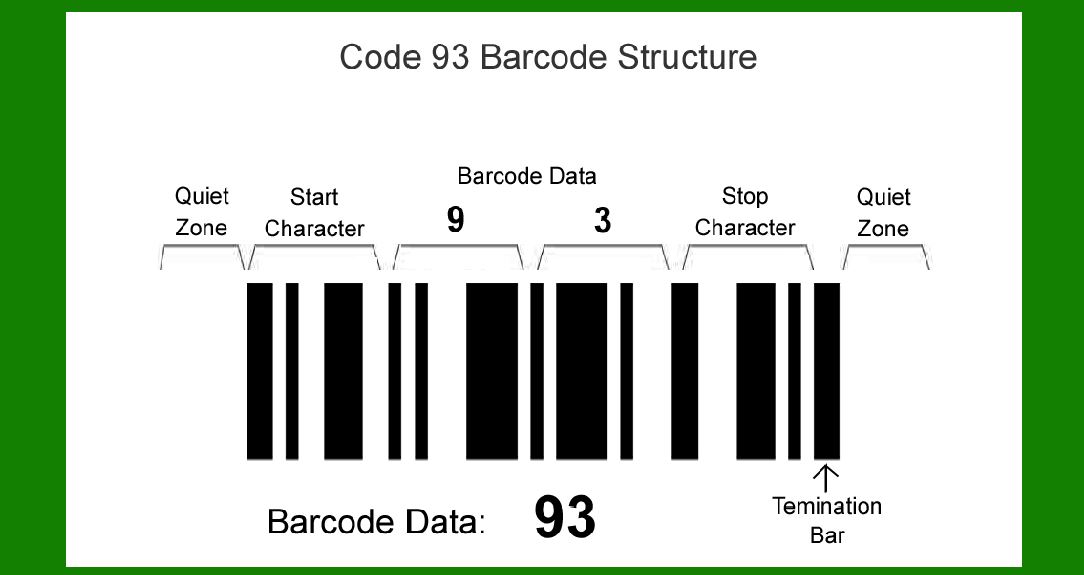
5.Structure of Code 93 The structure of Code 93 is composed of the following elements: |
Start/Stop Characters: These are unique characters that signal the beginning and end of the barcode. Data Characters: Each character is represented by a series of nine bars and spaces. Check Characters: Code 93 includes two check characters to enhance error detection. |

|
6.Adoption in Various Industries Code 93 quickly gained acceptance in various industries due to its advantages over Code 39. Its higher data density and enhanced error detection made it ideal for use in logistics, manufacturing, and other sectors where accurate and compact barcoding was crucial. |
7.Examples of Early Use Cases |
Manufacturing: Early adopters in the manufacturing sector used Code 93 to label and track components and finished products. The higher density of Code 93 allowed for more detailed information to be encoded on smaller labels. Logistics: In logistics, Code 93 was used to improve the accuracy of inventory management and shipping processes. The enhanced error detection reduced the likelihood of misreads during scanning. |

|
8.Integration with Other Technologies As technology advanced, Code 93 was integrated with various automated systems. For example, it was used in conjunction with early computer systems for inventory management, enabling faster and more accurate data entry and retrieval. |
9.Standardization Efforts In the mid-1980s, efforts were made to standardize Code 93 to ensure its consistent implementation across different industries and applications. Standards organizations, such as the American National Standards Institute (ANSI), began to develop guidelines for the use of Code 93. |
10.Expansion into New Markets By the late 1980s, Code 93 had expanded into new markets. Its versatility and reliability made it a popular choice in the healthcare industry, where it was used to label medical equipment and supplies. The ability to encode detailed information in a compact format was particularly beneficial in this sector. |

|
11.Evolution and Variants In the 1990s, as barcode technology continued to evolve, new variants of Code 93 were developed to address specific needs. One such variant was Code 93 Extended, which allowed for the encoding of the entire 128-character ASCII set by utilizing special shift characters. |
12.Use in Retail While Code 93 was not as widely adopted in the retail sector as other symbologies like UPC or EAN, it found niche applications. For example, certain retailers used Code 93 to encode detailed product information on packaging that required more than just a simple numeric code. |
13.Continued Relevance Despite the emergence of newer barcode technologies, Code 93 has continued to be relevant in certain applications. Its compact size and error detection capabilities make it a preferred choice in industries where these attributes are critical. |

|
14.Technological Advances and Modern Uses With the advent of modern scanning technologies, the use of Code 93 has been further enhanced. High-resolution scanners can read Code 93 barcodes more accurately and quickly, making them suitable for use in high-speed production and distribution environments. |
15.Legacy and Impact Code 93's legacy lies in its contributions to the development of barcode technology. It demonstrated the potential for higher density and improved error detection, setting the stage for future innovations in the field of automatic identification and data capture (AIDC). |
16.Case Study: Aerospace Industry In the aerospace industry, Code 93 was adopted for labeling components and tracking maintenance records. The ability to encode detailed alphanumeric information in a compact format was particularly useful for tracking parts and ensuring compliance with regulatory requirements. |

|
17.International Adoption Code 93 was not limited to the United States. It saw international adoption in various countries, especially in industries that required high data integrity and compact labeling solutions. Its standardization facilitated its global use. |
18.Comparison with Other Symbologies Code 93 is often compared with other symbologies like Code 128 and Data Matrix. While each symbology has its own strengths, Code 93 remains unique for its combination of higher density and robust error detection within a linear barcode format. |
19.Challenges and Limitations Despite its advantages, Code 93 also faced certain challenges. Its complexity and the need for higher-quality printing and scanning equipment sometimes limited its adoption. Additionally, the rise of 2D barcodes offered alternative solutions for high-density encoding. |
|
20.Educational and Training Materials To support the implementation of Code 93, various educational and training materials were developed. These resources helped businesses and industries understand the benefits and proper usage of Code 93, facilitating its broader adoption. |
21.Software and Hardware Support Over the years, software and hardware manufacturers integrated support for Code 93 into their products. Barcode printers, scanners, and software systems were updated to ensure compatibility with Code 93, making it easier for businesses to adopt and implement. |
22.Continued Evolution in the 21st Century In the 21st century, Code 93 continues to evolve. Advances in printing technology, such as thermal and laser printing, have improved the quality and durability of Code 93 labels. Similarly, advancements in scanning technology have enhanced the accuracy and speed of barcode reading. |

|
23.Environmental Considerations As industries become more environmentally conscious, the durability and recyclability of Code 93 labels have also become important considerations. Advances in label materials and printing methods have addressed these concerns, ensuring that Code 93 remains a viable option in sustainable practices. |
24.Security Applications Code 93 has also found applications in security and authentication. Its ability to encode complex alphanumeric information makes it suitable for use in secure access control systems and the labeling of sensitive materials. |
25.Future Prospects Looking ahead, Code 93 is expected to remain a valuable tool in specific niches where its unique features are particularly beneficial. While newer technologies may dominate the market, the principles and innovations introduced by Code 93 will continue to influence the development of future barcode symbologies. |

|
26.Conclusion The history of Code 93 is a testament to the continuous evolution and innovation in barcode technology. From its inception in 1982 to its ongoing use today, Code 93 has played a significant role in improving data density and error detection in linear barcodes. Its impact is seen across various industries, and its legacy continues to influence the development of new and improved barcode symbologies. |
 cs@easiersoft.com