1. Introduction to Color Construct Code |
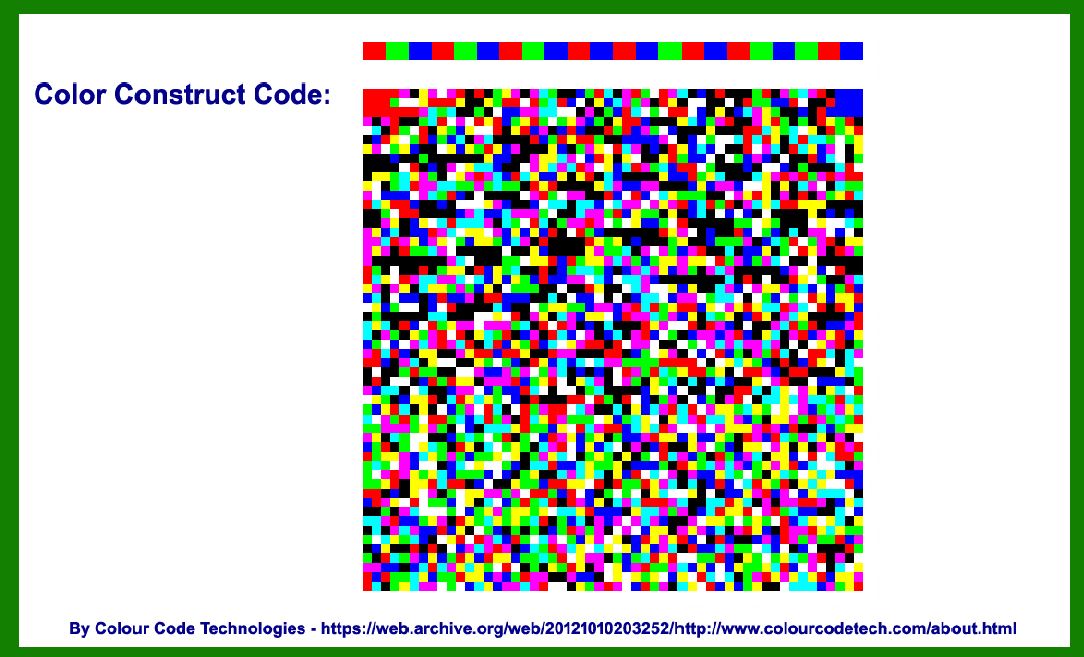
The Color Construct Code is a type of 2D barcode that utilizes colors in its encoding scheme to store information. It is part of a broader category of barcodes known as color barcodes, which offer advantages in terms of data capacity and error correction compared to traditional black-and-white barcodes. The development of the Color Construct Code represents a significant evolution in the field of barcode technology, driven by the need for more efficient and robust data encoding methods. |
|
2. Early Concepts and Development |
The concept of using color in barcodes dates back to the early 1990s when researchers and developers began exploring ways to enhance the data capacity and readability of barcodes. The primary motivation was to overcome the limitations of monochrome barcodes, which were restricted in terms of the amount of data they could encode and their resilience to damage or distortion. |
In the early stages, various experimental color barcodes were developed, each with unique encoding schemes and applications. These early color barcodes laid the groundwork for the eventual creation of the Color Construct Code. |

|
3. Pioneering Research and Prototypes |
In the mid-1990s, researchers at several academic institutions and private companies started to focus on creating practical implementations of color barcodes. One of the most notable early prototypes was developed by a team of researchers at the Massachusetts Institute of Technology (MIT) Media Lab. Their work involved using a combination of red, green, and blue colors to encode data in a 2D matrix. |
The MIT Media Lab's prototype demonstrated the feasibility of using colors to significantly increase the data capacity of barcodes. It also highlighted the potential for improved error correction capabilities, as the different colors could be used to create more complex redundancy schemes. |

|
4. Commercialization and Early Applications |
By the late 1990s, the potential of color barcodes was becoming increasingly evident, and several companies began to explore commercial applications. One of the earliest commercial implementations of a color barcode system was introduced by a startup company called ColorCode, Inc. Founded in 1998, ColorCode, Inc. aimed to develop and market a new type of barcode that leveraged the advantages of color encoding. |
ColorCode, Inc. introduced the first generation of Color Construct Code, which used a palette of eight distinct colors to encode data. This early version was primarily targeted at the retail and logistics industries, where the need for high-capacity barcodes was most acute. The company's initial success demonstrated the practical viability of color barcodes in real-world applications. |

|
5. Advancements in Encoding Algorithms |
In the early 2000s, significant advancements were made in the encoding algorithms used for Color Construct Code. Researchers and developers focused on optimizing the way colors were used to represent data, aiming to maximize data density while maintaining robustness against errors and distortions. |
One notable advancement was the introduction of adaptive color palettes, which allowed the barcode to dynamically adjust the colors used based on the specific data being encoded. This innovation improved the efficiency of the encoding process and further increased the data capacity of the barcodes. |

|
6. Adoption in the Healthcare Industry |
Around the same time, the healthcare industry began to recognize the potential benefits of Color Construct Code. Medical facilities and pharmaceutical companies required barcodes that could store large amounts of critical information, such as patient records and medication details. The high data capacity and error correction capabilities of Color Construct Code made it an ideal solution. |
Several pilot projects were launched to test the use of Color Construct Code in healthcare settings. These projects demonstrated the barcode's ability to enhance data accuracy and streamline information management processes. As a result, adoption in the healthcare sector began to grow steadily. |

|
7. Integration with Mobile Technology |
The proliferation of smartphones and mobile devices in the late 2000s and early 2010s opened up new opportunities for Color Construct Code. Mobile devices with high-resolution cameras could easily scan and decode color barcodes, making them more accessible to a broader audience. |
During this period, several mobile applications were developed to facilitate the use of Color Construct Code in various contexts. For example, some apps allowed users to scan color barcodes on product packaging to access detailed information about the product, such as ingredients, usage instructions, and promotional offers. This integration with mobile technology significantly expanded the potential use cases for Color Construct Code. |

|
8. Standardization Efforts |
As the use of Color Construct Code became more widespread, there was a growing need for standardization to ensure compatibility and interoperability across different industries and applications. In response, several industry organizations and standards bodies began to develop guidelines and specifications for color barcodes. |
One of the most significant milestones in this process was the publication of the ISO/IEC 24778 standard in 2008, which provided a comprehensive framework for the use of color barcodes, including Color Construct Code. This standardization effort helped to establish best practices for encoding, printing, and scanning color barcodes, facilitating their broader adoption. |

|
9. Expansion into Consumer Electronics |
In the 2010s, Color Construct Code began to find applications in the consumer electronics industry. Manufacturers of electronic devices, such as smartphones, tablets, and smartwatches, started using color barcodes to enhance the functionality of their products. For example, color barcodes were used to encode device settings, firmware updates, and user manuals, allowing for quick and easy access to important information. |
This expansion into consumer electronics further demonstrated the versatility and utility of Color Construct Code, as it was adapted to meet the specific needs of different industries and use cases. |

|
10. Enhanced Security Features |
As the technology matured, developers began to incorporate enhanced security features into Color Construct Code. These features were designed to protect against counterfeiting and unauthorized access to sensitive information. For example, some versions of Color Construct Code included encryption algorithms and digital signatures to ensure the authenticity and integrity of the encoded data. |
These security enhancements made Color Construct Code an attractive option for industries that required robust protection for their data, such as finance, government, and defense. |

|
11. Collaboration with Augmented Reality (AR) Technology |
In the late 2010s and early 2020s, the rise of augmented reality (AR) technology presented new opportunities for Color Construct Code. AR applications often required the ability to encode and decode large amounts of data quickly and accurately. The high data capacity and error correction capabilities of Color Construct Code made it well-suited for these applications. |
Several AR platforms and applications began to integrate Color Construct Code as a means of encoding AR markers and content. This integration allowed for more immersive and interactive AR experiences, further expanding the potential use cases for color barcodes. |

|
12. The Emergence of Advanced Printing Technologies |
The development of advanced printing technologies also played a crucial role in the evolution of Color Construct Code. High-resolution color printers and digital printing techniques made it possible to produce color barcodes with greater precision and clarity. These advancements improved the readability and reliability of color barcodes, making them more practical for a wide range of applications. |
The combination of advanced printing technologies and sophisticated encoding algorithms contributed to the continued growth and adoption of Color Construct Code across various industries. |

|
13. Adoption in the Automotive Industry |
The automotive industry is another sector that has embraced Color Construct Code. Car manufacturers and suppliers use color barcodes to encode detailed information about vehicle components, production processes, and maintenance records. This information is critical for ensuring quality control, traceability, and efficient inventory management. |
The use of Color Construct Code in the automotive industry has helped to streamline production processes, reduce errors, and improve overall efficiency. It has also facilitated compliance with industry regulations and standards. |

|
14. Integration with IoT Devices |
The advent of the Internet of Things (IoT) brought about new possibilities for Color Construct Code. IoT devices often require the ability to exchange large amounts of data quickly and securely. The high data capacity and robust error correction capabilities of Color Construct Code made it an ideal solution for encoding data in IoT applications. |
For example, color barcodes have been used to encode configuration settings, firmware updates, and sensor data for IoT devices. This integration has enhanced the functionality and interoperability of IoT systems, contributing to the growth of the IoT ecosystem. |

|
15. Environmental and Sustainability Considerations |
In recent years, there has been a growing emphasis on environmental sustainability and reducing the ecological footprint of industrial processes. Color Construct Code has been leveraged to support these efforts by enabling more efficient and accurate tracking of materials and products throughout their lifecycle. |
For example, color barcodes are used to encode information about the recyclability and environmental impact of products, helping consumers and businesses make more informed decisions. This application highlights the role of Color Construct Code in promoting sustainability and environmental responsibility. |

|
16. Recent Developments and Future Prospects |
In the 2020s, ongoing research and development efforts continue to push the boundaries of what Color Construct Code can achieve. Innovations in machine learning and computer vision are being applied to improve the accuracy and speed of color barcode decoding. These advancements hold the promise of making Color Construct Code even more versatile and capable. |
Looking to the future, Color Construct Code is expected to play an increasingly important role in a wide range of industries and applications. As technology continues to evolve, new use cases and opportunities will emerge, further cementing the significance of color barcodes in the digital age. |
17. Conclusion |
The history of Color Construct Code is a testament to the power of innovation and the ongoing quest for more efficient and robust data encoding methods. From its early conceptual stages to its current applications across diverse industries, Color Construct Code has demonstrated its ability to meet the evolving needs of businesses and consumers. As technology continues to advance, the future of Color Construct Code looks bright, with the potential to unlock new possibilities and drive further progress in the field of barcode technology. |
 cs@easiersoft.com