The History of DataGlyphs 2D Barcode |
1.Early Development and Concept (1980s) |
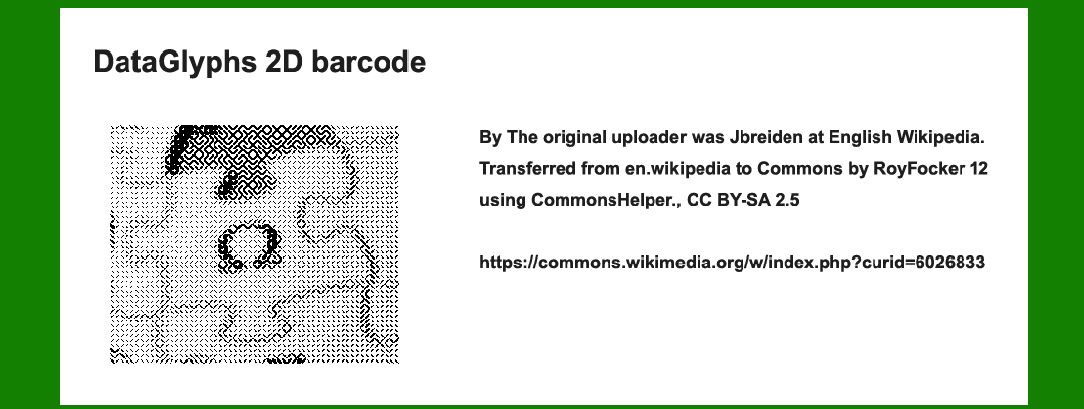
The concept of DataGlyphs was developed in the early 1980s at Xerox PARC (Palo Alto Research Center). Xerox PARC, known for its pioneering work in various computing technologies, was also deeply involved in exploring advanced methods for data encoding and information retrieval. The initial idea was to create a more efficient and versatile 2D barcode system that could handle a larger amount of data compared to traditional barcodes. The goal was to overcome the limitations of existing 1D barcodes by enabling richer and more complex data encoding. |
|
2.Initial Research and Design (1984-1985) |
During this period, researchers at Xerox PARC began experimenting with different designs for DataGlyphs. They aimed to develop a 2D barcode that could integrate seamlessly into various applications, including document tracking, inventory management, and other data-intensive operations. The team worked on creating a system that not only stored more data but also had the capability to be read quickly and accurately. |

|
3.Prototype Development (1986-1987) |
By mid to late 1986, Xerox PARC had developed the first prototypes of DataGlyphs. These early prototypes were tested in controlled environments to evaluate their performance and reliability. The prototypes showcased the potential of 2D barcodes to store and retrieve data in a more efficient manner compared to their 1D counterparts. These tests laid the groundwork for further refinement and development. |
|
4.Patent Filing and Legal Protections (1988-1989) |
In 1988, Xerox PARC filed for patents to protect the intellectual property related to DataGlyphs. The patents covered various aspects of the technology, including the encoding and decoding processes, as well as the specific design elements of the DataGlyphs. This period was crucial for establishing legal protections that would safeguard the technology from potential infringement and ensure its commercial viability. |

|
5.Public Demonstrations and Industry Adoption (1990-1992) |
In the early 1990s, Xerox PARC began showcasing DataGlyphs to industry stakeholders and potential commercial partners. These demonstrations highlighted the advantages of DataGlyphs over traditional barcodes, such as their enhanced data capacity and error correction capabilities. The technology garnered interest from several sectors, including logistics, retail, and manufacturing. However, widespread adoption was still limited as the industry needed time to transition to this new technology. |

|
6.Commercialization and Standardization Efforts (1993-1995) |
During this period, Xerox PARC made efforts to commercialize DataGlyphs by forming partnerships with various technology companies and barcode solution providers. The goal was to integrate DataGlyphs into existing systems and workflows, making it easier for businesses to adopt the new technology. Additionally, discussions about standardizing DataGlyphs began, with the aim of establishing industry-wide protocols and ensuring compatibility across different systems and devices. |

|
7.Challenges and Competition (1996-1998) |
As DataGlyphs entered the market, they faced significant competition from other emerging 2D barcode technologies, such as QR codes and Data Matrix codes. These competing technologies offered similar or even superior capabilities in some areas, leading to challenges for DataGlyphs in gaining widespread acceptance. Despite these challenges, DataGlyphs continued to be used in niche applications where their unique features provided distinct advantages. |

|
8.Integration with Emerging Technologies (1999-2002) |
With the advent of new technologies, including mobile devices and advanced scanning systems, DataGlyphs began to be integrated into a variety of applications. The technology was used in scenarios such as document management systems, product tracking, and authentication processes. This period marked a phase of adaptation and refinement as DataGlyphs sought to leverage the growing capabilities of new technologies to enhance their functionality and usability. |

|
9.Continued Evolution and Adoption (2003-Present) |
In the 2000s and beyond, DataGlyphs continued to evolve and adapt to changing technological landscapes. Advances in scanning technology and data processing allowed for improvements in the performance and accuracy of DataGlyphs. The technology found applications in various industries, including healthcare, logistics, and retail, where its ability to handle complex data and provide reliable performance was valued. Ongoing efforts to improve and update the technology ensured that DataGlyphs remained relevant in a rapidly changing digital environment. |

|
10.Current Status and Future Prospects |
Today, DataGlyphs remain a specialized 2D barcode technology with specific applications where their unique features are advantageous. While they may not be as widely adopted as some other 2D barcode technologies, their history reflects a significant effort to push the boundaries of data encoding and retrieval. The future of DataGlyphs will likely involve continued adaptation to new technologies and evolving industry needs, ensuring their continued relevance in various data-intensive applications. |

|
 cs@easiersoft.com