The History of Dot Code A (Philips Dot Code) |
1.Introduction to Dot Code A |
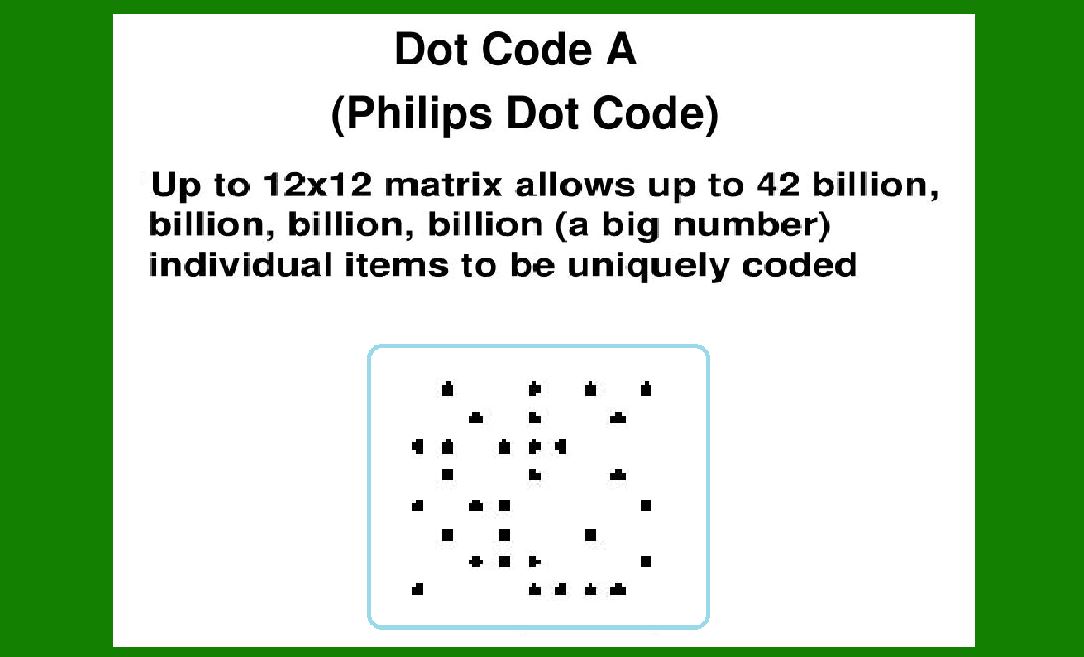
Dot Code A, also known as Philips Dot Code, represents a significant advancement in the field of barcode technology. It was developed by Philips, a company renowned for its innovation in various technological sectors. This barcode technology stands out due to its unique encoding method and has played a role in the evolution of data encoding and tracking systems. |
|
2.Origins and Early Development |
1.Inception (1988): Dot Code A was first patented in 1988 by Philips. This period was marked by rapid advancements in barcode technology, with various companies and researchers exploring new methods to enhance data encoding and decoding capabilities. Philips' entry into the field with Dot Code A was a testament to its commitment to innovation. |
2.Patent Filing and Early Publications (1988-1990): The initial patent for Dot Code A was filed in 1988, with the patent details published shortly thereafter. The early documentation emphasized the barcode's ability to encode data in a matrix format using dots, which was a departure from the traditional linear barcodes of the time. The technology aimed to offer higher data density and better reliability in decoding. |

|
3.Technological Features and Advancements |
1.Encoding Method: Dot Code A utilizes a matrix of dots to represent encoded data. Unlike linear barcodes that use varying widths of bars and spaces, Dot Code A employs a grid of dots, which allows for greater data capacity and error correction. Each dot can be either black or white, representing binary information. The matrix format helps in accommodating more data within a small area. |
2.Error Correction and Reliability: The technology incorporated sophisticated error correction algorithms to enhance reliability. The encoding method ensured that the barcode could be read accurately even if part of the code was damaged or obscured. This was particularly important for applications requiring high reliability, such as in manufacturing and logistics. |

|
4.Adoption and Use Cases |
1.Initial Applications (1990s): In the early 1990s, Dot Code A began to see adoption in various industries. Its primary applications included product labeling and tracking. The technology's robustness and ability to store more data compared to traditional barcodes made it suitable for complex supply chain management and inventory systems. |
2.Philips' Internal Use: Philips itself used Dot Code A for internal purposes, such as tracking components and products within its manufacturing processes. The technology's efficiency in encoding and decoding data facilitated smoother operations and improved accuracy in inventory management. |

|
5.Commercial Expansion and Standardization |
1.Commercial Availability (Late 1990s): As the technology matured, Dot Code A became commercially available. Philips licensed the technology to other companies and industries, expanding its use beyond its own operations. The technology found applications in various sectors, including consumer goods, electronics, and logistics. |
2.Standardization Efforts (2000s): In the 2000s, efforts were made to standardize Dot Code A to ensure compatibility and interoperability across different systems and platforms. The barcode technology was integrated into various industry standards, making it more accessible for widespread adoption. This period also saw improvements in the technology, including enhanced error correction and more efficient encoding methods. |

|
6.Technological Evolution and Modern Applications |
1.Technological Enhancements (2010s): The 2010s brought further advancements in Dot Code A technology. Innovations included improved algorithms for data encoding and decoding, as well as enhancements in error correction mechanisms. These improvements helped in maintaining the barcode's relevance in an increasingly digital and data-driven world. |
2.Modern Use Cases: Today, Dot Code A is used in various applications, including logistics, manufacturing, and consumer goods. Its ability to encode a large amount of data in a compact format makes it suitable for modern tracking and inventory systems. The barcode continues to be utilized in contexts where reliability and data capacity are crucial. |

|
7.Legacy and Impact |
1.Impact on Barcode Technology: Dot Code A has had a significant impact on the evolution of barcode technology. Its introduction of a matrix-based encoding system paved the way for the development of other matrix barcodes, such as QR codes and Data Matrix codes. The technology's emphasis on error correction and data density influenced the design and functionality of subsequent barcode systems. |
2.Continued Relevance: Despite the emergence of newer barcode technologies, Dot Code A remains relevant in certain applications. Its robust design and ability to store substantial amounts of data continue to make it a valuable tool in various industries. The legacy of Dot Code A is reflected in its contributions to the advancement of data encoding technologies. |

|
8.Conclusion |
Dot Code A, or Philips Dot Code, represents a notable chapter in the history of barcode technology. From its inception in 1988 to its ongoing use in modern applications, the barcode has demonstrated significant advancements in data encoding and reliability. Its impact on the field and its continued relevance highlight the importance of innovation in the evolution of technology. |

|
 cs@easiersoft.com