1. Introduction |
The DX (Digital Index) film edge barcode represents a significant innovation in the history of photographic film. It was developed to improve the process of film manufacturing, handling, and developing. Introduced in the 1980s, the DX system revolutionized the way photographic film was used and processed by automating several steps that previously required manual intervention. The DX system includes two types of codes: the DX film edge barcode and the DX film cassette barcode. This narrative focuses on the detailed history and evolution of the DX film edge barcode. |
|
2. The Birth of the DX System |
2.1. Early Developments in Photographic Film |
Before the introduction of the DX system, photographic film handling was entirely manual. Photographers had to set the film speed (ISO) on their cameras manually, which was prone to human error. Additionally, film processing in labs required manual identification and handling of different film types and speeds. This inefficiency led to a demand for a more automated and reliable system. |
2.2. Kodak's Role |
Kodak, a leading company in the photographic industry, recognized the need for innovation in film handling and processing. In the early 1980s, Kodak began developing a system to automate these processes. The result was the DX coding system, which was first introduced to the market in 1983. This system was designed to be simple yet effective, allowing cameras and photo labs to read essential information about the film automatically. |

|
3. Introduction of the DX Film Edge Barcode |
3.1. The Concept |
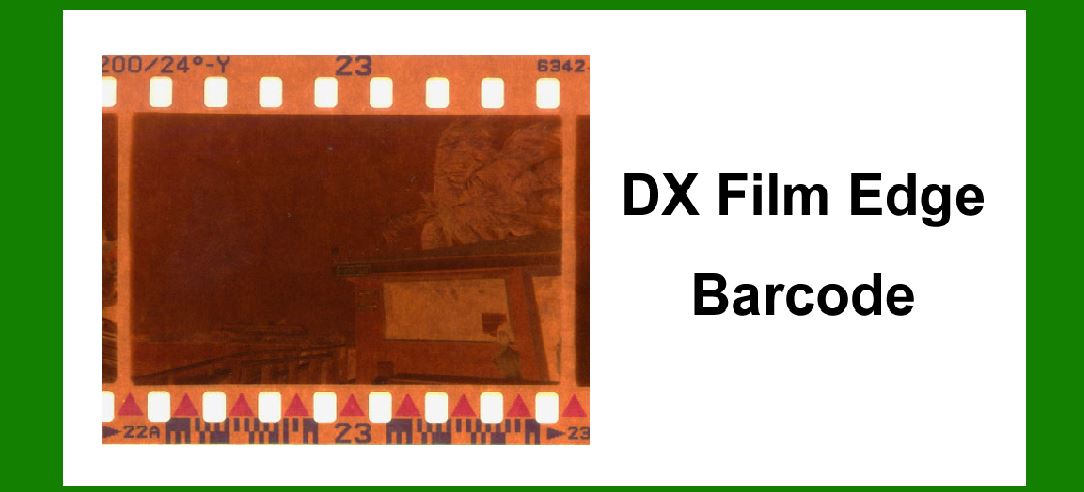
The DX film edge barcode was a part of the broader DX coding system. It consists of a series of black and white squares printed along the edge of the film. This barcode carries information such as the type of film, the manufacturer, the film speed (ISO), and the number of exposures. The barcode is read by sensors in cameras and processing equipment, ensuring that the film is handled correctly at every stage. |
3.2. Technical Details |
The DX film edge barcode is located on the edge of the film strip, outside the area used for capturing images. This ensures that the barcode does not interfere with the photographs. The barcode consists of two rows of rectangular black and white blocks. Each row contains eight blocks, making a total of sixteen blocks. These blocks encode the necessary information in a binary format. |

|
4. Implementation and Adoption |
4.1. Camera Integration |
The first cameras to utilize the DX film edge barcode were introduced in the mid-1980s. These cameras were equipped with sensors that could read the barcode and automatically set the film speed (ISO) based on the information encoded. This automation reduced the risk of exposure errors and made photography more accessible to amateurs and professionals alike. |
4.2. Film Processing Labs |
Film processing labs also quickly adopted the DX system. The barcodes allowed automated film handling and sorting, improving efficiency and reducing the chance of errors. The integration of DX readers in developing machines ensured that each roll of film was processed according to its specific requirements. |

|
5. Examples of Early DX-Coded Films |
5.1. Kodak Gold Series |
One of the first film series to feature the DX film edge barcode was Kodak's Gold series. These films were marketed for their high quality and reliability, and the inclusion of the DX barcode added to their appeal by ensuring correct exposure settings in compatible cameras. |
5.2. Fujifilm Superia |
Fujifilm was another early adopter of the DX system. Their Superia film line included the DX film edge barcode, providing photographers with an easy-to-use solution for various lighting conditions. The Superia series became popular for its vibrant colors and fine grain, further enhanced by the reliability offered by the DX system. |

|
6. Evolution of the DX System |
6.1. Expanded Use |
Throughout the late 1980s and 1990s, the use of the DX film edge barcode expanded. Virtually all major film manufacturers adopted the system, and it became a standard feature on consumer and professional film products. This widespread adoption further solidified the DX system's place in the photographic industry. |
6.2. Technological Advances |
As technology advanced, so did the capabilities of the DX system. Improvements in sensor technology and barcode printing techniques allowed for more precise and reliable reading of the barcodes. These advancements ensured that the DX system remained relevant even as digital photography began to emerge. |

|
7. The Decline of Film and the Legacy of the DX Barcode |
7.1. The Rise of Digital Photography |
The late 1990s and early 2000s saw a rapid shift towards digital photography. Digital cameras eliminated the need for film and, consequently, the DX coding system. As more photographers transitioned to digital, the demand for film products declined sharply. |
7.2. Continued Use in Niche Markets |
Despite the decline in mainstream use, the DX film edge barcode continues to be relevant in niche markets. Some professional photographers and enthusiasts still prefer the aesthetic and tactile qualities of film. Additionally, the resurgence of interest in analog photography has kept the DX system in use for certain specialty films. |
7.3. Impact on Digital Technologies |
The principles behind the DX film edge barcode have influenced modern digital technologies. The concept of encoding metadata directly onto media has parallels in digital photography, where EXIF data stores information about camera settings and conditions for each photo. The DX system's legacy can be seen in the continued emphasis on automation and accuracy in imaging technologies. |

|
8. Conclusion |
The DX film edge barcode represents a significant milestone in the history of photographic technology. From its inception in the early 1980s to its widespread adoption and eventual decline, the DX system played a crucial role in automating and improving the process of film photography. While digital photography has largely supplanted film, the legacy of the DX film edge barcode lives on in the principles of automation and metadata integration that continue to shape modern imaging technologies. |

|
9. Timeline of Major Events |
9.1. Early 1980s |
Kodak begins development of the DX coding system to automate film handling and processing. |
Focus on creating a system that reduces manual intervention and errors in film photography. |
9.2. 1983 |
Official introduction of the DX coding system by Kodak. |
Initial implementation includes the DX film edge barcode and DX film cassette barcode. |
9.3. Mid-1980s |
First cameras equipped with sensors to read the DX film edge barcode are released. |
Kodak Gold series and Fujifilm Superia films become early adopters of the DX barcode. |
9.4. Late 1980s to 1990s |
Widespread adoption of the DX system by major film manufacturers. |
Expansion of DX coding system capabilities and improvements in technology. |
9.5. Late 1990s to Early 2000s |
Rapid rise of digital photography reduces demand for film products. |
DX coding system becomes less prevalent as digital cameras dominate the market. |
9.6. Present Day |
Continued use of DX film edge barcode in niche markets and specialty films. |
Influence of DX system principles seen in modern digital imaging technologies. |

|
10. Additional Examples and Developments |
10.1. Professional and Specialty Films |
High-end professional films, such as Kodak Portra and Fujifilm Pro, also integrated the DX film edge barcode. |
Specialty films for artistic and experimental photography continued to use the DX system for its reliability. |
10.2. Innovations in Film Processing |
The DX coding system led to innovations in film processing equipment, with automated readers and sorters becoming standard in photo labs. |
Improved efficiency and accuracy in film development contributed to the popularity of the DX system. |
10.3. Consumer Impact |
The ease of use provided by the DX film edge barcode made photography more accessible to casual users. |
Automated ISO settings in cameras helped amateur photographers achieve better results with less effort. |
10.4. Industry Standards |
The DX coding system set a new standard for film manufacturing and handling. |
The adoption of the DX system by multiple manufacturers ensured consistency and compatibility across different film brands. |
10.5. Collectors and Analog Enthusiasts |
The resurgence of interest in analog photography has kept the DX film edge barcode relevant for collectors and enthusiasts. |
Vintage cameras and films with DX coding are sought after by hobbyists who appreciate the nostalgia and quality of film photography. |

|
11. Conclusion and Reflection |
The DX film edge barcode was more than just a technical innovation; it represented a shift towards automation and precision in the photographic industry. Its impact was felt across the entire spectrum of film photography, from casual users to professionals. While digital technology has taken the forefront in recent years, the DX system's principles continue to influence how we think about and interact with photographic media. The history of the DX film edge barcode is a testament to the enduring value of thoughtful design and technological advancement in improving user experiences and ensuring quality in the arts. |
 cs@easiersoft.com