The History of the Facing Identification Mark (FIM) Barcode |
1. Introduction to FIM Barcodes |
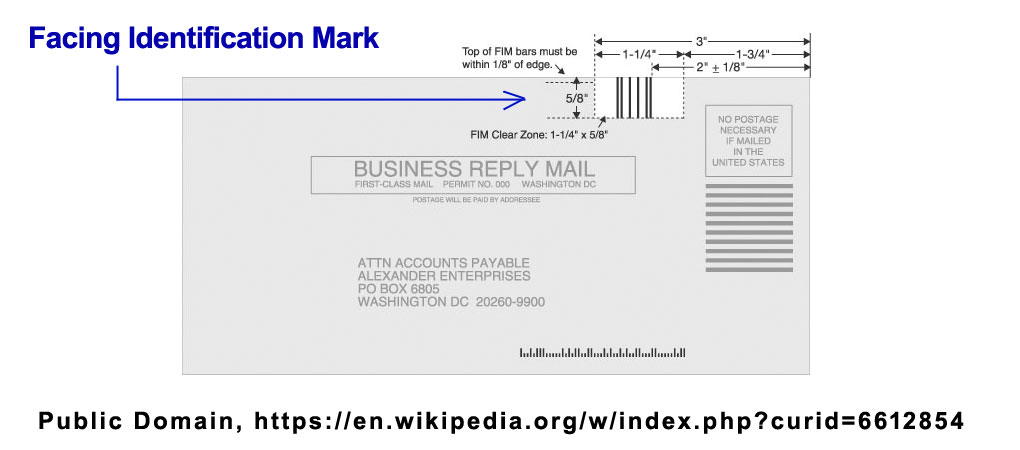
The Facing Identification Mark (FIM) barcode is a special postal mark used primarily in the United States. It serves a specific purpose in the automation of mail sorting and handling by the United States Postal Service (USPS). Unlike other barcodes used for comprehensive data storage, the FIM barcode contains minimal information and is primarily used to indicate the type of service and the presence of other barcodes or preprinted information on the mailpiece. |
|
2. Early Beginnings and Need for FIM Barcodes |
2.1 Early Postal Automation: The inception of the FIM barcode can be traced back to the early days of postal automation in the 1960s and 1970s. During this period, the USPS began to introduce automated systems to handle the increasing volume of mail more efficiently. The need for a system that could quickly and accurately identify and sort different types of mailpieces led to the development of various coding schemes. |
2.2 Challenges in Mail Sorting: Before the introduction of automated systems, mail sorting was a labor-intensive process. The USPS faced challenges in maintaining accuracy and speed, particularly with the growing mail volume. This prompted the need for a standardized marking system that could assist in the efficient processing and sorting of mail. |

|
3. Development of the FIM Barcode |
3.1 Conceptualization: The concept of the FIM barcode emerged as a solution to the challenges faced in the early days of postal automation. The idea was to create a simple yet effective mark that could be easily read by sorting machines to identify different types of mail and the presence of other important information, such as a preprinted address or barcode. |
3.2 Implementation: The first implementation of the FIM barcode occurred in the 1970s. The USPS introduced the FIM as part of its broader efforts to modernize mail handling and sorting. The FIM barcode was designed to be placed in the upper right corner of the mailpiece, where it could be easily read by automated equipment. |
3.3 Standardization: To ensure consistency and compatibility with sorting machines, the USPS developed standards for the design and placement of FIM barcodes. These standards specified the size, spacing, and pattern of the bars in the FIM barcode. The initial versions of the FIM barcode included only a few variations, each serving a specific purpose. |

|
4. Evolution of FIM Barcodes |
4.1 Introduction of FIM A: The first widely used version of the FIM barcode was FIM A. This version consisted of a specific pattern of bars designed to indicate the presence of a preprinted address and a courtesy reply envelope (CRE) or business reply mail (BRM). FIM A helped sorting machines quickly identify these types of mailpieces and route them accordingly. |
4.2 FIM B and FIM C: As the needs of the USPS evolved, additional versions of the FIM barcode were introduced. FIM B was developed to indicate the presence of a barcode on the mailpiece, typically a POSTNET barcode used for automated sorting. FIM C was introduced to identify mailpieces with a preprinted address but no barcode. These variations allowed the USPS to handle a wider range of mail types more efficiently. |
4.3 FIM D and FIM E: In the 1980s and 1990s, further refinements to the FIM barcode system led to the introduction of FIM D and FIM E. FIM D was used for mailpieces with a POSTNET barcode and a preprinted address, while FIM E was used for mailpieces with a POSTNET barcode but no preprinted address. These additional variations provided greater flexibility in handling different types of mail and ensured accurate sorting. |

|
5. Adoption and Integration into Postal Operations |
5.1 Widespread Adoption: By the late 1980s, the FIM barcode had become an integral part of the USPS's automated mail processing system. Its simplicity and effectiveness in identifying different types of mail made it a valuable tool for improving the efficiency of postal operations. The USPS began to require the use of FIM barcodes on certain types of mailpieces to ensure accurate and timely processing. |
5.2 Training and Education: To facilitate the adoption of FIM barcodes, the USPS provided training and educational materials to mailers and postal workers. This included guidelines on the correct placement and usage of FIM barcodes, as well as information on the benefits of using these marks for mail processing. |
5.3 Integration with Other Technologies: The FIM barcode system was integrated with other postal technologies, such as the POSTNET barcode and later the Intelligent Mail barcode (IMb). This integration allowed for even greater automation and accuracy in mail sorting and handling. The combination of FIM and other barcodes enabled the USPS to track and manage mailpieces throughout the entire postal network. |

|
6. Enhancements and Modernization |
6.1 Technological Advancements: With advancements in technology, the USPS continued to enhance the FIM barcode system. Improved sorting machines and scanners allowed for faster and more accurate reading of FIM barcodes. Additionally, the development of more sophisticated barcode printing techniques ensured that FIM barcodes were consistently readable and durable. |
6.2 Introduction of IMb: In the early 2000s, the USPS introduced the Intelligent Mail barcode (IMb), a more advanced barcode system that provided greater information and tracking capabilities. While the IMb offered many benefits, the FIM barcode remained in use for specific types of mailpieces, particularly those involving preprinted addresses and reply mail. |
6.3 Ongoing Use and Relevance: Despite the introduction of newer barcode technologies, the FIM barcode continues to play a crucial role in postal operations. Its simplicity and effectiveness in identifying specific types of mailpieces make it a valuable tool for ensuring accurate and efficient mail sorting. The USPS maintains standards and guidelines for the use of FIM barcodes to this day. |

|
7. Examples of FIM Barcode Applications |
7.1 Business Reply Mail (BRM): One of the most common applications of the FIM barcode is in Business Reply Mail (BRM). Businesses use BRM to provide customers with a preaddressed, postage-paid envelope for returning forms, payments, or other documents. The presence of the FIM barcode on BRM envelopes helps sorting machines quickly identify and process these mailpieces, ensuring they are routed correctly and delivered promptly. |
7.2 Courtesy Reply Mail (CRE): Similar to BRM, Courtesy Reply Mail (CRE) involves preaddressed envelopes provided to customers, but the recipient is responsible for paying the postage. The FIM barcode on CRE envelopes indicates the presence of a preprinted address, allowing sorting machines to process these mailpieces efficiently. This helps businesses improve response rates by making it easier for customers to return mail. |
7.3 Automated Bill Payments: Many utility companies, banks, and other service providers use FIM barcodes on their billing statements and payment envelopes. The FIM barcode helps sorting machines identify these mailpieces and ensure they are processed quickly. This is particularly important for time-sensitive documents such as bills and payments, where timely delivery and processing are critical. |
7.4 Direct Mail Campaigns: Marketers often use FIM barcodes in direct mail campaigns to ensure their mailpieces are handled efficiently. The FIM barcode can indicate the presence of a preprinted address or other important information, helping sorting machines process the mail more accurately. This improves the overall effectiveness of direct mail campaigns by reducing delivery times and increasing the likelihood of a timely response. |

|
8. Challenges and Solutions |
8.1 Maintaining Readability: One of the challenges faced with FIM barcodes is ensuring they remain readable throughout the mail processing cycle. Factors such as printing quality, ink durability, and environmental conditions can affect the readability of FIM barcodes. The USPS has developed guidelines and standards to address these challenges, including specifications for barcode size, spacing, and contrast. |
8.2 Compatibility with Other Barcodes: As new barcode technologies have been introduced, ensuring compatibility with FIM barcodes has been important. The USPS has worked to integrate FIM barcodes with systems that read other barcodes, such as the POSTNET barcode and the Intelligent Mail barcode (IMb). This integration ensures that mailpieces with multiple barcodes are processed accurately and efficiently. |
8.3 Training and Education: Ongoing training and education for mailers and postal workers are essential to the effective use of FIM barcodes. The USPS provides resources and support to help mailers understand the correct placement and usage of FIM barcodes. This includes workshops, online tutorials, and printed guidelines that explain the benefits of FIM barcodes and how to use them properly. |

|
9. Future Prospects for FIM Barcodes |
9.1 Continued Relevance: While newer barcode technologies such as the Intelligent Mail barcode (IMb) offer enhanced capabilities, the FIM barcode remains relevant for specific applications. Its simplicity and effectiveness in identifying certain types of mailpieces ensure that it continues to play a vital role in postal operations. The USPS is likely to maintain and support the use of FIM barcodes for the foreseeable future. |
9.2 Potential Innovations: As technology continues to evolve, there may be opportunities to enhance the FIM barcode system further. Innovations in printing technology, barcode design, and mail processing equipment could improve the efficiency and accuracy of FIM barcode applications. The USPS may explore new ways to integrate FIM barcodes with emerging technologies to enhance their functionality. |
9.3 Global Influence: Although the FIM barcode is primarily used in the United States, its principles and concepts have influenced postal systems in other countries. The idea of using simple, easily recognizable marks to assist in automated mail sorting has been adopted by postal services worldwide. As global postal systems continue to modernize, the influence of the FIM barcode is likely to persist. |

|
10. Conclusion |
The Facing Identification Mark (FIM) barcode has a rich history rooted in the early days of postal automation. Developed to address the challenges of mail sorting and handling, the FIM barcode has evolved to become an integral part of the USPS's operations. Its simplicity, effectiveness, and adaptability have ensured its continued relevance in a rapidly changing technological landscape. |
From its early beginnings in the 1970s to its ongoing use today, the FIM barcode has played a crucial role in improving the efficiency and accuracy of mail processing. Its applications in Business Reply Mail, Courtesy Reply Mail, automated bill payments, and direct mail campaigns demonstrate its versatility and importance. |
As the USPS and other postal systems continue to innovate and modernize, the principles and concepts behind the FIM barcode are likely to influence future developments. The ongoing commitment to maintaining standards, providing training, and exploring new technologies ensures that the FIM barcode will remain a valuable tool in the world of postal operations. |

|
 cs@easiersoft.com