The History of Farmacode (Code 32) |
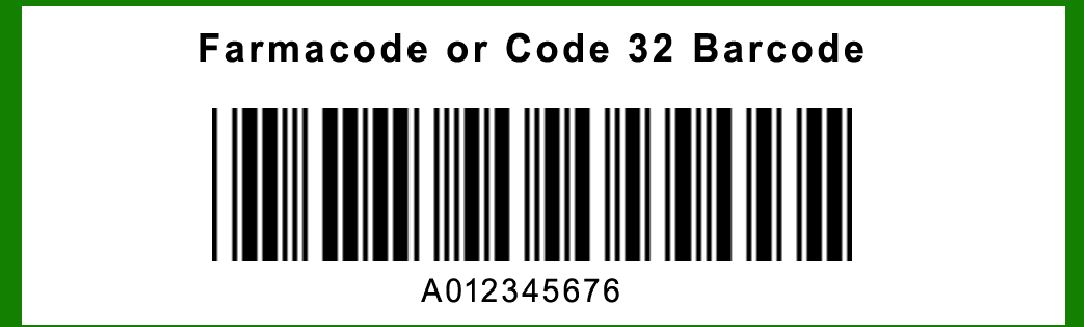
1.Introduction to Farmacode (Code 32) Farmacode, also known as Code 32, is a barcode symbology that is a variation of the Code 39 barcode. It was developed specifically for the pharmaceutical industry in Italy. The primary goal of Farmacode was to encode the AIC (Azienda Identificazione Codici), an alphanumeric code assigned by the Italian Ministry of Health to each pharmaceutical product. This encoding allows for the unique identification and tracking of pharmaceutical products throughout their lifecycle, from production to distribution and ultimately to the consumer. |
|
2.Origins and Early Development The development of Farmacode can be traced back to the mid-1980s when the Italian Ministry of Health identified the need for a standardized system to track pharmaceutical products. During this period, the pharmaceutical industry was facing challenges related to product authentication, counterfeiting, and efficient inventory management. The Ministry of Health aimed to address these issues by implementing a barcode system that would enable better control and traceability of pharmaceutical products. |

|
3.Adoption and Implementation (Late 1980s) In the late 1980s, the Italian Ministry of Health officially adopted Farmacode as the standard barcode for pharmaceutical products. This adoption was part of a broader regulatory framework that mandated the use of barcodes for all pharmaceutical products sold in Italy. The Farmacode system was designed to be compatible with existing barcode scanning technology, making it easier for pharmaceutical companies to implement without requiring significant changes to their existing infrastructure. |

|
4.Technical Specifications and Encoding Structure Farmacode is based on the Code 39 symbology, but it includes modifications to accommodate the specific needs of the pharmaceutical industry. The encoding structure of Farmacode includes the following components: |
Start and Stop Characters: Similar to Code 39, Farmacode uses an asterisk (*) as the start and stop character to indicate the beginning and end of the barcode. |
AIC Code: The primary data encoded in Farmacode is the AIC code, which is a unique alphanumeric identifier assigned to each pharmaceutical product. |
Checksum: To ensure data integrity, Farmacode includes a checksum digit that is calculated based on the encoded data. This checksum helps detect and correct errors that may occur during scanning. |

|
5.Regulatory Impact and Industry Adoption (1990s) Throughout the 1990s, the adoption of Farmacode gained momentum as pharmaceutical companies recognized the benefits of standardized barcoding for product tracking and inventory management. The Italian Ministry of Health continued to enforce regulations that required the use of Farmacode on all pharmaceutical products, further driving industry compliance. During this period, the Farmacode system proved effective in reducing instances of counterfeiting and improving the efficiency of the supply chain. |

|
6.Integration with Information Systems One of the significant advancements during the 1990s was the integration of Farmacode with various information systems used by pharmaceutical companies, wholesalers, and retailers. This integration allowed for seamless data exchange and real-time tracking of pharmaceutical products. Information systems were developed to capture and store barcode data, enabling better inventory management, product recalls, and regulatory reporting. |

|
7.Enhancements and Standardization Efforts (2000s) In the 2000s, efforts were made to enhance the Farmacode system and align it with international barcode standards. These efforts included improvements in barcode readability, data accuracy, and compatibility with global supply chain practices. Organizations such as GS1 (Global Standards One) played a crucial role in promoting standardization and interoperability of barcodes, including Farmacode, within the pharmaceutical industry. |

|
8.Case Study: Implementation at a Major Pharmaceutical Company To illustrate the practical application of Farmacode, consider the case of a major pharmaceutical company in Italy that adopted Farmacode in the early 1990s. The company faced challenges related to product counterfeiting and inefficient inventory management. By implementing Farmacode, the company was able to: |
Improve Product Authentication: The unique AIC code encoded in Farmacode allowed the company to verify the authenticity of its products at various points in the supply chain. |
Enhance Inventory Management: The use of barcodes enabled the company to track inventory levels accurately and reduce instances of stockouts and overstocking. |
Facilitate Regulatory Compliance: Farmacode helped the company comply with regulatory requirements set by the Italian Ministry of Health, ensuring that all products were properly labeled and tracked. |

|
9.Challenges and Solutions Despite the benefits, the implementation of Farmacode was not without challenges. Some of the key challenges faced by the pharmaceutical industry included: |
Barcode Readability: Ensuring that barcodes were printed clearly and could be read by scanners was critical. This challenge was addressed by adopting high-quality printing techniques and regular quality checks. |
Data Accuracy: Maintaining accurate and up-to-date data was essential for the effectiveness of the Farmacode system. This was achieved through rigorous data management practices and regular audits. |
Integration with Legacy Systems: Integrating Farmacode with existing legacy systems required significant effort and investment. However, the long-term benefits of improved efficiency and compliance justified the initial costs. |

|
10.Expansion to Other Markets (2010s) In the 2010s, the success of Farmacode in Italy prompted interest from other countries looking to enhance their pharmaceutical tracking systems. While Farmacode remained primarily an Italian standard, its principles and practices influenced the development of similar systems in other regions. Countries with similar regulatory challenges and requirements looked to Farmacode as a model for implementing their barcode systems. |

|
11.Technological Advancements and Future Prospects The rapid advancements in barcode scanning technology, such as the development of 2D barcodes and RFID (Radio Frequency Identification), have the potential to further enhance the capabilities of Farmacode. These technologies offer greater data storage capacity and improved scanning accuracy, making them suitable for the evolving needs of the pharmaceutical industry. |

|
12.Conclusion The history of Farmacode (Code 32) is a testament to the importance of standardized barcoding systems in the pharmaceutical industry. From its origins in the 1980s to its widespread adoption and continued relevance today, Farmacode has played a crucial role in improving product authentication, inventory management, and regulatory compliance. The ongoing efforts to enhance and standardize barcode systems ensure that Farmacode remains a vital tool in the fight against counterfeit pharmaceuticals and the efficient management of the pharmaceutical supply chain. |
 cs@easiersoft.com