1. Early Development and Conceptualization (1990s) |
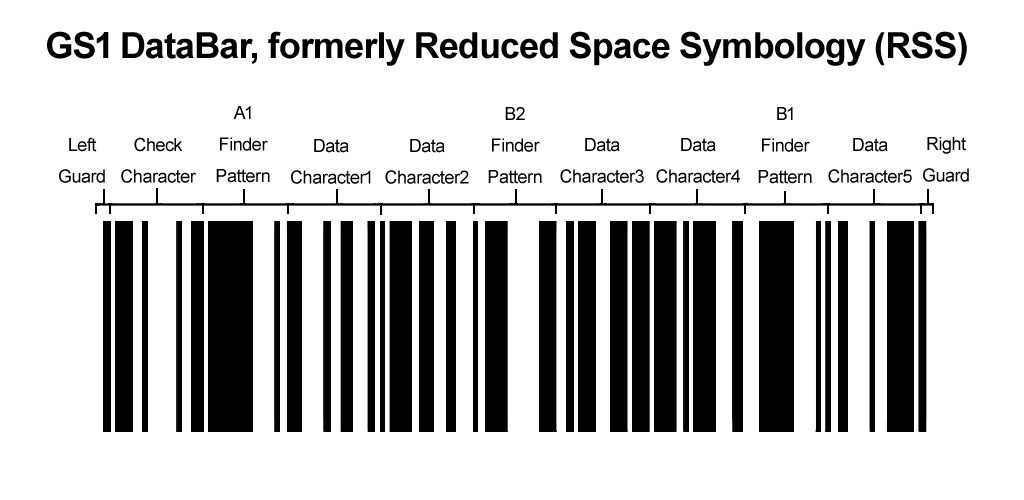
1.1. The development of GS1 DataBar, formerly known as Reduced Space Symbology (RSS), traces its origins back to the 1990s. During this period, the need for a more compact barcode symbology became evident. Traditional barcodes such as UPC (Universal Product Code) and EAN (European Article Number) were widely used, but their size and data capacity limitations were increasingly problematic for certain industries, particularly in sectors like retail and pharmaceuticals where space on packaging is limited. |
1.2. The initial concept of RSS was driven by the aim to create a smaller barcode that could store more information while occupying less space. This was particularly important for small items such as cosmetics, pharmaceuticals, and fresh produce, where space constraints made traditional barcodes impractical. |
|
2. Introduction of Reduced Space Symbology (RSS) (1997) |
2.1. In 1997, the first version of RSS was introduced. The primary design goal was to reduce the space required for barcodes while maintaining or enhancing data capacity. The RSS family included several symbologies designed to encode various types of data. These included RSS-14, RSS Limited, and RSS Expanded. |
2.2. RSS-14 was designed to encode GTIN (Global Trade Item Number) data in a smaller space compared to traditional barcodes. RSS Limited was intended for applications where the GTIN-12 or GTIN-13 data needs to be encoded, but the symbol size must be minimized. RSS Expanded, on the other hand, was designed to encode additional data such as batch numbers and expiration dates alongside the GTIN. |

|
3. Adoption and Standardization (Early 2000s) |
3.1. By the early 2000s, RSS began to gain traction. The versatility and compact size of the RSS barcodes made them suitable for a variety of applications. Industries such as healthcare, retail, and logistics started to recognize the benefits of using RSS barcodes for small item marking and traceability. |
3.2. In 2001, the Uniform Code Council (UCC) and EAN International (now known as GS1), which are the global organizations responsible for barcode standards, began to formally recognize and promote RSS as a part of the global barcode standards. This endorsement by major standards organizations was crucial for the widespread adoption and implementation of RSS. |

|
4. Rebranding to GS1 DataBar (2006) |
4.1. In 2006, RSS was rebranded as GS1 DataBar. The rebranding was part of a broader effort by GS1 to streamline and simplify the naming conventions of its standards. The new name, GS1 DataBar, more accurately reflected the symbology's connection to the GS1 system and its ability to encode comprehensive data. |
4.2. The rebranding also included the introduction of new variants and enhancements to the symbology. These included GS1 DataBar Omnidirectional, GS1 DataBar Truncated, GS1 DataBar Stacked, GS1 DataBar Stacked Omnidirectional, and GS1 DataBar Expanded Stacked. Each variant was designed to address specific use cases and applications, further expanding the utility of GS1 DataBar. |

|
5. GS1 DataBar in Retail (2008) |
5.1. In January 2008, the GS1 DataBar was formally approved for use in retail point-of-sale (POS) applications. This approval marked a significant milestone in the adoption of GS1 DataBar. Retailers were now able to use the symbology on products that previously could not accommodate traditional barcodes due to size constraints. |
5.2. The introduction of GS1 DataBar in retail applications allowed for more efficient inventory management and improved checkout processes. Retailers could now capture more detailed information about products, such as batch numbers and expiration dates, which was particularly useful for perishable goods and pharmaceuticals. |

|
6. Implementation in Fresh Produce (2009-2010) |
6.1. The fresh produce industry was one of the early adopters of GS1 DataBar. By 2009, several major retailers and suppliers in the fresh produce sector had begun to implement GS1 DataBar on their products. The compact size of the symbology made it ideal for small fruits and vegetables that previously could not be labeled with traditional barcodes. |
6.2. The adoption of GS1 DataBar in fresh produce allowed for better traceability and inventory management. Retailers could now track the origin and movement of fresh produce more accurately, which was crucial for ensuring food safety and managing recalls. |

|
7. Expansion to Healthcare (2010-2012) |
7.1. In 2010, GS1 DataBar began to see significant adoption in the healthcare sector. The ability to encode detailed information such as batch numbers, expiration dates, and serial numbers made GS1 DataBar an ideal choice for pharmaceutical products and medical devices. |
7.2. By 2012, several major healthcare providers and pharmaceutical companies had implemented GS1 DataBar on their products. The symbology's compact size and high data capacity allowed for better traceability and management of medical products, which was essential for patient safety and regulatory compliance. |

|
8. Enhancements and Technological Improvements (2013-2015) |
8.1. Between 2013 and 2015, several technological enhancements were made to GS1 DataBar. These improvements focused on increasing the data capacity and readability of the symbology, particularly in challenging scanning environments. |
8.2. One significant enhancement was the development of GS1 DataBar Expanded, which allowed for even more data to be encoded within the same compact space. This variant was particularly useful for applications that required detailed product information, such as pharmaceuticals and fresh produce. |

|
9. Global Standardization and Compliance (2016-2018) |
9.1. By 2016, GS1 DataBar had become a globally recognized and standardized symbology. It was included in several international standards and guidelines, ensuring its compatibility and interoperability across different regions and industries. |
9.2. In 2017, GS1 DataBar was included in the GS1 General Specifications, which are the official guidelines for implementing GS1 standards. This inclusion solidified GS1 DataBar's position as a key component of the GS1 system and ensured its continued use and support in various industries. |

|
10. Current Applications and Future Prospects (2019-Present) |
10.1. As of 2019, GS1 DataBar continues to be widely used in various industries, including retail, healthcare, and logistics. Its compact size, high data capacity, and versatility make it an ideal choice for applications that require detailed product information and traceability. |
10.2. Looking to the future, GS1 DataBar is expected to play a crucial role in the continued development of the Internet of Things (IoT) and smart packaging. The ability to encode detailed information in a compact barcode will be essential for enabling advanced tracking and management of products in an increasingly connected and automated world. |
10.3. In conclusion, the history of GS1 DataBar is a testament to the continuous innovation and evolution of barcode symbology. From its early development as RSS in the 1990s to its current status as a globally recognized standard, GS1 DataBar has consistently met the needs of various industries by providing a compact, versatile, and data-rich solution for product identification and traceability. |

|
 cs@easiersoft.com