1. Introduction to High Capacity Color Barcode (HCCB) |
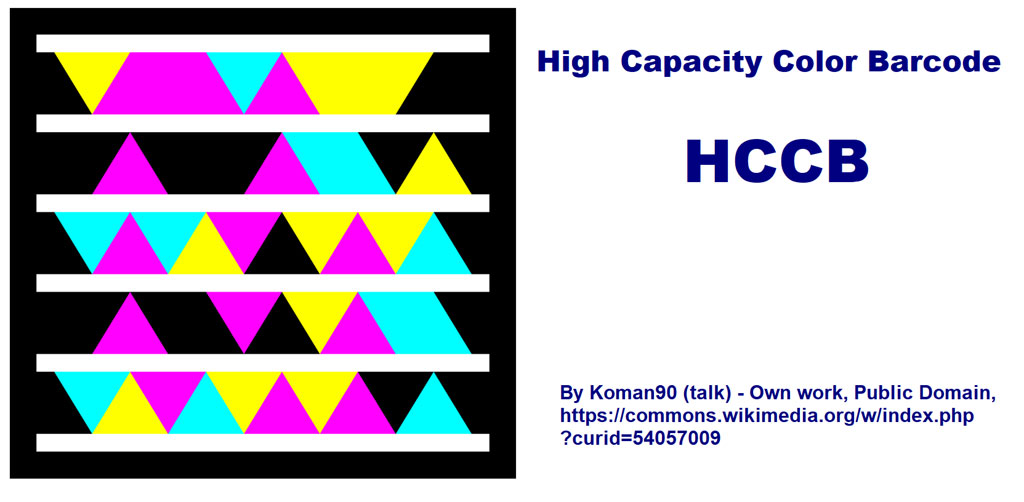
High Capacity Color Barcode (HCCB) is a type of two-dimensional (2D) barcode developed by Microsoft. Unlike traditional black-and-white barcodes, HCCB uses a series of colored triangles to encode information. This innovative approach allows for a higher data density and a more aesthetically pleasing appearance. HCCB was developed to address the increasing demand for higher capacity barcodes that could store more information in a smaller space. |
|
2. Early Development and Conceptualization (2006) |
The conceptualization of HCCB began around 2006, during a period when Microsoft was exploring various technologies to enhance mobile user experiences and integrate digital content with the physical world. The idea was to create a barcode that could store more data than traditional black-and-white barcodes, leveraging the capabilities of modern cameras and imaging software. |
|
3. Initial Research and Development (2006-2007) |
During 2006 and 2007, Microsoft's research team, primarily based in their Redmond campus, worked on developing the core technology behind HCCB. The team focused on the use of color as a means to increase data density. They experimented with various shapes and patterns before settling on colored triangles, which proved to be the most effective in terms of data capacity and readability. |

|
4. Public Introduction and Demonstrations (2007-2008) |
Microsoft publicly introduced HCCB in 2007-2008. The technology was showcased at various tech conferences and events, demonstrating its potential applications. One notable demonstration was at the 2008 Consumer Electronics Show (CES) in Las Vegas, where Microsoft highlighted HCCB's ability to store URLs, text, and other data types, making it suitable for a wide range of applications from advertising to product packaging. |
|
5. Integration with Microsoft Tag (2009) |
In 2009, Microsoft launched a mobile application called Microsoft Tag, which utilized HCCB technology. Microsoft Tag allowed users to scan HCCB barcodes with their smartphones to access web links, videos, contact information, and more. This integration marked the first major commercial application of HCCB and aimed to bridge the gap between physical media and digital content. |

|
6. Adoption by Businesses and Marketers (2009-2011) |
Following the launch of Microsoft Tag, various businesses and marketers began adopting HCCB for their promotional campaigns. Companies used HCCB codes on product packaging, in magazines, and on billboards to provide consumers with quick access to additional information or promotional content. For example, a retailer might place an HCCB code on a product label that, when scanned, directs customers to a website with more details about the product. |

|
7. Enhancements and Feature Updates (2010-2011) |
Between 2010 and 2011, Microsoft continued to enhance HCCB and the Microsoft Tag application. Updates included improved scanning accuracy, faster decoding times, and enhanced error correction capabilities. These improvements made HCCB more reliable and user-friendly, encouraging further adoption by businesses and consumers. |

|
8. Broader Applications and Use Cases (2011-2013) |
As HCCB technology matured, its applications expanded beyond marketing and advertising. Some notable use cases included: |
Event Ticketing: Event organizers began using HCCB for electronic tickets, allowing attendees to gain entry by scanning their mobile devices. |
Educational Materials: Publishers incorporated HCCB into textbooks and educational materials, providing students with quick access to supplementary content online. |
Product Authentication: Manufacturers used HCCB codes to verify the authenticity of their products, helping to combat counterfeiting. |
|
9. Competitive Landscape and Alternatives (2012-2013) |
During this period, other barcode technologies and mobile tagging solutions began to emerge, creating a competitive landscape for HCCB. Technologies like QR codes, which were simpler and already widely adopted, posed a significant challenge. Despite the advantages of HCCB in terms of data capacity and aesthetics, QR codes became the preferred choice for many businesses due to their ease of use and widespread recognition. |

|
10. Decline in Usage and Microsoft Tag's Transition (2013-2015) |
By 2013, the adoption of QR codes had significantly overshadowed HCCB. Although HCCB and Microsoft Tag continued to be used, their prevalence decreased. In 2015, Microsoft announced that it would phase out the Microsoft Tag service, citing the widespread adoption of QR codes and other similar technologies. This marked the end of HCCB's active development and promotion by Microsoft. |

|
11. Legacy and Impact of HCCB |
Despite its decline, HCCB left a lasting impact on the barcode industry. It showcased the potential of color in barcode technology and influenced subsequent developments in the field. HCCB's innovative use of color and shape inspired other barcode technologies to explore new ways of encoding data, pushing the boundaries of what was previously thought possible. |

|
12. Conclusion |
The history of High Capacity Color Barcode (HCCB) is a testament to Microsoft's innovation and willingness to explore new frontiers in technology. From its early development in 2006 to its integration with Microsoft Tag and eventual decline in the face of competitive alternatives, HCCB played a significant role in the evolution of barcode technology. Although it is no longer in active use, its legacy continues to influence the industry and inspire new advancements. |

|
 cs@easiersoft.com