1. Introduction and Early Development |
1.1 Origins (1980s): |
The KarTrak Automatic Car Identification (ACI) system was developed in the early 1980s as a solution for the rail industry to streamline the identification and tracking of railroad rolling stock. This was a period when the rail industry was grappling with inefficiencies in asset management and inventory control. The system was devised to address these issues by providing a reliable and automated method for identifying and tracking rolling stock, including freight cars and locomotives. |
1.2 Initial Development: |
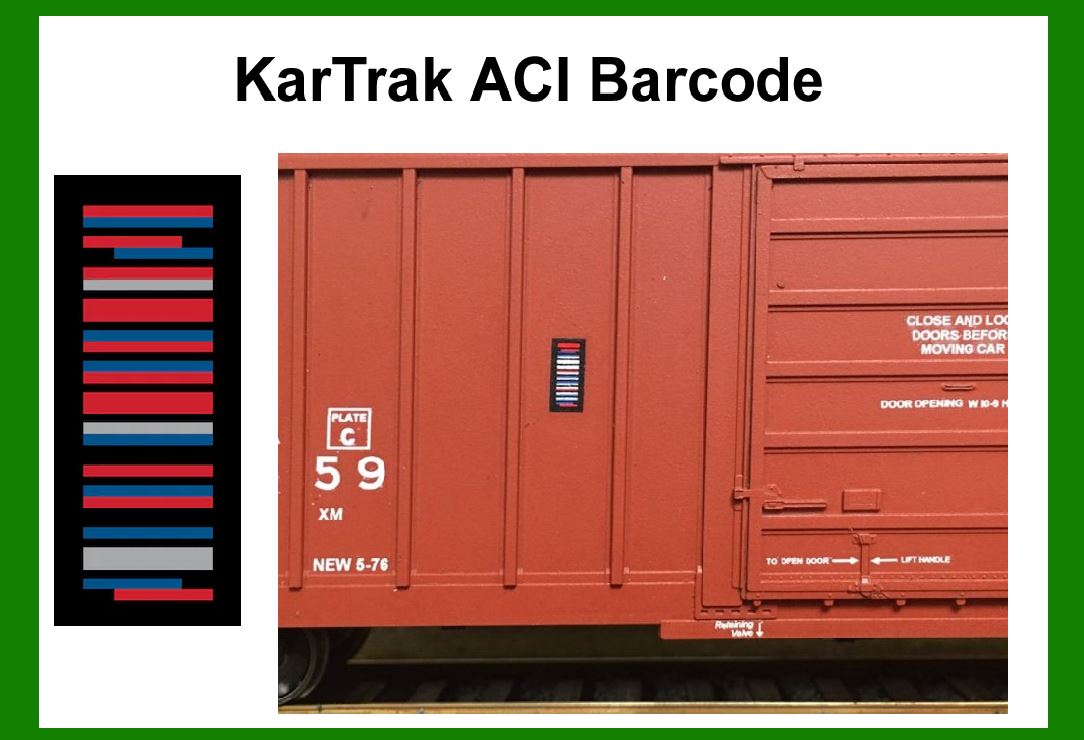
The concept of KarTrak was conceived by the KarTrak Technology, Inc., a company specializing in the development of barcode technology for the rail industry. The key challenge was to create a robust and durable barcode system that could withstand the harsh conditions of rail operations, including exposure to weather, dust, and physical wear. |
|
2. Design and Implementation |
2.1 Barcode Design (1984): |
The KarTrak ACI barcode was designed to be a high-capacity, rugged, and easy-to-read system. The barcode itself was a linear code, which could encode a significant amount of information about each railcar. The design incorporated redundancy and error-correction features to ensure data integrity despite potential damage or wear. |
2.2 Prototype Testing (1985): |
In 1985, prototypes of the KarTrak ACI system were tested in real-world conditions. These tests involved applying the barcodes to a variety of rolling stock and subjecting them to typical operational environments. The results demonstrated that the barcodes could withstand extreme temperatures, moisture, and mechanical stress while remaining readable. |
|
3. Early Adoption and Deployment |
3.1 Pilot Programs (1986): |
Following successful prototype testing, pilot programs were launched in 1986 to evaluate the practical application of the KarTrak ACI system. These programs were conducted with several major North American railroads, including Union Pacific and Norfolk Southern. The pilot programs aimed to assess the system's effectiveness in improving inventory management and operational efficiency. |
3.2 Early Success (1987): |
The pilot programs yielded positive results, leading to the early adoption of the KarTrak ACI system by several railroads. The system demonstrated its ability to enhance asset tracking, reduce manual inventory checks, and improve overall operational efficiency. The success of these early implementations paved the way for broader adoption across the rail industry. |

|
4. Expansion and Standardization |
4.1 Wider Implementation (1988-1990): |
Throughout the late 1980s and early 1990s, the KarTrak ACI system saw widespread adoption among North American railroads. This period marked a significant expansion of the system's use, with many railroads incorporating KarTrak ACI into their operations. The system was standardized across various rail networks, allowing for interoperability and seamless integration. |
4.2 Technological Advances (1991-1995): |
During this period, advancements in barcode technology and scanning equipment contributed to further improvements in the KarTrak ACI system. Enhanced scanners and processing technology allowed for faster and more accurate barcode reading. Additionally, improvements in barcode durability and adhesive materials ensured that the KarTrak ACI barcodes remained effective in demanding environments. |

|
5. Challenges and Evolution |
5.1 Challenges (1996-2000): |
As the rail industry continued to evolve, the KarTrak ACI system faced several challenges. These included the need to accommodate new types of rolling stock, changes in operational practices, and the increasing complexity of rail networks. Additionally, competition from other tracking technologies and the advent of newer barcode systems presented challenges for KarTrak ACI's market position. |
5.2 System Evolution (2001-2005): |
In response to these challenges, the KarTrak ACI system underwent several updates and improvements. The system was adapted to handle new types of rolling stock and integrated with advanced rail management systems. Efforts were also made to enhance the system's scalability and compatibility with emerging technologies, including RFID and GPS. |

|
6. Modernization and Continued Use |
6.1 Modernization Efforts (2006-2010): |
During the mid-2000s, modernization efforts focused on updating the KarTrak ACI system to align with the latest industry standards and technological advancements. This included upgrading barcode readers, improving data integration capabilities, and enhancing the overall system infrastructure. The goal was to ensure that the KarTrak ACI system remained relevant and effective in an increasingly digital rail industry. |
6.2 Current Use (2011-Present): |
Today, the KarTrak ACI system continues to be used by various railroads and rail operators. While newer technologies have emerged, KarTrak ACI remains a reliable and proven solution for rolling stock identification and tracking. Its robust design and established track record have solidified its place in the rail industry, particularly in regions where legacy systems are still prevalent. |

|
7. Case Studies and Examples |
7.1 Union Pacific Railroad (1986-Present): |
Union Pacific Railroad was one of the early adopters of the KarTrak ACI system. The implementation of KarTrak ACI helped Union Pacific streamline its asset management processes, resulting in improved operational efficiency and reduced manual inventory checks. The system's ability to withstand harsh environmental conditions proved particularly valuable for Union Pacific's extensive rail network. |
7.2 Norfolk Southern Railway (1986-Present): |
Norfolk Southern Railway also played a significant role in the early adoption of the KarTrak ACI system. The implementation of KarTrak ACI allowed Norfolk Southern to enhance its rolling stock tracking capabilities and improve overall inventory management. The system's durability and reliability were key factors in its continued use by Norfolk Southern. |

|
8. Future Prospects |
8.1 Technological Integration: |
As the rail industry continues to evolve, the KarTrak ACI system is expected to integrate with newer technologies such as RFID and advanced data analytics. This integration will help enhance the system's capabilities and ensure its continued relevance in a rapidly changing industry. |
8.2 Legacy and Impact: |
The KarTrak ACI system has had a lasting impact on the rail industry, demonstrating the effectiveness of barcode technology in asset tracking and management. Its legacy continues to influence the development of new tracking solutions and serves as a testament to the importance of robust and reliable identification systems in the rail industry. |

|
 cs@easiersoft.com