The History of Matrix 2 of 5 Barcode |
Introduction |
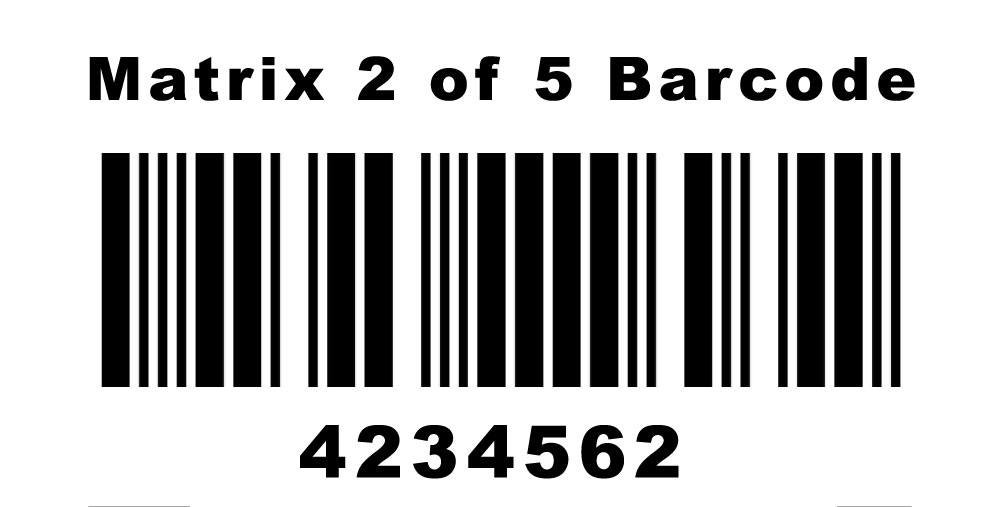
The Matrix 2 of 5 barcode, often considered one of the lesser-known symbologies in the realm of barcoding, has a unique history that reflects the evolution of data encoding and technological advancements over the years. This barcode type, recognized for its simple yet effective design, has served various industries, albeit in more niche applications compared to other barcodes like UPC or QR codes. |
|
1. Early Concept and Development (1950s - 1960s) |
1.1 Initial Barcoding Innovations: The concept of barcodes emerged in the late 1940s and early 1950s, primarily aimed at automating supermarket checkout systems. Early efforts by inventors such as Norman Joseph Woodland and Bernard Silver, who patented a bullseye-shaped barcode in 1952, laid the groundwork for subsequent barcode technologies. |
1.2 Foundation of Numerical Encoding: During the 1960s, the focus on numerical encoding systems increased. The traditional linear barcodes, which represented data through varying widths of parallel lines, began to see enhancements in their encoding capacity and readability. These developments formed the basis for the creation of barcodes like Matrix 2 of 5, which utilized a numerical system. |

|
2. Introduction of Matrix 2 of 5 Barcode (1970s) |
2.1 Conceptualization: The Matrix 2 of 5 barcode was developed in the early 1970s as an improvement over the traditional Interleaved 2 of 5 barcode. It was designed to be a higher-density symbology capable of encoding numeric data more efficiently. |
2.2 Design Features: Unlike Interleaved 2 of 5, which interleaved pairs of digits, Matrix 2 of 5 encoded data by representing each digit using a combination of bars and spaces in a matrix format. This method allowed for a more compact and denser representation of information. |
2.3 Early Applications: Initially, Matrix 2 of 5 was used in applications where space was limited, and a higher density of data was required. Early adopters included industries that needed to track small items or components, such as electronics and pharmaceuticals. |

|
3. Evolution and Standardization (1980s) |
3.1 Growing Adoption: During the 1980s, the Matrix 2 of 5 barcode saw increased adoption due to its efficiency in encoding numerical data. It became particularly popular in manufacturing and inventory management, where compactness and readability were crucial. |
3.2 Standardization Efforts: As barcoding technology became more widespread, efforts to standardize various symbologies, including Matrix 2 of 5, were undertaken by industry groups and standards organizations. This standardization helped ensure compatibility and interoperability across different systems and industries. |
3.3 Technological Enhancements: Advances in barcode scanning technology, including the development of more sophisticated laser and CCD scanners, improved the readability and accuracy of Matrix 2 of 5 barcodes. These technological enhancements contributed to the barcode's reliability and effectiveness in various applications. |

|
4. Industry Applications and Diversification (1990s) |
4.1 Expansion into New Sectors: By the 1990s, the use of Matrix 2 of 5 expanded into new sectors, including logistics, transportation, and warehousing. Its ability to encode a significant amount of numerical data in a small space made it ideal for tracking and managing inventory in these industries. |
4.2 Integration with Automated Systems: The integration of barcoding systems with automated tracking and inventory management systems became more prevalent during this period. Matrix 2 of 5 barcodes were used in conjunction with these systems to streamline operations and improve efficiency. |
4.3 Examples of Use Cases: Notable examples of Matrix 2 of 5 barcode applications included tracking parts in automotive manufacturing, managing pharmaceutical inventory, and handling package tracking in courier and delivery services. These use cases highlighted the barcode's versatility and utility across different domains. |

|
5. Challenges and Competition (2000s) |
5.1 Emergence of Alternative Technologies: The 2000s saw the emergence of alternative barcode symbologies and data encoding technologies, such as QR codes and Data Matrix codes. These newer technologies offered enhanced data capacity, error correction, and the ability to encode alphanumeric characters, posing a challenge to the continued use of Matrix 2 of 5. |
5.2 Maintaining Relevance: Despite the competition, Matrix 2 of 5 continued to maintain relevance in specific niche applications where its compactness and simplicity were advantageous. Industries that required straightforward numerical encoding without the need for complex data structures continued to utilize this barcode. |
5.3 Technological Adaptations: To address the challenges posed by newer technologies, adaptations and improvements were made to Matrix 2 of 5, including better error detection and correction mechanisms. These enhancements helped maintain its utility in environments where precision and reliability were paramount. |

|
6. Modern Usage and Legacy (2010s - Present) |
6.1 Continued Niche Applications: In the modern era, Matrix 2 of 5 remains in use, albeit in more specialized applications. It is often found in industries that have long-standing legacy systems and where the cost of transitioning to newer technologies is prohibitive. |
6.2 Integration with Modern Systems: Efforts to integrate Matrix 2 of 5 barcodes with modern data management and tracking systems have been undertaken to ensure compatibility with contemporary technology. This integration has allowed industries to leverage the benefits of Matrix 2 of 5 while taking advantage of modern system capabilities. |
6.3 Examples of Current Applications: Current applications of Matrix 2 of 5 include tracking serialized components in electronics manufacturing, managing small-item inventories in pharmaceuticals, and handling specialized logistics operations. These examples demonstrate the barcode's continued relevance in specific contexts. |
6.4 Preservation of Historical Significance: The history of Matrix 2 of 5 is a testament to the evolution of barcode technology and its impact on various industries. Its development and adaptation over the decades highlight the importance of innovation and standardization in the field of data encoding and management. |
|
Conclusion |
The Matrix 2 of 5 barcode has a rich history that reflects the broader trends in barcode technology and data management. From its conceptualization in the early 1970s to its continued use in specialized applications today, this barcode has demonstrated its value and utility in various contexts. While it may not be as widely recognized as some other symbologies, its contributions to the field of barcoding are significant and enduring. |

|
 cs@easiersoft.com