The History of MaxiCode: Used by United Parcel Service |
1.Introduction to MaxiCode MaxiCode, a 2D matrix barcode, is an integral part of the logistics and shipping industry, particularly for the United Parcel Service (UPS). Developed in the early 1990s, MaxiCode was designed to facilitate fast and reliable package sorting and tracking in the rapidly expanding world of global shipping. |
|
2.Origins and Development The development of MaxiCode was driven by the need for a more efficient way to manage the increasing volume of packages handled by UPS. In the late 1980s and early 1990s, UPS was looking for a solution to enhance its automated package sorting systems. Traditional linear barcodes were reaching their limits in terms of data capacity and readability, especially in high-speed environments. |

|
3.Technological Foundation MaxiCode was created by a team of engineers and researchers at UPS, in collaboration with technology partners. The design of MaxiCode was influenced by existing barcode technologies but aimed to overcome their limitations. The primary goal was to develop a barcode that could be read quickly and accurately from any orientation, even on moving packages. |

|
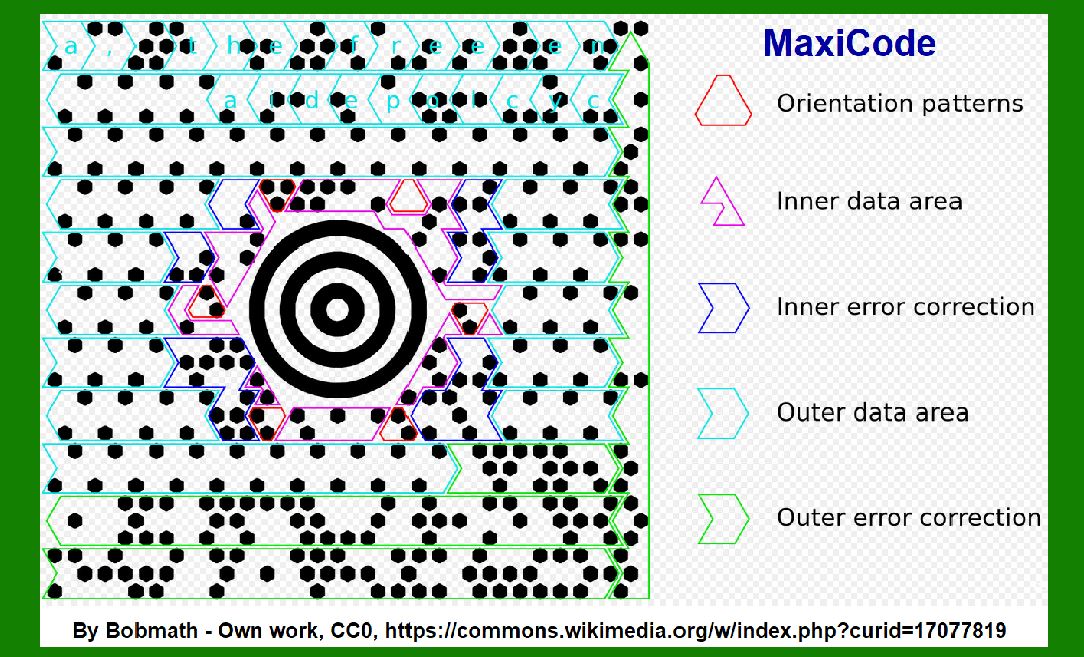
4.Design and Features MaxiCode features a bullseye-like pattern at its center, which serves as a reference point for scanners. This central target allows for omnidirectional scanning, ensuring that the code can be read regardless of its orientation. Surrounding the central target are a series of hexagonal modules arranged in a grid pattern, encoding the data. |

|
5.Initial Implementation UPS began testing MaxiCode in its distribution centers in the early 1990s. The initial implementation focused on integrating MaxiCode with UPS's automated sorting systems. The goal was to ensure that the new barcode could be seamlessly incorporated into existing workflows without disrupting operations. |

|
6.Pilot Programs and Testing The early 1990s saw several pilot programs and extensive testing phases for MaxiCode. These tests were conducted in various UPS facilities to evaluate the barcode's performance in real-world conditions. The pilot programs helped identify and address potential issues, such as scanner compatibility and printing accuracy. |

|
7.Rollout and Adoption After successful pilot programs, UPS began a phased rollout of MaxiCode across its global network. The barcode was initially used on high-priority and time-sensitive packages, where accurate and rapid sorting was crucial. Over time, its use expanded to include a broader range of shipments. |

|
8.Standardization Efforts As MaxiCode proved its value in UPS operations, efforts were made to standardize the technology. In 1995, MaxiCode was adopted as an international standard by the International Organization for Standardization (ISO), specifically under ISO/IEC 16023. This standardization facilitated wider adoption and interoperability with other systems. |

|
9.Enhancements and Improvements Throughout the late 1990s and early 2000s, UPS continued to refine and enhance MaxiCode. Improvements were made in printing technologies to ensure high-quality and durable codes. Scanner technologies also evolved, with more advanced and capable readers being developed to handle the increasing volume of packages. |
10.MaxiCode in the Digital Era The advent of the digital era brought new challenges and opportunities for MaxiCode. With the rise of e-commerce, the volume of packages handled by UPS skyrocketed. MaxiCode played a crucial role in managing this increased load, enabling faster and more accurate sorting and tracking. |

|
11.Integration with Other Technologies MaxiCode did not exist in isolation; it was integrated with other technologies to enhance UPS's overall logistics capabilities. For example, MaxiCode was often used in conjunction with RFID tags and other barcode types to provide a comprehensive tracking and identification system. |
12.Case Studies and Examples One notable example of MaxiCode's impact is its use in the shipping of medical supplies. During the late 1990s and early 2000s, UPS began using MaxiCode for high-priority shipments of medical equipment and pharmaceuticals. The ability to quickly and accurately track these shipments ensured timely deliveries, which was critical in the healthcare industry. |

|
13.MaxiCode in International Shipping MaxiCode also played a significant role in international shipping. With the global reach of UPS, it was essential to have a barcode system that could be used universally. MaxiCode's standardization by ISO facilitated its use in international logistics, ensuring that packages could be tracked and sorted accurately across borders. |
14.Challenges and Solutions Despite its many advantages, the implementation of MaxiCode was not without challenges. One significant challenge was ensuring consistent printing quality. To address this, UPS worked closely with printing technology manufacturers to develop printers capable of producing high-resolution MaxiCode images. |

|
15.MaxiCode's Role in Automation The automation of package sorting and tracking was a major driver behind the development of MaxiCode. By enabling faster and more reliable scanning, MaxiCode helped UPS streamline its operations and reduce manual handling of packages. This automation was particularly important in large distribution centers handling thousands of packages per hour. |
16.MaxiCode's Impact on Efficiency The efficiency gains from using MaxiCode were substantial. UPS reported significant reductions in sorting errors and improved package handling times. These improvements translated into cost savings and enhanced customer satisfaction, as packages were delivered more reliably and on time. |

|
17.Evolution of Scanning Technology As scanning technology evolved, so did the capabilities of MaxiCode. Early scanners were relatively simple and required precise alignment to read the codes accurately. Modern scanners, however, are much more advanced, capable of reading MaxiCode at high speeds and from various angles, even on moving conveyor belts. |
18.MaxiCode in the Age of Big Data In the age of big data, MaxiCode's ability to store and transmit information quickly and accurately became even more valuable. UPS leveraged the data captured by MaxiCode to optimize its logistics operations, analyze shipping patterns, and improve overall efficiency. |

|
19.MaxiCode and Environmental Sustainability MaxiCode also contributed to UPS's environmental sustainability efforts. By improving the efficiency of package sorting and tracking, UPS was able to reduce the carbon footprint of its operations. Faster sorting meant fewer delays and less fuel consumption, contributing to greener logistics practices. |
20.Future Prospects and Innovations Looking to the future, MaxiCode continues to be a critical component of UPS's logistics infrastructure. Ongoing innovations in printing and scanning technologies promise to further enhance the capabilities of MaxiCode. For example, advancements in digital printing could enable even higher resolution codes, while next-generation scanners could offer even faster and more accurate reading capabilities. |

|
21.Conclusion In conclusion, the history of MaxiCode is a testament to the importance of innovation in the logistics industry. From its origins in the early 1990s to its current role in UPS's global operations, MaxiCode has proven to be an invaluable tool for improving efficiency, accuracy, and reliability in package sorting and tracking. As technology continues to evolve, MaxiCode is poised to remain a key player in the ever-changing world of logistics. |
 cs@easiersoft.com