The History of Messenger Codes for Facebook |
1. Introduction to Messenger Codes |
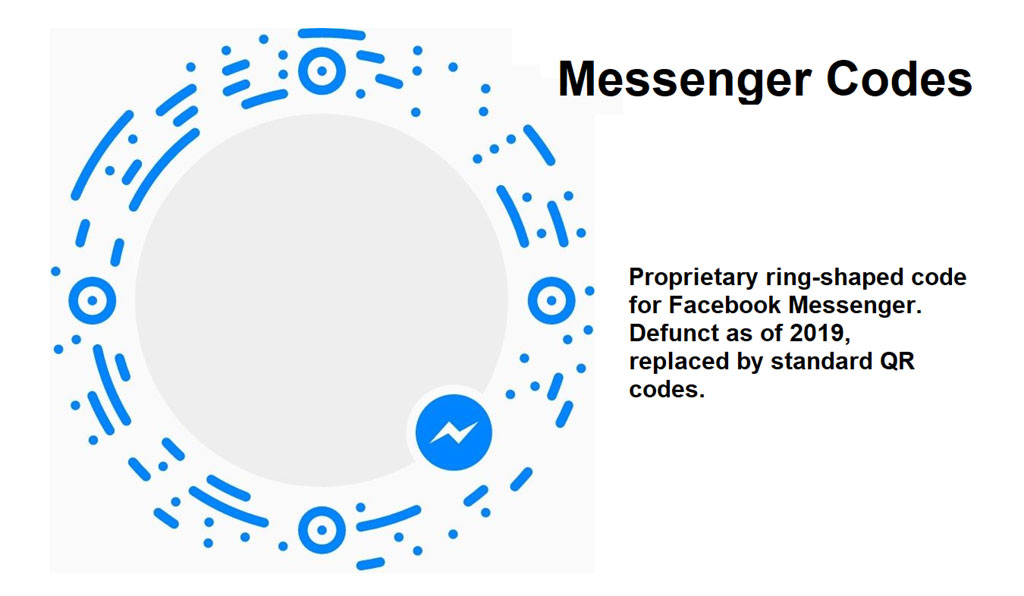
Messenger Codes are a type of scannable code used primarily within Facebook's messaging platform, Messenger. These codes were introduced as part of Facebook's strategy to enhance user engagement and simplify interactions on its platform. Designed to function similarly to QR codes, Messenger Codes allow users to initiate conversations or connect with other users through a simple scan. |
|
2. Early Development and Launch |
Messenger Codes were officially launched by Facebook on April 15, 2015. This feature was introduced as part of a broader update to Facebook Messenger, which included various new functionalities aimed at improving user interaction. The launch of Messenger Codes was a significant step for Facebook as it sought to make Messenger a more integral part of its ecosystem, blending digital interactions with real-world engagement. |

|
3. Functionality and Design |
Messenger Codes are circular codes with a series of dots and patterns that users can scan with the Messenger app. Each code is unique and linked to a specific Facebook Messenger profile or business page. The design of Messenger Codes includes concentric circles with dots around the perimeter and a central area for customization, such as a profile picture or a company logo. This unique design ensures that each code is distinct, reducing the likelihood of confusion between different codes. |

|
4. Integration with Facebook Messenger |
Upon their release, Messenger Codes were designed to simplify the process of finding and connecting with users or businesses on Facebook Messenger. By scanning a code, users are immediately directed to the associated Messenger profile or chat window, bypassing the need for searching or manually typing usernames. This streamlined process enhances user experience and provides a quick method for initiating conversations. |

|
5. Early Adoption and Use Cases |
In the early days following their introduction, Messenger Codes were adopted by various businesses and organizations seeking to leverage the feature for customer engagement. For example, retail brands used Messenger Codes in their advertisements and storefronts to encourage customers to connect directly with customer service representatives or participate in promotions. Similarly, event organizers used Messenger Codes on tickets and marketing materials to facilitate direct communication with attendees. |

|
6. Expansion and Enhancements |
As Facebook continued to develop Messenger Codes, additional features and enhancements were introduced. These included the ability for users to create custom codes with their own branding, further enhancing the tool's versatility. Over time, Facebook integrated Messenger Codes with other features in Messenger, such as automated responses and chatbots, to provide a more comprehensive solution for businesses. |

|
7. Case Studies and Examples |
Several notable case studies illustrate the impact of Messenger Codes. For instance, in 2016, Coca-Cola utilized Messenger Codes in a marketing campaign that encouraged customers to scan codes on packaging to enter contests and access exclusive content. This campaign successfully increased engagement by offering a direct and interactive experience. Another example includes the use of Messenger Codes by local businesses to streamline customer service interactions and drive sales through personalized promotions. |

|
8. Technological Challenges and Adaptations |
Throughout its history, Messenger Codes faced several technological challenges. Early on, there were concerns about the accuracy and speed of code scanning, particularly in low-light conditions or when codes were printed on various surfaces. Facebook addressed these issues by continually improving the scanning technology and providing updates to the Messenger app to enhance performance and reliability. |

|
9. Decline in Popularity |
Despite their initial success, Messenger Codes experienced a decline in popularity as new technologies and features emerged. The rise of other digital interaction tools, such as augmented reality (AR) and more sophisticated QR code alternatives, contributed to the reduced emphasis on Messenger Codes. Facebook eventually shifted its focus towards integrating new features and technologies within Messenger, leading to a decreased emphasis on Messenger Codes. |

|
10. Current Status and Legacy |
As of the latest updates, Messenger Codes are still supported within Facebook Messenger, but their use has become less prominent compared to their early days. The codes remain a part of Facebook's broader strategy for digital communication, but the focus has shifted towards other innovations. The legacy of Messenger Codes lies in their contribution to simplifying user interactions and influencing the design of future digital engagement tools. |

|
11. Conclusion |
The history of Messenger Codes reflects Facebook's broader efforts to enhance user engagement and streamline communication on its platform. From their initial launch to their current status, Messenger Codes have played a role in shaping the way users connect and interact through Messenger. While their prominence has waned with the advent of new technologies, their impact on digital communication remains a notable aspect of Facebook's innovation journey. |
 cs@easiersoft.com