1. Introduction to MSI Barcode |
The MSI (Modified Plessey) barcode, also known as MSI Plessey or simply MSI, is a one-dimensional barcode symbology. It is derived from the original Plessey barcode standard but has been modified to enhance its usability and performance. MSI is typically used for applications that require high-density data encoding and error detection, such as inventory management and retail point-of-sale systems. |
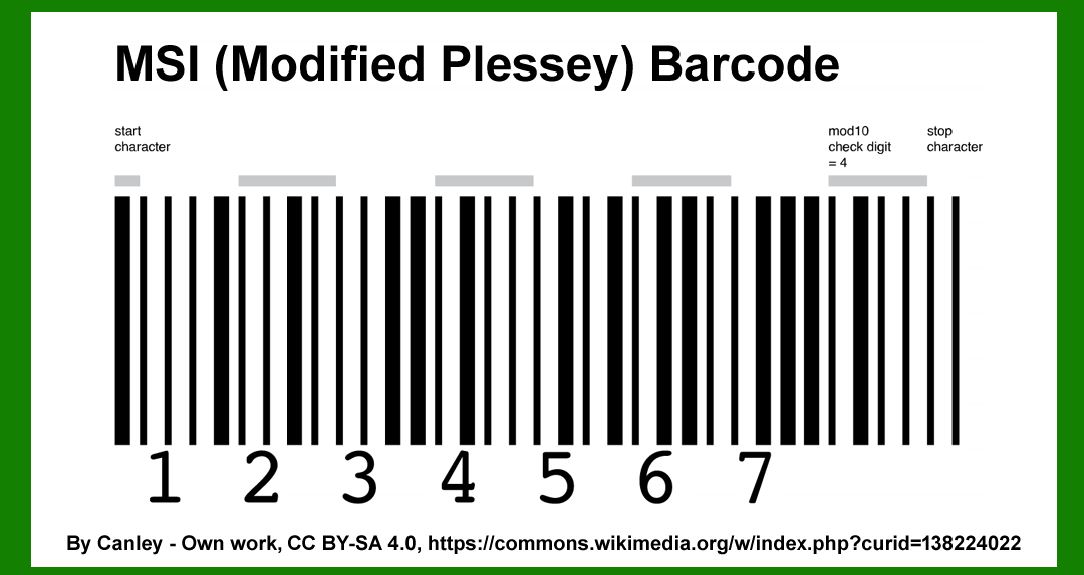
|
2. Early Beginnings: The Plessey Code |
1.1950s: Plessey Code Development |
The Plessey Code, the precursor to the MSI barcode, was developed in the late 1950s by the Plessey Company, a British electronics manufacturer. The original Plessey Code was designed to be a simple and efficient barcode system for automated data capture. |
2.1960s: Adoption and Limitations |
Throughout the 1960s, the Plessey Code found applications in various industries, including retail and manufacturing. However, it had limitations in terms of error detection and data capacity, which led to the need for improvements. |

|
3. The Emergence of MSI Barcode |
1.1970s: Introduction of Modified Plessey |
In the early 1970s, the need for a more robust and versatile barcode system prompted the development of the MSI barcode. The MSI barcode was created as a modification of the original Plessey Code to address its shortcomings and to offer enhanced functionality. |
2.1975: Standardization and Adoption |
By 1975, the MSI barcode had gained traction in various sectors due to its improved features. It was standardized by the MSI Data Corporation, which played a significant role in its development and promotion. The standardization of the MSI barcode led to its adoption in multiple industries, particularly in retail and logistics. |

|
4. Key Developments and Enhancements |
1.1980s: Expansion and Usage |
During the 1980s, the MSI barcode continued to evolve and expand its applications. Its use became more widespread in retail environments for inventory management and checkout processes. The barcode's design allowed for efficient scanning and data retrieval, making it a popular choice for various commercial applications. |
2.1982: Error Detection Enhancement |
In 1982, the MSI barcode underwent a significant enhancement with the introduction of improved error detection capabilities. This enhancement addressed some of the earlier limitations related to data accuracy and reliability. The inclusion of error detection algorithms helped reduce scanning errors and increased the overall efficiency of the barcode system. |

|
5. Technological Advancements |
1.1990s: Integration with Digital Systems |
The 1990s marked a period of technological advancement for the MSI barcode. As digital systems and automated data capture technologies advanced, the MSI barcode was integrated into various digital platforms and systems. This integration facilitated seamless data transfer and processing, enhancing the barcode's utility in modern retail and logistics environments. |
2.1995: Introduction of MSI with Enhanced Features |
In 1995, the MSI barcode was further refined to include additional features such as improved scanning distance and higher data density. These enhancements made the MSI barcode even more versatile and suitable for a wide range of applications. The barcode's ability to handle larger amounts of data and maintain accuracy over longer distances contributed to its continued popularity. |

|
6. Modern Applications and Adaptations |
1.2000s: Widespread Adoption |
By the early 2000s, the MSI barcode had become a widely adopted standard in various industries. Its use extended beyond retail to include sectors such as healthcare, manufacturing, and logistics. The barcode's ability to provide accurate and reliable data capture made it an essential tool for inventory management, product tracking, and supply chain optimization. |
2.2003: Technological Innovations |
In 2003, further technological innovations were introduced to the MSI barcode system. These innovations included enhancements to its data encoding capabilities and compatibility with new scanning technologies. The barcode's adaptability to evolving technological trends ensured its continued relevance in an increasingly digital world. |

|
7. The Role of MSI Barcode Today |
1.2010s: Continued Relevance |
Throughout the 2010s, the MSI barcode maintained its relevance in various industries. It continued to be used for inventory management, retail checkout, and logistics applications. The barcode's reliability and ease of use ensured its continued presence in a rapidly changing technological landscape. |
2.2015: Integration with Modern Systems |
By 2015, the MSI barcode had been successfully integrated with modern data management systems and software platforms. This integration allowed for seamless data exchange and improved overall efficiency in various operational processes. The barcode's ability to work with contemporary digital systems ensured its ongoing utility in diverse applications. |

|
8. Legacy and Future Prospects |
1.2020s: Legacy of MSI Barcode |
As of the 2020s, the MSI barcode remains an important part of the barcode technology landscape. Its legacy includes its role in shaping the development of barcode systems and its contribution to improving data capture and management processes. The MSI barcode's historical significance is recognized in the context of its impact on various industries and its continued use in specific applications. |
2.Future Prospects |
Looking ahead, the MSI barcode's future prospects are influenced by ongoing advancements in technology and evolving industry needs. While newer barcode systems and technologies may offer additional features and capabilities, the MSI barcode's proven reliability and performance ensure its continued relevance in specific applications. Its adaptability to changing technological trends and its ability to meet industry requirements will likely contribute to its ongoing use in various sectors. |

|
 cs@easiersoft.com