1. Introduction |
The Nintendo Dot Code, a pioneering form of 2D barcode technology, represents a significant milestone in the history of barcode evolution. Its development and implementation mark a key chapter in the broader narrative of how barcodes and similar technologies have transformed data management and accessibility. This document aims to provide a comprehensive history of Nintendo Dot Code, outlining its origins, development, and notable applications. |
|
2. Origins of Nintendo Dot Code |
The Nintendo Dot Code originated from the technological innovations pursued by Nintendo, a leading company in the gaming and entertainment industry. The concept emerged during the late 1990s and early 2000s, a period characterized by rapid advancements in digital technology and the increasing use of barcodes for a variety of applications. The code was specifically developed to enhance the interaction between physical media and digital content, reflecting Nintendo's commitment to integrating new technologies to improve user experience. |

|
3. Development and Technical Specifications |
Nintendo's interest in barcode technology led to the creation of the Dot Code as a response to the limitations of existing barcode formats. The primary goal was to develop a robust, scalable, and versatile code that could be seamlessly integrated into Nintendo's products and services. |
3.1 Technical Specifications |
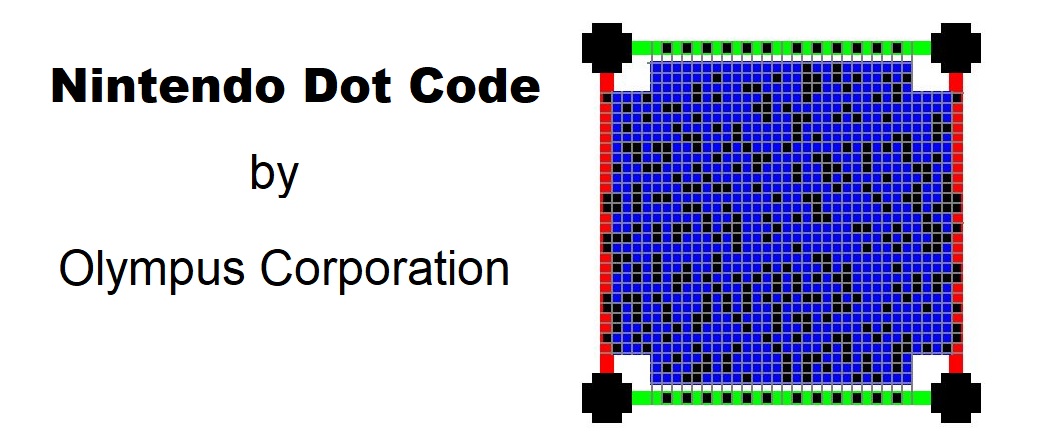
The Nintendo Dot Code features a matrix of dots arranged in a specific pattern. Unlike traditional barcodes that use linear or stacked patterns, the Dot Code employs a 2D matrix, which allows it to store more information in a compact space. This design provides several advantages, including higher data density and improved error correction capabilities. |
3.2 Design Philosophy |
The design philosophy behind the Nintendo Dot Code was to create a code that could be easily read by various devices, including those with limited scanning capabilities. This was achieved by incorporating features such as redundancy and error-checking algorithms to ensure accurate data retrieval even in less-than-ideal conditions. |

|
4. Initial Applications and Implementation |
The initial applications of the Nintendo Dot Code were primarily focused on enhancing user interaction with Nintendo's gaming consoles and related products. The code was used in various ways to enrich the gaming experience and streamline product management. |
4.1 Gaming Consoles |
One of the first implementations of the Nintendo Dot Code was in the Nintendo GameCube. The Dot Code was used to encode game information, which could be scanned by the console to verify the authenticity of the game discs and unlock additional content. This application not only improved security but also provided gamers with a more interactive experience. |
4.2 Merchandise and Collectibles |
The Dot Code was also employed in merchandise and collectible items associated with Nintendo franchises. For example, limited-edition toys and promotional items featured Dot Codes that could be scanned to access exclusive content or rewards. This approach created a new level of engagement for fans and collectors. |

|
5. Expansion and Adoption |
Following its successful integration into Nintendo products, the Dot Code began to gain traction beyond the gaming industry. Its versatility and effectiveness in encoding data led to its adoption in various other sectors. |
5.1 Cross-Industry Use |
The Dot Code's adoption extended to other industries such as retail and logistics. Companies in these sectors recognized the potential of the Dot Code to improve inventory management and streamline supply chain processes. The code's ability to store a significant amount of data in a compact format made it an attractive option for tracking and managing products. |
5.2 International Reach |
As the technology gained recognition, it began to see international adoption. Businesses and organizations outside Japan started exploring the potential of the Dot Code for their own applications. This global reach highlighted the code's adaptability and its relevance in different market contexts. |

|
6. Notable Examples and Case Studies |
Several notable examples and case studies illustrate the impact and success of the Nintendo Dot Code in various applications. |
6.1 Example 1: Nintendo Wii Integration |
The Nintendo Wii, another popular gaming console, incorporated the Dot Code technology to enhance user interaction. Game discs and accessories featured Dot Codes that allowed users to quickly access additional features or updates. This implementation showcased the code's effectiveness in improving the gaming experience and streamlining content delivery. |
6.2 Example 2: Retail and Logistics |
In the retail sector, the Dot Code was used to improve product tracking and inventory management. A major retail chain implemented Dot Code technology to streamline its supply chain operations. The ability to encode detailed product information and track items more efficiently led to significant improvements in inventory accuracy and operational efficiency. |
6.3 Example 3: Promotional Campaigns |
Several promotional campaigns leveraged the Dot Code to engage consumers. For instance, a campaign for a popular Nintendo game included collectible cards with Dot Codes. Scanning these codes provided participants with exclusive in-game content and rewards, enhancing the overall promotional experience and driving customer engagement. |

|
7. Technological Advancements and Future Prospects |
The development of the Nintendo Dot Code set the stage for further advancements in barcode technology. As technology continues to evolve, the principles and innovations introduced by the Dot Code remain relevant. |
7.1 Advancements in Barcode Technology |
The success of the Nintendo Dot Code paved the way for advancements in 2D barcode technologies. Newer barcode formats and technologies have built upon the foundations established by the Dot Code, incorporating enhanced features and capabilities. |
7.2 Future Prospects |
Looking ahead, the principles of the Nintendo Dot Code continue to influence the design and implementation of new barcode technologies. The focus on data density, error correction, and versatility remains crucial in developing future barcode solutions. As technology evolves, the legacy of the Dot Code will likely continue to inform and inspire new innovations. |

|
8. Conclusion |
The history of the Nintendo Dot Code reflects a significant chapter in the evolution of barcode technology. From its origins in Nintendo's gaming products to its adoption in various industries, the Dot Code has demonstrated its versatility and effectiveness in encoding and managing data. Its impact on technology and its continued relevance in the field of barcodes underscore the importance of innovation in shaping the future of data management and accessibility. |

|
 cs@easiersoft.com