1. Introduction to ShotCode |
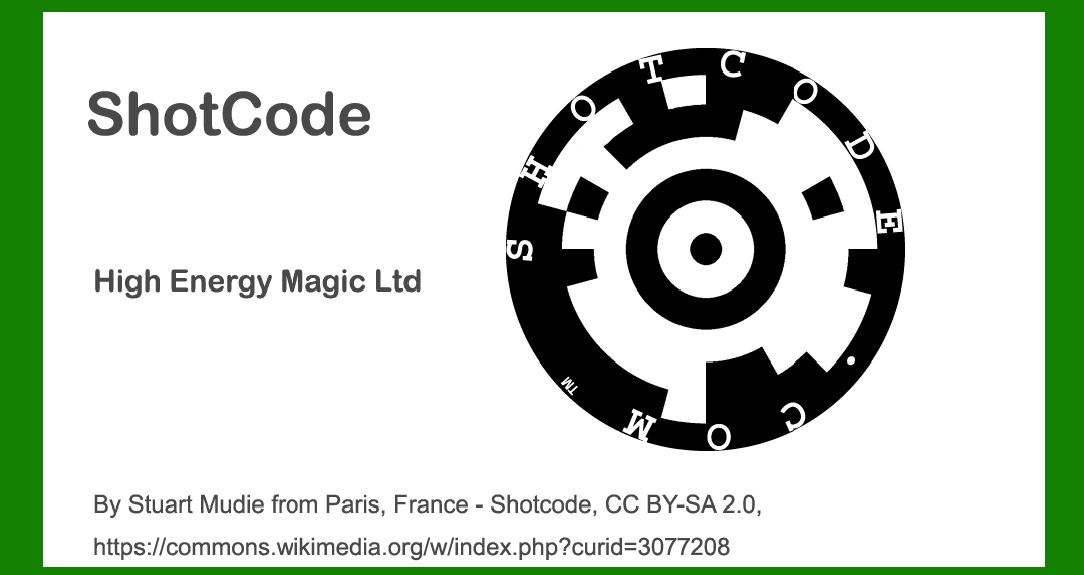
ShotCode, originally developed by High Energy Magic Ltd, represents a significant advancement in visual barcode technology. This 2D barcode technology was designed to be scanned by mobile phones, leveraging their cameras to decode encoded information. ShotCode emerged in the early 2000s and played a pivotal role in the evolution of mobile phone-based scanning technologies, making it a notable player in the barcode domain. |
|
2. Early Development and Concept |
1.Origins and Vision (2002-2004): The concept of ShotCode began to take shape in the early 2000s. High Energy Magic Ltd, a company specializing in innovative digital technologies, envisioned a barcode system that would be easily scannable by mobile phones. At this time, the focus was on creating a compact and robust barcode that could store a significant amount of data while remaining easy to scan and process. |
2.Technological Foundations: ShotCode was designed to address several limitations of existing barcode technologies, such as QR Codes and Data Matrix codes. Unlike these predecessors, ShotCode aimed to be more efficient in terms of size and scanning reliability. The development involved creating a new encoding system that would maximize the information density while maintaining clarity when printed or displayed on digital screens. |

|
3. Technical Specifications and Innovations |
1.Barcode Structure: ShotCode features a distinctive design with a series of small dots arranged in a specific pattern. The dots are arranged in a grid that allows for a high level of information density. Each dot represents a piece of encoded data, and the overall pattern enables robust error correction and data retrieval. |
2.Error Correction and Robustness: One of the key innovations of ShotCode was its focus on error correction. The technology incorporates advanced error correction algorithms that enhance the barcode's reliability, ensuring that data can be accurately decoded even if the barcode is partially damaged or obscured. This feature was crucial for ensuring high scanning accuracy in various conditions. |
3.Size and Scalability: ShotCode was designed to be highly scalable, allowing it to be printed at various sizes without compromising readability. This adaptability made it suitable for a wide range of applications, from small product labels to larger advertisements. |

|
4. Commercialization and Adoption |
1.Initial Launch and Market Reaction (2004-2006): ShotCode was officially launched in 2004. Its entry into the market was met with considerable interest due to its innovative approach and the growing trend of mobile phone-based scanning technologies. Early adopters included businesses looking to integrate mobile-friendly barcode solutions into their marketing and logistics strategies. |
2.Partnerships and Implementations: High Energy Magic Ltd actively sought partnerships with companies and organizations to promote ShotCode. This included collaborations with mobile phone manufacturers, software developers, and marketing agencies. These partnerships facilitated the integration of ShotCode into various applications, such as product packaging, advertisements, and promotional materials. |

|
5. Case Studies and Applications |
1.Retail and Consumer Goods: In the retail sector, ShotCode was used to enhance customer engagement through interactive packaging. For example, product labels featuring ShotCode allowed consumers to scan the code with their mobile phones to access additional information about the product, such as promotional offers, detailed descriptions, and reviews. |
2.Advertising and Marketing: ShotCode also found applications in advertising campaigns. Advertisers used ShotCode in print ads, posters, and other marketing materials to provide instant access to digital content. For instance, a magazine ad featuring ShotCode could direct readers to a video or a special online offer when scanned. |
3.Event Management and Ticketing: In the event management sector, ShotCode was utilized for ticketing and access control. Event organizers incorporated ShotCode into tickets, enabling attendees to scan their codes at entry points for quick and secure access. This use case demonstrated ShotCode's ability to streamline event operations and enhance attendee experience. |

|
6. Challenges and Evolution |
1.Competitive Landscape: As the mobile scanning market evolved, ShotCode faced competition from other 2D barcode technologies, such as QR Codes and Data Matrix codes. These competitors gained popularity due to their established presence and widespread adoption. High Energy Magic Ltd needed to continuously innovate and refine ShotCode to maintain its relevance in the market. |
2.Technological Advancements: The rapid advancement of mobile technology and barcode standards led to ongoing developments in ShotCode. High Energy Magic Ltd invested in research and development to improve the barcode's performance, enhance its error correction capabilities, and ensure compatibility with new mobile devices and software. |

|
7. Legacy and Impact |
1.Influence on Mobile Scanning: ShotCode played a significant role in shaping the landscape of mobile phone-based scanning technologies. Its emphasis on compact design, error correction, and scalability contributed to the advancement of 2D barcode technology and influenced subsequent innovations in the field. |
2.Transition to New Technologies: While ShotCode was an important milestone, the industry eventually saw a shift towards other barcode technologies. QR Codes, in particular, gained widespread adoption due to their versatility and global recognition. Despite this, ShotCode's contributions to the development of mobile scanning technologies remain notable. |

|
8. Conclusion |
ShotCode by High Energy Magic Ltd represents a significant chapter in the history of 2D barcode technology. Its development marked a step forward in making mobile phone-based scanning more accessible and reliable. Through its innovative design and applications, ShotCode contributed to the broader adoption of mobile scanning technologies and paved the way for future advancements in the field. |

|
 cs@easiersoft.com