Barcode Technology

Barcode History

Barcode Label Paper

Barcode Printer

Barcode Application

Inventory Management

AI Barcode QRCode

Barcode Scanner

Barcode Software

Barcode Software B

Barcode Software C

Barcode Software D

Barcode Software E

New Technology A

New Technology B

Robot Technology

Barcode Types

Barcode Types B

Barcode Types C

Barcode Types D

Barcode Types E

Barcode Types F

Electronic Technology

Psychology at Work

Barcode Technology and Barcode Software Related   <<< Back to Directory <<<

Who invented the barcode?

Who invented the barcode?

In 1948, Bernard Silver, a graduate student at the Drexel Institute of Technology in Philadelphia, Pennsylvania, overheard a conversation between the president of Food Fair and the dean of his university.

The president was seeking a solution to automatically read product information during checkout at the grocery store.

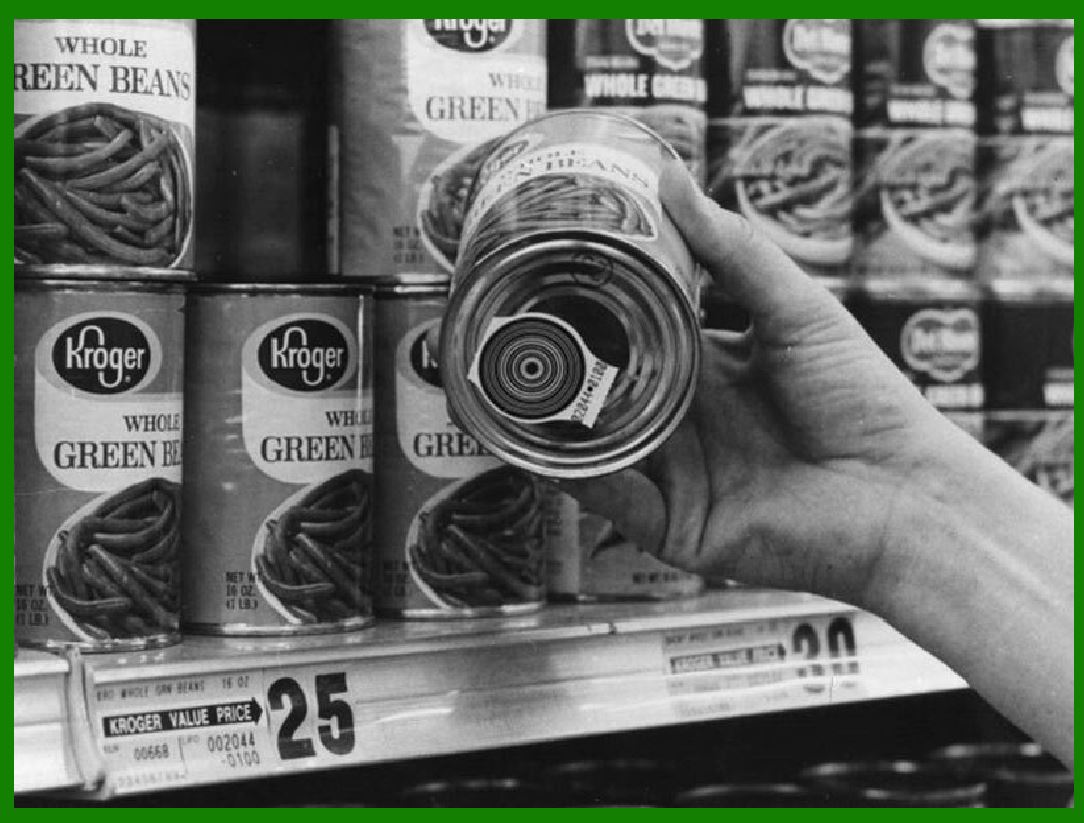
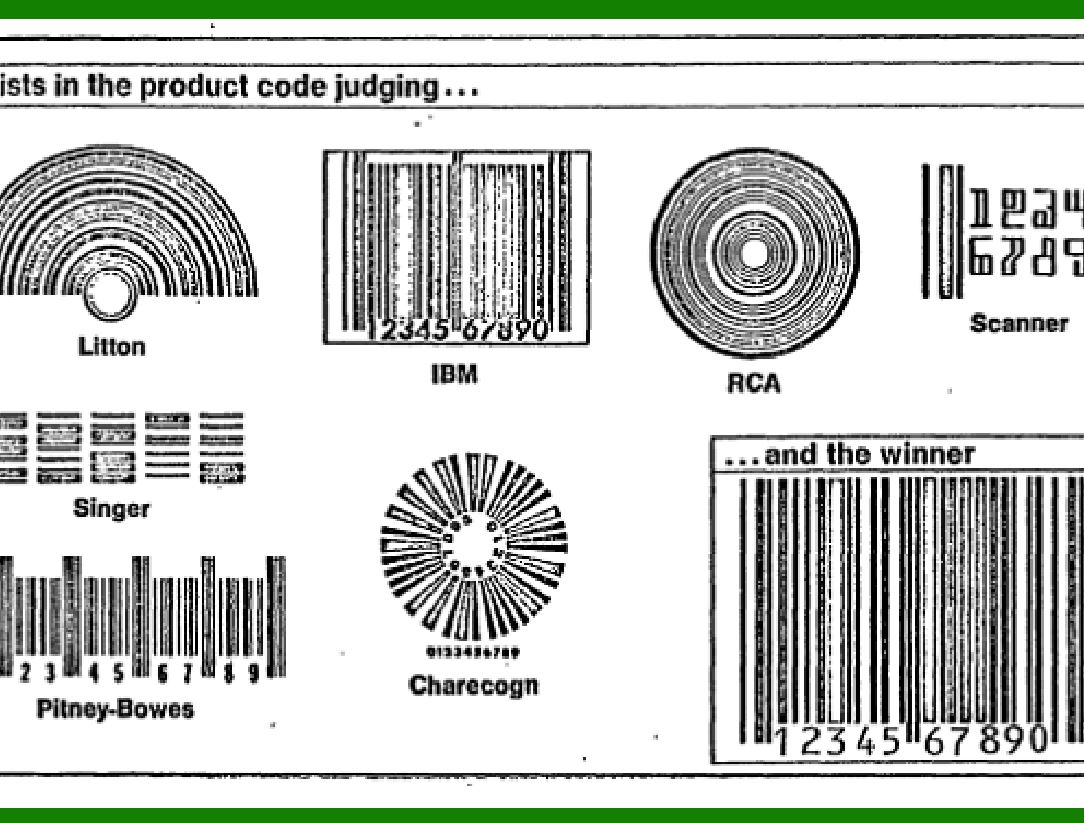
Silver, along with Norman Joseph Woodland, embarked on developing a solution. Their initial attempt involved a system of lines and circles based on Morse code, but they eventually settled on a bullseye pattern that could be scanned from any direction.

They filed a patent for their invention on October 20, 1949, and it was granted as U.S. patent 2,612,994 on October 7, 1952. Interestingly, they sold their patent to Philco for $15,000, which turned out to be the entirety of their earnings from this groundbreaking invention.

This invention revolutionized retail and logistics, leading to the widespread use of barcodes for product identification and tracking.

Today, barcodes are an integral part of our daily lives, simplifying inventory management, supply chains, and point-of-sale transactions.

Silver's contribution to this technology remains significant, and in 2011, he was inducted into the National Inventors Hall of Fame alongside Woodland.

The earliest barcode development process.

Silver told his friend Norman Joseph Woodland about the request, and they started working on a variety of systems. Their first working system used ultraviolet ink, but the ink faded too easily and was expensive.

Convinced that the system was workable with further development, Woodland left Drexel, moved into his father's apartment in Florida, and continued working on the system. His next inspiration came from Morse code, and he formed his first barcode from sand on the beach. "I just extended the dots and dashes downwards and made narrow lines and wide lines out of them."

To read them, he adapted technology from optical soundtracks in movies, using a 500-watt incandescent light bulb shining through the paper onto an RCA935 photomultiplier tube (from a movie projector) on the far side. He later decided that the system would work better if it were printed as a circle instead of a line, allowing it to be scanned in any direction.

On 20 October 1949, Woodland and Silver filed a patent application for "Classifying Apparatus and Method", in which they described both the linear and bull's eye printing patterns, as well as the mechanical and electronic systems needed to read the code. The patent was issued on 7 October 1952 as US Patent 2,612,994.

In 1951, Woodland moved to IBM and continually tried to interest IBM in developing the system. The company eventually commissioned a report on the idea, which concluded that it was both feasible and interesting, but that processing the resulting information would require equipment that was some time off in the future.

IBM offered to buy the patent, but the offer was not accepted. Philco purchased the patent in 1962 and then sold it to RCA sometime later.

Indeed, the invention of barcodes has transformed the way we handle retail and logistics. These simple yet powerful graphical representations have become ubiquitous in our daily lives.

Barcodes provide a unique identifier for each product. When scanned, they reveal essential information such as the item’s name, price, and stock level. This streamlines inventory management, making it easier to track items across warehouses, stores, and distribution centers.

Efficient Point-of-Sale Transactions, At the checkout counter, barcodes expedite the process. Cashiers scan the barcode on each item, and the system automatically retrieves pricing details and deducts the quantity from the inventory. This automation reduces human error and speeds up transactions.


EasierSoft Barcode Label Design & Bulk Printing Software

---- Use Excel Data to Batch Print Barcodes on Label Sheets or Roll Labels  

---- How to use this barcode software

Download:  Free Barcode Software + Barcode Label Designer

Download Free Barcode Software at Softonic

     Download at CNET

Once you obtain a GS1/UPC/EAN barcode, or other barcode type and QR code, you can use our free software to batch print barcode labels onto Roll label paper using a professional label printer, or to batch print barcodes onto Avery 5160 label sheets using a regular laser or inkjet printer. Our software has free and paid versions.

The free version fully meets your needs for batch printing GS1/UPC/EAN barcodes. The paid version can import data from Excel and databases to batch print barcode labels with different values.

How to Start

Input Data

Import Excel Data

Print Barcode

Barcode Format

Label Designer

All Screen Shot

Export Barcode Image

Save Template

Output Word Excel

How to Use & FAQ:

Add ascii key to barcode

Auto calculate barcode size (Std)

Make barcode by command line

Export barcode image files

Barcode text font setting

Generate ISBN barcode

Predefined label templates

Printing setup

Save settings

Serial number generator

The supported barcode types

Load Excel data (pro)

Manually copy data from Excel files

Filter some data for printing

Edit imported barcode data

Input data (Pro)

Label Designer

Edit data in Label designer

Label Designer - Add new label

Label Designer - Printing

Set the barcode label format to be printed

Other Barcode Label Format Settings

Barcode types supported by this program

Barcode Label Font Settings

Configuring the Barcode Print Rotation

Text Alignment for Barcode Labels

Automatically Adjusting Barcode Width

Text Beneath the Barcode

Configuring Barcode Size

Auto Calculate the Barcode Size

Export Barcode images

Export Barcode Image Format

File Names for Exported Barcode

Resolution of Exported Barcode Images

Fixed Folder for Exporting Barcode

Default Barcode Image Export Format

Print bulk barcodes quickly

Print barcodes to Avery 5160 label

How to bulk Barcode Printing

Sample - Avery 5162 (2x7) Label Sheet

Example: Print barcodes to 5*3cm roll

Example: Print barcodes to 5161 label

Example: Print barcodes to 5162 label

Example: Print barcodes to 5163 label

Example: Print barcodes to 5164 label

Example: Print portrait orientation 5164

Example: Print barcodes to 5167 label

Example: Print barcodes to 5168 label

Example: Print portrait orientation 5168

Example: Print barcodes to 5169 label

Highlights

Excel integration: Import data directly from Excel to generate and print barcodes in bulk.

Label designer: Create complex labels with multiple barcodes, text, logos, and shapes.

Batch printing: Print thousands of barcodes at once using standard inkjet/laser printers or professional barcode printers.


Flexible editions:

Standard Edition: Simple batch printing with Excel data.

Professional Edition: Adds command-line automation for workflow integration.

Label Designer Edition: Advanced design features for complex labels.


Why Choose Our Barcode Solutions?

Cost-effective: Free online generator and permanent free desktop version available.

Easy to use: No technical expertise required—just input data and print.

Versatile: Supports nearly all 1D and 2D barcode types, including QR codes.

Trusted: Recommended by CNET and widely downloaded by users worldwide.


Suitable Use Cases

Small businesses and startups needing quick barcode labels for products.

Retailers and online sellers managing inventory with batch barcode printing.

Manufacturers requiring sequential or custom barcode labels for packaging.

Educational and testing environments where barcodes are used for tracking.


CONTACT

cs@easiersoft.com

If you have any question, please feel free to email us.


https://free-barcode.com


<<< Back to Directory <<<     Barcode Generator     Barcode Freeware     Privacy Policy