1. Introduction to Avery Dennison |
Avery Dennison is a global leader in labeling and packaging materials and solutions. The company is known for its innovative products and technologies that enhance the efficiency and effectiveness of labeling processes. Avery Dennison’s barcode label printers are designed to meet the diverse needs of various industries, including retail, logistics, healthcare, and manufacturing. |
|
2. Overview of Avery Dennison Barcode Label Printers |
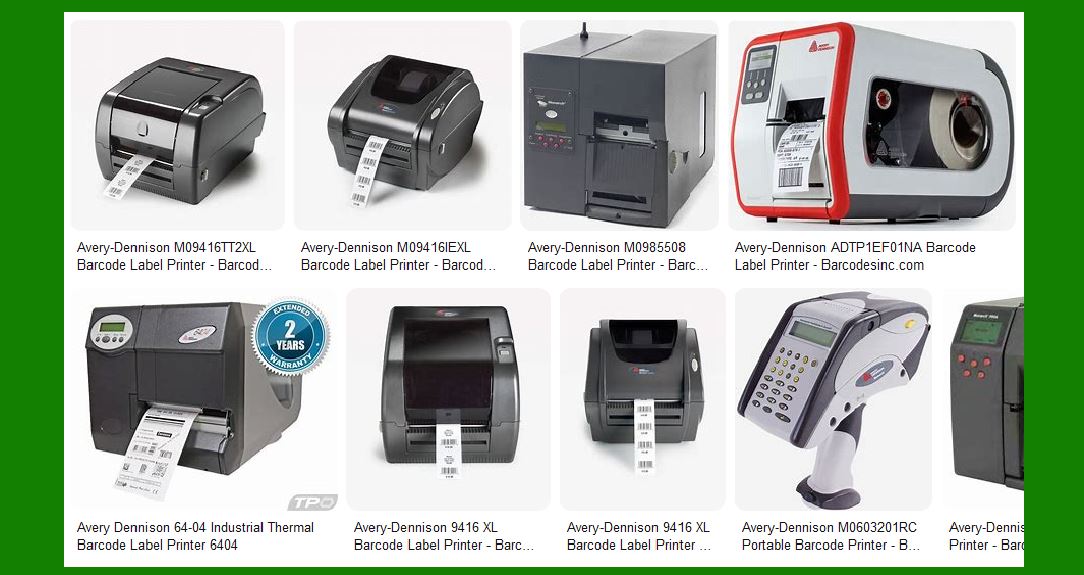
Avery Dennison offers a range of barcode label printers that cater to different printing needs. These printers are known for their reliability, durability, and high-quality output. The main categories of Avery Dennison barcode label printers include: |
2.1. Desktop Printers |
Desktop printers are compact and designed for low to medium-volume printing. They are ideal for small businesses or departments within larger organizations. Key features include: |
Ease of Use: User-friendly interfaces and easy media loading. Compact Design: Space-saving design suitable for office environments. Versatility: Capable of printing various label types, including barcode labels, shipping labels, and product labels. |
2.2. Industrial Printers |
Industrial printers are built for high-volume, high-speed printing in demanding environments. They are suitable for large-scale operations such as warehouses and manufacturing plants. Key features include: |
Durability: Robust construction to withstand harsh conditions. High-Speed Printing: Fast printing speeds to handle large print jobs efficiently. Advanced Features: Options for RFID encoding, peel-and-present, and cutter modules. |
2.3. Mobile Printers |
Mobile printers are portable and designed for on-the-go printing. They are commonly used in retail, logistics, and field service applications. Key features include: |
Portability: Lightweight and compact for easy carrying. Wireless Connectivity: Bluetooth and Wi-Fi options for seamless integration with mobile devices. Battery Life: Long-lasting batteries to support extended use. |

|
3. Key Models of Avery Dennison Barcode Label Printers |
Avery Dennison offers several models within each category, each with unique features and capabilities. Here are some notable models: |
3.1. Avery Dennison Monarch 9416XL |
The Monarch 9416XL is a desktop printer known for its compact size and versatility. Key features include: |
Print Speed: Up to 4 inches per second. Resolution: 203 dpi for clear and crisp printing. Connectivity: USB, serial, and parallel ports for flexible connectivity options. Media Handling: Supports a wide range of media types and sizes. |
3.2. Avery Dennison Monarch 9860 |
The Monarch 9860 is an industrial printer designed for high-volume printing. Key features include: |
Print Speed: Up to 10 inches per second. Resolution: 300 dpi for high-quality printing. Durability: Metal construction for enhanced durability in industrial environments. Advanced Features: RFID encoding and peel-and-present options. |
3.3. Avery Dennison Pathfinder 6057 |
The Pathfinder 6057 is a mobile printer that combines printing, scanning, and data entry in one device. Key features include: |
Portability: Lightweight and ergonomic design for easy handling. Integrated Scanner: Built-in barcode scanner for efficient data capture. Wireless Connectivity: Bluetooth and Wi-Fi for seamless integration with mobile devices. Battery Life: Long-lasting battery to support extended use in the field. |

|
4. Features and Benefits of Avery Dennison Barcode Label Printers |
Avery Dennison barcode label printers offer several features and benefits that make them a preferred choice for businesses: |
4.1. High-Quality Printing |
Avery Dennison printers are known for their high-resolution printing capabilities, ensuring that barcodes and labels are clear and easy to read. This is crucial for accurate scanning and data capture. |
4.2. Durability and Reliability |
The printers are built to last, with robust construction that can withstand the rigors of various environments. This ensures minimal downtime and maintenance, leading to increased productivity. |
4.3. Versatility |
Avery Dennison printers can handle a wide range of media types and sizes, making them suitable for various applications. Whether you need to print shipping labels, product labels, or barcode labels, these printers can handle it all. |
4.4. Ease of Use |
The printers are designed with user-friendly interfaces and easy media loading mechanisms, making them easy to operate even for users with minimal technical knowledge. |
4.5. Connectivity Options |
Avery Dennison printers offer multiple connectivity options, including USB, serial, parallel, Bluetooth, and Wi-Fi. This ensures seamless integration with existing systems and devices. |

|
5. Applications of Avery Dennison Barcode Label Printers |
Avery Dennison barcode label printers are used in various industries for different applications. Here are some common use cases: |
5.1. Retail |
In the retail industry, Avery Dennison printers are used for printing price tags, shelf labels, and barcode labels. The printers help streamline inventory management and improve the accuracy of pricing and product information. |
5.2. Logistics and Warehousing |
In logistics and warehousing, Avery Dennison printers are used for printing shipping labels, pallet labels, and barcode labels for inventory tracking. The printers help improve the efficiency of warehouse operations and ensure accurate tracking of goods. |
5.3. Healthcare |
In the healthcare industry, Avery Dennison printers are used for printing patient wristbands, specimen labels, and medication labels. The printers help improve patient safety and ensure accurate identification of specimens and medications. |
5.4. Manufacturing |
In manufacturing, Avery Dennison printers are used for printing product labels, barcode labels, and compliance labels. The printers help ensure accurate labeling of products and compliance with industry regulations. |

|
6. Advanced Technologies in Avery Dennison Barcode Label Printers |
Avery Dennison incorporates advanced technologies in their barcode label printers to enhance their performance and capabilities. Some of these technologies include: |
6.1. RFID Encoding |
Many Avery Dennison printers come with RFID encoding capabilities, allowing businesses to print and encode RFID tags in a single step. This helps improve inventory tracking and asset management. |
6.2. Peel-and-Present |
The peel-and-present feature allows labels to be automatically peeled from the backing paper and presented to the user for easy application. This helps improve the efficiency of labeling processes. |
6.3. Cutter Modules |
Some Avery Dennison printers come with cutter modules that can automatically cut labels to the desired length. This is useful for printing labels of varying sizes and reducing waste. |

|
7. Software and Integration |
Avery Dennison provides software solutions and integration options to enhance the functionality of their barcode label printers. Some of these solutions include: |
7.1. NiceLabel Design Tool |
The NiceLabel Design Tool is recommended by Avery Dennison for designing and printing barcode labels. It offers a user-friendly interface and a wide range of design options to create professional-looking labels. |
7.2. Printer Drivers |
Avery Dennison provides printer drivers for various operating systems, ensuring compatibility with different devices and systems. The drivers are regularly updated to support new features and improvements. |
7.3. Integration with ERP Systems |
Avery Dennison printers can be integrated with enterprise resource planning (ERP) systems to streamline labeling processes and improve data accuracy. This helps businesses manage their labeling operations more efficiently. |

|
8. Support and Services |
Avery Dennison offers comprehensive support and services to ensure the optimal performance of their barcode label printers. Some of these services include: |
8.1. Technical Support |
Avery Dennison provides technical support to help users troubleshoot and resolve any issues with their printers. This includes phone support, email support, and online resources. |
8.2. Maintenance and Repair |
Avery Dennison offers maintenance and repair services to keep printers in optimal condition. This includes regular maintenance checks, repairs, and replacement of parts. |
8.3. Training and Resources |
Avery Dennison provides training and resources to help users get the most out of their printers. This includes user manuals, online tutorials, and training sessions. |

|
9. Environmental Considerations |
Avery Dennison is committed to sustainability and environmental responsibility. The company incorporates eco-friendly practices in the design and manufacturing of their barcode label printers. Some of these practices include: |
9.1. Energy Efficiency |
Avery Dennison printers are designed to be energy-efficient, reducing power consumption and minimizing environmental impact. |
9.2. Recyclable Materials |
The printers are made from recyclable materials, reducing waste and promoting sustainability. |
9.3. Eco-Friendly Printing |
Avery Dennison offers eco-friendly printing options, such as water-based inks and recyclable label materials, to reduce the environmental impact of printing. |

|
10. Conclusion |
Avery Dennison barcode label printers are a reliable and versatile solution for various labeling needs. With their high-quality printing, durability, and advanced features, these printers are suitable for a wide range of applications in different industries. Avery Dennison’s commitment to innovation and sustainability ensures that their printers meet the evolving needs of businesses while minimizing environmental impact. |
 cs@easiersoft.com