1. Introduction to Bixolon |
Bixolon is a leading global manufacturer of advanced printing technologies, specializing in mobile, label, and POS (Point of Sale) printers. The company is known for its innovative solutions that cater to various industries, including retail, healthcare, logistics, and manufacturing. Bixolon’s barcode label printers are designed to offer high performance, reliability, and ease of use, making them a popular choice for businesses of all sizes. |
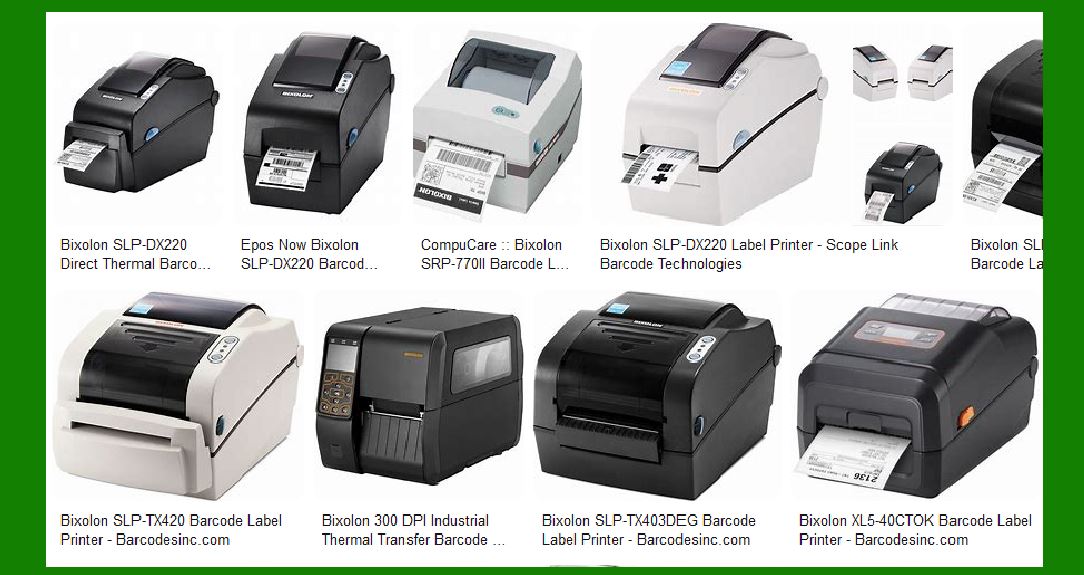
|
2. Types of Bixolon Barcode Label Printers |
Bixolon offers a diverse range of barcode label printers, categorized into several types based on their intended use and features: |
2.1. Industrial Label Printers |
Industrial label printers are designed for high-volume printing in demanding environments. They are built to withstand harsh conditions and provide consistent performance. Key models include: |
XT5-40 Series: This mid-tier industrial printer supports UHF RFID print and encode capability, offering features like USB Host, Ethernet, and optional Bluetooth and Wi-Fi connectivity. XT3-40: An entry-level industrial printer that provides high performance at a low cost, with print speeds of up to 8 inches per second (ips). XT2-40: Another entry-level model, known for its compact design and fast print speeds of up to 6 ips at 203 dpi. |
2.2. Desktop Label Printers |
Desktop label printers are suitable for medium to low-volume printing tasks. They are compact and user-friendly, making them ideal for office and retail environments. Key models include: |
XD5-40 Series: Available in Direct Thermal and Thermal Transfer models, these printers support various programming languages and offer advanced features like Smart Switch Programming. XD3-40 Series: Known for its durability and quality, this series includes models like the XD3-40d (Direct Thermal) and XD3-40t (Thermal Transfer). SLP-TX400: A mid-tier desktop printer that supports industry-standard barcode symbologies and offers reliable performance. SLP-TX420: This model provides consistent, high-quality printing with minimal downtime, making it suitable for healthcare and retail applications. |
2.3. Mobile Label Printers |
Mobile label printers are designed for on-the-go printing, offering portability and convenience. They are commonly used in field operations, warehousing, and retail. Key models include: |
SPP-R200III: A compact and lightweight printer that supports Bluetooth and Wi-Fi connectivity, making it ideal for mobile applications. SPP-R310: Known for its rugged design and long battery life, this model is suitable for demanding mobile printing tasks. SPP-R410: A 4-inch mobile printer that offers high-speed printing and robust connectivity options. |

|
3. Key Features of Bixolon Barcode Label Printers |
Bixolon barcode label printers are equipped with a range of features that enhance their performance and usability: |
3.1. Printing Technologies |
Bixolon printers utilize various printing technologies to meet different needs: |
Direct Thermal Printing: This method uses heat-sensitive paper and is ideal for short-term labeling applications. Thermal Transfer Printing: This method uses a ribbon to transfer ink onto the label, providing durable and long-lasting prints. RFID Printing: Some models support RFID printing, allowing for the encoding of RFID tags for advanced tracking and inventory management. |
3.2. Connectivity Options |
Bixolon printers offer multiple connectivity options to ensure seamless integration with existing systems: |
USB: Standard connectivity for most models. Ethernet: For networked printing in office and industrial environments. Bluetooth and Wi-Fi: For wireless printing, particularly useful in mobile and remote applications. Serial and Parallel Ports: Available on some models for legacy system compatibility. |
3.3. User-Friendly Design |
Bixolon printers are designed with the user in mind, offering features that simplify operation and maintenance: |
Easy Media Loading: Many models feature clamshell designs that make it easy to load labels and ribbons. LCD Displays: Some printers come with LCD screens that provide status updates and error messages, making troubleshooting easier. Compact Footprint: Desktop and mobile models are designed to take up minimal space, making them suitable for crowded workspaces. |

|
4. Applications of Bixolon Barcode Label Printers |
Bixolon barcode label printers are versatile and can be used in a wide range of applications across various industries: |
4.1. Retail |
In the retail sector, Bixolon printers are used for printing price tags, shelf labels, and promotional labels. Their compact design and ease of use make them ideal for in-store labeling tasks. |
4.2. Healthcare |
Healthcare facilities use Bixolon printers for patient identification wristbands, specimen labels, and medication labels. The printers’ reliability and high print quality ensure accurate and legible labels, which are crucial for patient safety. |
4.3. Logistics and Warehousing |
In logistics and warehousing, Bixolon printers are used for shipping labels, inventory labels, and pallet labels. Their rugged design and fast print speeds help streamline operations and improve efficiency. |
4.4. Manufacturing |
Manufacturing environments use Bixolon printers for product labeling, asset tracking, and compliance labeling. The printers’ durability and ability to handle high-volume printing make them suitable for industrial applications. |

|
5. Advantages of Bixolon Barcode Label Printers |
Bixolon barcode label printers offer several advantages that make them a preferred choice for businesses: |
5.1. High Performance |
Bixolon printers are known for their high performance, with fast print speeds and high-resolution printing. This ensures that labels are printed quickly and with excellent clarity. |
5.2. Reliability |
Bixolon printers are built to last, with robust designs that can withstand harsh environments. This reliability reduces downtime and maintenance costs, providing a better return on investment. |
5.3. Versatility |
With a wide range of models and features, Bixolon printers can meet the needs of various industries and applications. Whether it’s a compact desktop printer for a retail store or a rugged industrial printer for a warehouse, Bixolon has a solution. |
5.4. Ease of Use |
Bixolon printers are designed to be user-friendly, with intuitive interfaces and easy media loading. This reduces the learning curve and allows users to start printing quickly. |

|
6. Conclusion |
Bixolon barcode label printers are a reliable and versatile solution for businesses looking to improve their labeling processes. With a wide range of models and features, Bixolon offers printers that can meet the needs of various industries and applications. Their high performance, reliability, and ease of use make them a preferred choice for businesses of all sizes. |
 cs@easiersoft.com