1. Introduction to Brady Corporation |
Brady Corporation is a global leader in the manufacturing and marketing of complete solutions that identify and protect premises, products, and people. Founded in 1914, Brady has a long history of innovation and quality. The company is headquartered in Milwaukee, Wisconsin, and operates in multiple countries worldwide. Brady’s product lines include high-performance labels, signs, safety devices, printing systems, and software. |
|
2. Overview of Brady Barcode Label Printers |
Brady barcode label printers are designed to meet the diverse needs of various industries, including manufacturing, healthcare, telecommunications, and more. These printers are known for their durability, reliability, and ease of use. Brady offers a wide range of printers, from portable models to high-volume industrial printers, ensuring that there is a solution for every application. |

|
3. Types of Brady Barcode Label Printers |
Brady’s barcode label printers can be broadly categorized into three main types: portable printers, desktop printers, and industrial printers. |
3.1 Portable Printers |
Portable printers are compact, lightweight, and designed for on-the-go labeling. They are ideal for fieldwork, maintenance, and other applications where mobility is essential. Some popular models include: |
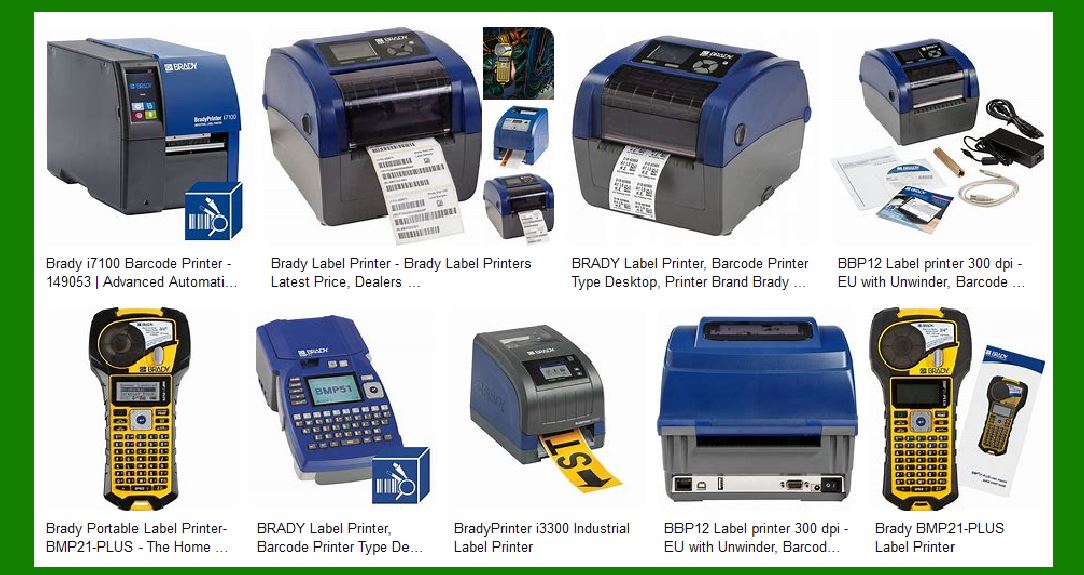
Brady M210: A rugged, handheld printer suitable for general identification tasks. Brady M610: Offers advanced connectivity options and a wide range of label materials. Brady BMP21-PLUS: Known for its durability and ease of use, perfect for electrical and datacom labeling. |
3.2 Desktop Printers |
Desktop printers are designed for medium to high-volume printing needs. They offer a balance between performance and convenience, making them suitable for office and light industrial environments. Key models include: |
BradyPrinter i3300: A versatile printer that supports a wide range of label materials and sizes. BradyPrinter S3100: Ideal for safety and facility identification, offering high-resolution printing. Brady BBP12: A compact and affordable printer for general labeling tasks. |
3.3 Industrial Printers |
Industrial printers are built for high-volume, high-demand environments. They are robust, reliable, and capable of handling large print jobs with ease. Notable models include: |
BradyPrinter i7100: A high-performance printer designed for complex labeling applications. BradyPrinter i5300: Offers precision printing for detailed labels and barcodes. Wraptor A6500: An automated printer applicator that combines printing and application in one step. |

|
4. Features and Benefits of Brady Barcode Label Printers |
Brady barcode label printers come with a range of features that enhance their functionality and usability. Some of the key features include: |
4.1 Durability |
Brady printers are built to withstand harsh environments. They are made from high-quality materials that ensure long-lasting performance, even in challenging conditions. |
4.2 Ease of Use |
Brady printers are designed with user-friendly interfaces and intuitive controls. Many models come with touchscreen displays, making it easy to navigate through settings and options. |
4.3 Connectivity |
Modern Brady printers offer various connectivity options, including USB, Ethernet, Wi-Fi, and Bluetooth. This allows for seamless integration with existing systems and easy data transfer. |
4.4 Versatility |
Brady printers support a wide range of label materials, including vinyl, polyester, and polyimide. This versatility makes them suitable for various applications, from asset tracking to safety labeling. |
4.5 High-Quality Printing |
Brady printers deliver high-resolution printing, ensuring that barcodes and text are clear and legible. This is crucial for maintaining accuracy in identification and tracking. |

|
5. Applications of Brady Barcode Label Printers |
Brady barcode label printers are used in a variety of industries and applications. Some common uses include: |
5.1 Manufacturing |
In manufacturing, Brady printers are used for labeling products, components, and equipment. This helps in tracking inventory, managing assets, and ensuring compliance with industry standards. |
5.2 Healthcare |
In healthcare, Brady printers are used for labeling patient records, medications, and laboratory samples. This improves patient safety and ensures accurate tracking of medical supplies. |
5.3 Telecommunications |
In the telecommunications industry, Brady printers are used for labeling cables, network equipment, and data centers. This helps in organizing and maintaining complex network infrastructures. |
5.4 Electrical |
Electricians use Brady printers for labeling wires, panels, and electrical components. This enhances safety and simplifies maintenance tasks. |
5.5 Safety and Facility Identification |
Brady printers are widely used for creating safety signs, hazard labels, and facility identification markers. This helps in maintaining a safe and compliant workplace. |

|
6. Popular Brady Barcode Label Printer Models |
Here are some of the most popular Brady barcode label printer models, along with their key features: |
6.1 BradyPrinter i3300 |
Type: Desktop Printer Features: Supports a wide range of label materials, easy-to-use interface, high-resolution printing. Applications: General labeling, asset tracking, safety labeling. |
6.2 BradyPrinter i7100 |
Type: Industrial Printer Features: High-performance, precision printing, supports complex labeling applications. Applications: Manufacturing, healthcare, telecommunications. |
6.3 Brady BMP21-PLUS |
Type: Portable Printer Features: Durable, easy to use, suitable for electrical and datacom labeling. Applications: Fieldwork, maintenance, electrical labeling. |
6.4 BradyPrinter S3100 |
Type: Desktop Printer Features: High-resolution printing, ideal for safety and facility identification. Applications: Safety labeling, facility identification, general labeling. |
6.5 Wraptor A6500 |
Type: Industrial Printer Applicator Features: Combines printing and application in one step, high-speed operation. Applications: Manufacturing, telecommunications, electrical labeling. |

|
7. Software and Accessories for Brady Barcode Label Printers |
Brady offers a range of software and accessories to complement their barcode label printers. These tools enhance the functionality and usability of the printers. |
7.1 Label Creation Software |
Brady’s label creation software allows users to design and print custom labels with ease. The software offers various templates, design tools, and integration options. |
7.2 Printer Ribbons and Cartridges |
Brady provides a wide range of printer ribbons and cartridges that are compatible with their printers. These consumables are designed to deliver high-quality prints and ensure long-lasting performance. |
7.3 Label Materials |
Brady offers a variety of label materials, including vinyl, polyester, and polyimide. These materials are designed to withstand harsh environments and provide durable labeling solutions. |
7.4 Printer Accessories |
Brady also offers various accessories, such as carrying cases, battery packs, and label dispensers. These accessories enhance the portability and convenience of the printers. |

|
8. Customer Support and Warranty |
Brady is known for its excellent customer support and comprehensive warranty programs. The company offers various support options, including online resources, technical support, and training programs. |
8.1 Online Resources |
Brady’s website provides a wealth of information, including user manuals, FAQs, and troubleshooting guides. These resources help users get the most out of their printers. |
8.2 Technical Support |
Brady offers technical support through phone, email, and live chat. Their support team is knowledgeable and responsive, ensuring that users receive timely assistance. |
8.3 Training Programs |
Brady provides training programs to help users understand the features and capabilities of their printers. These programs include online tutorials, webinars, and in-person training sessions. |
8.4 Warranty Programs |
Brady’s printers come with comprehensive warranty programs that cover defects in materials and workmanship. The company also offers extended warranty options for added peace of mind. |

|
9. Environmental and Sustainability Initiatives |
Brady is committed to environmental sustainability and has implemented various initiatives to reduce its environmental impact. |
9.1 Eco-Friendly Products |
Brady offers eco-friendly label materials and printing solutions that minimize waste and reduce environmental impact. These products are designed to meet industry standards for sustainability. |
9.2 Recycling Programs |
Brady has established recycling programs for printer consumables, such as ribbons and cartridges. These programs help reduce waste and promote responsible disposal of used materials. |
9.3 Energy Efficiency |
Brady’s printers are designed to be energy-efficient, reducing power consumption and lowering operating costs. The company continuously works to improve the energy efficiency of its products. |

|
10. Conclusion |
Brady barcode label printers are renowned for their durability, reliability, and versatility. With a wide range of models to choose from, Brady offers solutions for various industries and applications. Whether you need a portable printer for fieldwork or an industrial printer for high-volume labeling, Brady has a product that meets your needs. The company’s commitment to quality, customer support, and sustainability makes Brady a trusted choice for barcode label printing solutions. |
 cs@easiersoft.com