1. Introduction to Brother Barcode Label Printers |
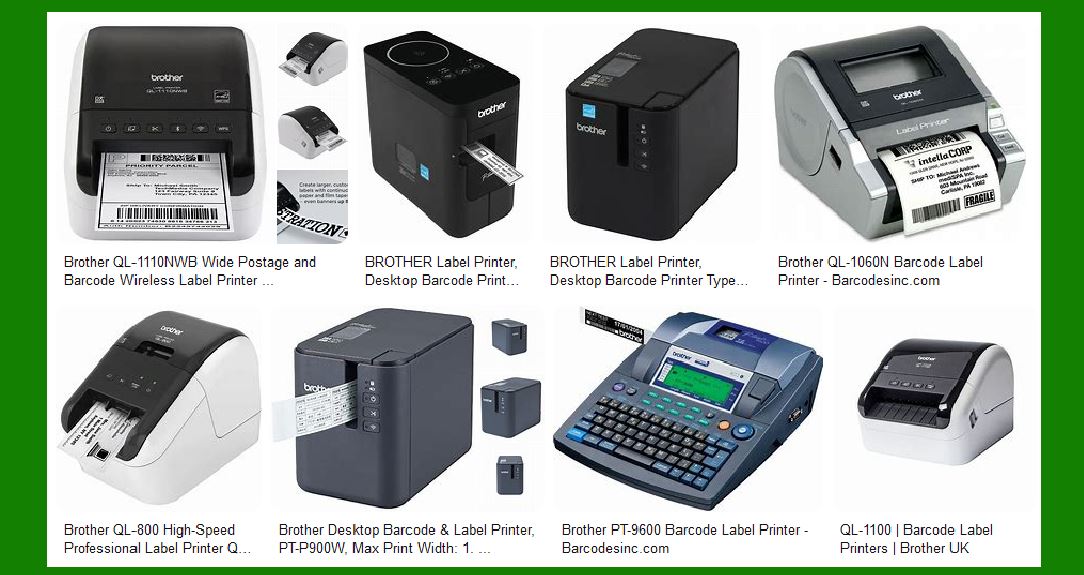
Brother is a well-known brand in the printing industry, offering a wide range of barcode label printers designed for various applications. These printers are known for their reliability, ease of use, and advanced features. Brother’s barcode label printers cater to different needs, from small businesses to large enterprises, providing solutions for inventory management, shipping, asset tracking, and more. |
|
2. Types of Brother Barcode Label Printers |
Brother offers several types of barcode label printers, each designed to meet specific requirements. The main categories include: |
2.1 Desktop Label Printers |
Desktop label printers are ideal for office and small business environments. They are compact, easy to use, and capable of printing high-quality labels. Examples include the Brother QL series and the PT series. |
2.2 Industrial Label Printers |
Industrial label printers are designed for heavy-duty use in manufacturing, warehousing, and logistics. They offer high-speed printing, durability, and the ability to handle large volumes of labels. The Brother TJ series is a popular choice in this category. |
2.3 Mobile Label Printers |
Mobile label printers are portable and battery-operated, making them perfect for on-the-go labeling needs. They are commonly used in retail, healthcare, and field service applications. The Brother RJ series is known for its mobility and rugged design. |

|
3. Key Features of Brother Barcode Label Printers |
Brother barcode label printers come with a variety of features that enhance their functionality and usability. Some of the key features include: |
3.1 High Print Resolution |
Brother printers offer high print resolutions, typically ranging from 203 dpi to 300 dpi, ensuring that barcodes and text are sharp and clear. |
3.2 Fast Print Speeds |
These printers are capable of high-speed printing, with some models reaching speeds of up to 152.4 mm/sec. This is particularly useful in environments where large volumes of labels need to be printed quickly. |
3.3 Connectivity Options |
Brother barcode label printers support various connectivity options, including USB, Ethernet, Wi-Fi, and Bluetooth. This allows for easy integration with different systems and devices. |
3.4 Compatibility with Label Design Software |
Brother printers are compatible with a range of label design software, such as P-touch Editor and b-PAC SDK. This enables users to create custom labels with ease. |
3.5 Durability and Reliability |
Brother printers are built to withstand harsh environments and heavy use. Many models feature rugged designs and are resistant to dust, moisture, and impact. |

|
4. Popular Brother Barcode Label Printer Models |
Here are some of the popular models of Brother barcode label printers, along with their specifications and features: |
4.1 Brother QL-820NWB |
Type: Desktop Label Printer Print Resolution: 300 dpi Print Speed: Up to 110 mm/sec Connectivity: USB, Ethernet, Wi-Fi, Bluetooth Features: Supports continuous and die-cut labels, built-in cutter, backlit LCD display |
4.2 Brother PT-P900W |
Type: Desktop Label Printer Print Resolution: 360 dpi Print Speed: Up to 80 mm/sec Connectivity: USB, Wi-Fi Features: High-resolution printing, automatic cutter, supports TZe tapes up to 36 mm wide |
4.3 Brother TJ-4420TN |
Type: Industrial Label Printer Print Resolution: 203 dpi Print Speed: Up to 254 mm/sec Connectivity: USB, Ethernet, Serial, Optional Wi-Fi and Bluetooth Features: High-speed printing, durable metal construction, large media capacity |
4.4 Brother RJ-4250WB |
Type: Mobile Label Printer Print Resolution: 203 dpi Print Speed: Up to 127 mm/sec Connectivity: USB, Wi-Fi, Bluetooth Features: Rugged design, drop protection up to 2.1 meters, rechargeable battery |

|
5. Applications of Brother Barcode Label Printers |
Brother barcode label printers are used in various industries and applications. Some common uses include: |
5.1 Retail |
In retail, barcode label printers are used for pricing, inventory management, and shelf labeling. Mobile printers are particularly useful for in-store labeling and markdowns. |
5.2 Healthcare |
In healthcare, these printers are used for patient identification, specimen labeling, and asset tracking. The ability to print clear and accurate barcodes is crucial for patient safety and efficient operations. |
5.3 Manufacturing |
Manufacturing environments use barcode label printers for product labeling, inventory management, and tracking work-in-progress. Industrial printers are preferred for their durability and high-speed printing capabilities. |
5.4 Logistics and Warehousing |
In logistics and warehousing, barcode label printers are essential for shipping labels, pallet labeling, and inventory tracking. The ability to print large volumes of labels quickly and accurately is vital for efficient operations. |

|
6. Advanced Features and Technologies |
Brother barcode label printers incorporate advanced features and technologies to enhance their performance and usability. Some of these include: |
6.1 Thermal Printing Technology |
Brother printers use thermal printing technology, which includes direct thermal and thermal transfer methods. Direct thermal printing is ideal for short-term labeling, while thermal transfer printing is suitable for long-lasting labels. |
6.2 RFID Printing |
Some Brother printers support RFID (Radio Frequency Identification) printing, allowing users to create smart labels that can be read by RFID scanners. This is useful for asset tracking and inventory management. |
6.3 Integration with ERP Systems |
Brother barcode label printers can be integrated with ERP (Enterprise Resource Planning) systems, enabling seamless data transfer and label printing. This integration helps streamline operations and improve efficiency. |
6.4 Customizable Print Settings |
Users can customize print settings such as label size, print speed, and resolution to meet specific requirements. This flexibility ensures that the printers can handle a wide range of labeling tasks. |

|
7. Maintenance and Support |
Brother provides comprehensive maintenance and support services for their barcode label printers. This includes: |
7.1 Regular Maintenance |
Regular maintenance is essential to keep the printers in optimal condition. Brother offers guidelines and tools for cleaning and maintaining the printers, such as cleaning kits and replacement parts. |
7.2 Technical Support |
Brother provides technical support through various channels, including online resources, phone support, and on-site service. This ensures that users can get assistance whenever they encounter issues with their printers. |
7.3 Software Updates |
Brother regularly releases software updates to enhance the functionality and performance of their printers. Users can download and install these updates to keep their printers up to date. |

|
8. Conclusion |
Brother barcode label printers are versatile, reliable, and packed with features that cater to various labeling needs. Whether you need a desktop printer for office use, an industrial printer for heavy-duty applications, or a mobile printer for on-the-go labeling, Brother has a solution for you. With their high print quality, fast speeds, and robust connectivity options, Brother barcode label printers are an excellent choice for businesses of all sizes. |

|
9. Additional Resources |
For more information on Brother barcode label printers, you can visit the official Brother website or contact their customer support. They offer detailed product specifications, user manuals, and other resources to help you choose the right printer for your needs. |
 cs@easiersoft.com