1. Introduction to CognitiveTPG |
CognitiveTPG is a well-known manufacturer of barcode label printers, recognized for their reliability, durability, and innovative solutions. The company has a long history of producing high-quality printers that cater to various industries, including retail, healthcare, manufacturing, and logistics. CognitiveTPG’s printers are designed to withstand harsh environments and heavy workloads, making them a preferred choice for businesses that require robust and dependable printing solutions. |
|
2. Product Line Overview |
CognitiveTPG offers a diverse range of barcode label printers, each tailored to meet specific needs and applications. The main product lines include: |
2.1 Desktop Label Printers |
CognitiveTPG is credited with inventing the first desktop label printer in 1986. Their desktop printers are known for their ruggedness and capability to handle low to mid-volume printing tasks. Key models in this category include: |
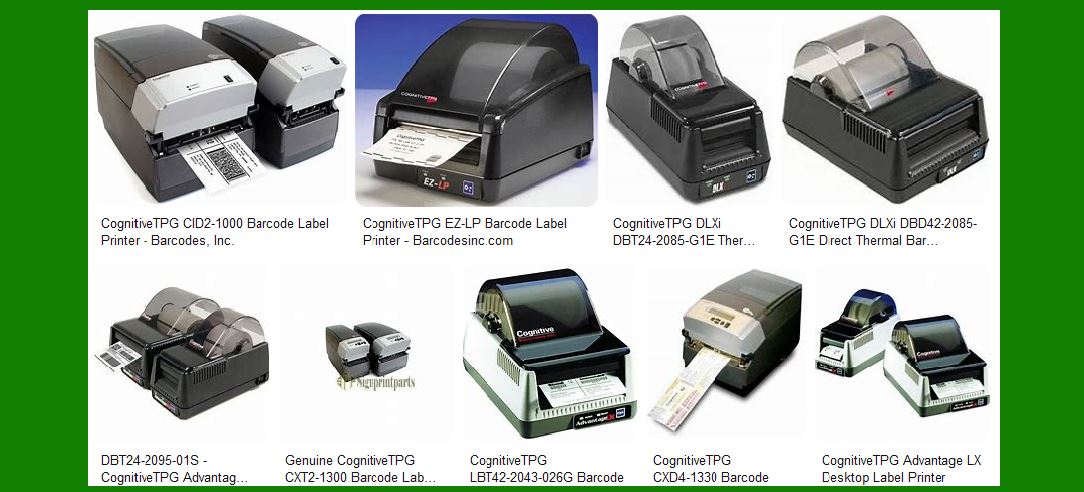
DLXi Series: These printers are designed for ease of use and reliability. They come with optional Bluetooth connectivity, making them versatile for various applications. Advantage LX Series: Known for their compact design and high performance, these printers are ideal for businesses that need efficient and reliable printing in a small footprint. |
2.2 Compact Industrial Label Printers |
The C Series printers are versatile thermal printers that combine the performance of mid-range printers with the compact size and affordability of desktop printers. They are suitable for both mid-range and desktop applications. |
C Series: These printers are designed to handle a wide range of printing tasks, from labels to tags, making them ideal for various industries. |
2.3 Pharmacy & Wristband Printers |
CognitiveTPG offers specialized printers for healthcare applications, including prescription labels, admission wristbands, and laboratory labels. |
CRx Series: These printers feature PCL5 emulation, allowing them to integrate with laser printer programming languages. DLXi Series: Also used in healthcare, these printers are versatile and reliable for various medical printing needs. |

|
3. Key Features and Technologies |
CognitiveTPG barcode label printers are equipped with several advanced features and technologies that enhance their performance and usability: |
3.1 Durability and Ruggedness |
CognitiveTPG printers are built to last, with robust construction that can withstand harsh environments. This durability is a hallmark of their design, ensuring that the printers can handle heavy workloads without compromising performance. |
3.2 High-Performance Printing |
The printers are capable of high-speed printing, making them suitable for businesses that require quick and efficient label production. They support various printing technologies, including thermal transfer and direct thermal printing. |
3.3 Connectivity Options |
CognitiveTPG printers offer multiple connectivity options, including USB, Ethernet, and Bluetooth. This flexibility allows them to integrate seamlessly with different systems and devices, enhancing their versatility. |
3.4 User-Friendly Interface |
Many CognitiveTPG printers come with intuitive user interfaces, including menu-driven LCD controls. This makes them easy to set up and operate, even for users with minimal technical expertise. |

|
4. Specific Models and Their Applications |
Here are some specific models of CognitiveTPG barcode label printers and their applications: |
4.1 DLXi Series |
The DLXi series is known for its reliability and ease of use. These printers are suitable for various applications, including retail, healthcare, and logistics. They offer optional Bluetooth connectivity, making them versatile for different environments. |
4.2 Advantage LX Series |
The Advantage LX series is designed for businesses that need high-performance printing in a compact form factor. These printers are ideal for retail and manufacturing applications, where space is limited but performance is critical. |
4.3 C Series |
The C Series printers are versatile and can handle a wide range of printing tasks. They are suitable for mid-range and desktop applications, making them ideal for industries such as manufacturing, logistics, and healthcare. |
4.4 CRx Series |
The CRx series is specifically designed for healthcare applications. These printers can handle prescription labels, admission wristbands, and laboratory labels, making them essential for medical facilities. |

|
5. Labels and Supplies |
CognitiveTPG offers a variety of labels, tags, and ribbons for their printers. They provide stock labels and custom solutions to meet specific needs. The company also offers a Label Selection Tool to help customers choose the right labels for their printers. |

|
6. Customization and OEM Solutions |
CognitiveTPG has a long history of providing OEM solutions and customizations for their customers. They offer private labeling, product modifications, custom interfaces, firmware, and settings. This flexibility allows businesses to tailor the printers to their specific requirements. |

|
7. Support and Resources |
CognitiveTPG provides comprehensive support and resources for their printers. This includes drivers, manuals, software, and other documentation. They also offer a Partner Portal for resellers, ISVs, and distributors to access information and request co-branded materials. |

|
8. Conclusion |
CognitiveTPG barcode label printers are known for their reliability, durability, and innovative features. With a wide range of models and applications, they cater to various industries and printing needs. Whether you need a compact desktop printer or a versatile industrial printer, CognitiveTPG has a solution that can meet your requirements. |
 cs@easiersoft.com