1.Introduction to Datamax-O'Neil | Datamax-O'Neil, now part of Honeywell, is a renowned manufacturer of barcode label printers. The company offers a wide range of printing solutions designed for various industrial, corporate, and enterprise environments. Their products are known for their reliability, cost-efficiency, and advanced features. | 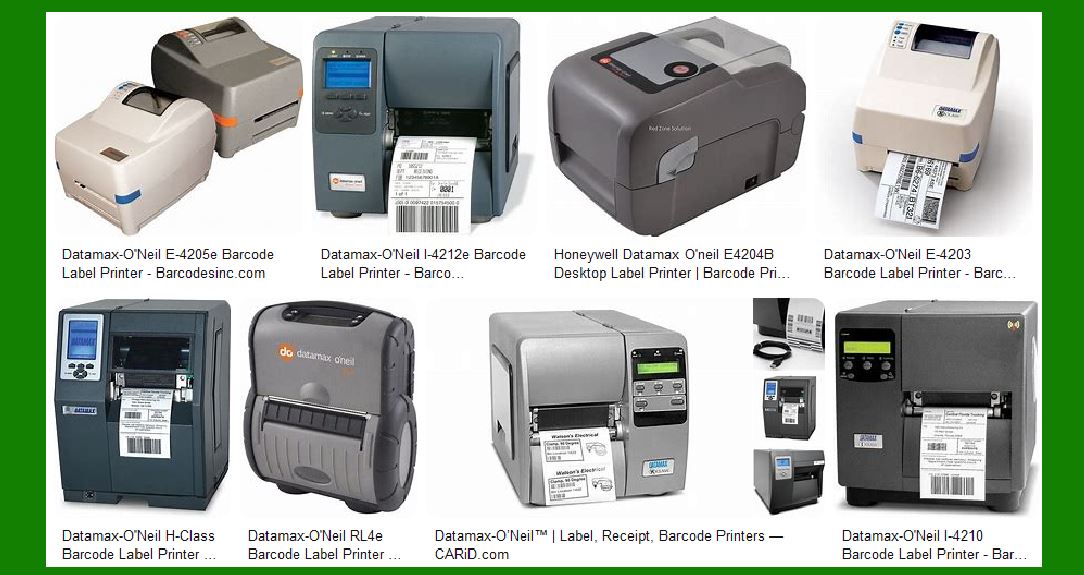
| 2.Product Range Overview | Datamax-O'Neil's product lineup includes desktop, industrial, and mobile printers. Each category is designed to meet specific needs, from small-scale operations to large industrial applications. The printers support both thermal transfer and direct thermal printing methods. | 
| 3.Desktop Printers | E-Class Mark III: This series is designed for light-duty applications. It offers a compact design, making it suitable for environments with limited space. The E-Class Mark III printers are known for their ease of use, affordability, and reliability. They are ideal for small businesses, retail, and healthcare applications. M-Class Mark II: These mid-range printers are versatile and can handle a variety of applications. They are designed for environments that require a balance between performance and cost. The M-Class Mark II printers are suitable for manufacturing, warehousing, and logistics. | 
| 4.Industrial Printers | I-Class Mark II: Known for their durability and high performance, these printers are designed for heavy-duty industrial applications. They offer fast print speeds, large media capacity, and advanced connectivity options. The I-Class Mark II printers are ideal for manufacturing, distribution, and high-volume labeling. H-Class: This series is designed for high-performance printing in demanding environments. The H-Class printers offer high print speeds, large media capacity, and advanced features such as RFID encoding. They are suitable for applications in manufacturing, warehousing, and logistics. | 
| 5.Mobile Printers | RL3e and RL4e: These rugged mobile printers are designed for on-the-go printing. They offer durability, long battery life, and wireless connectivity options. The RL3e and RL4e printers are ideal for field service, retail, and warehousing applications. MP Compact4 Mark III: This compact mobile printer is designed for space-constrained environments. It offers high print speeds, wireless connectivity, and easy integration with existing systems. The MP Compact4 Mark III is suitable for retail, healthcare, and transportation applications. | 6.Specialty Printers | S-Class: Designed for ticketing applications, the S-Class printers offer high print quality and reliability. They are suitable for printing admission tickets, event tickets, and transportation tickets. W-Class: These wide-format printers are designed for applications that require large labels. They offer high print speeds, large media capacity, and advanced features such as RFID encoding. The W-Class printers are suitable for manufacturing, warehousing, and logistics. | 
| 7.Key Features and Technologies | Thermal Transfer and Direct Thermal Printing: Datamax-O'Neil printers support both thermal transfer and direct thermal printing methods. Thermal transfer printing uses a ribbon to transfer ink onto the label, providing durable and long-lasting prints. Direct thermal printing uses heat-sensitive paper, making it suitable for short-term applications. RFID Encoding: Some Datamax-O'Neil printers, such as the H-Class and W-Class, offer RFID encoding capabilities. This feature allows users to print and encode RFID tags, which can be used for tracking and inventory management. Connectivity Options: Datamax-O'Neil printers offer a variety of connectivity options, including USB, Ethernet, Wi-Fi, and Bluetooth. This allows for easy integration with existing systems and networks. Durability and Reliability: Datamax-O'Neil printers are known for their durability and reliability. They are designed to withstand harsh environments and heavy usage, making them suitable for industrial applications. | 8.Software and Compatibility | Printer Drivers: Datamax-O'Neil printers are compatible with various operating systems, including Windows, Linux, and Mac OS. The company provides printer drivers and software tools to facilitate easy integration and setup. Label Design Software: Datamax-O'Neil printers are compatible with popular label design software, such as BarTender and NiceLabel. These software tools allow users to create custom labels with ease. SDKs and APIs: For developers, Datamax-O'Neil offers software development kits (SDKs) and application programming interfaces (APIs). These tools enable the integration of printing capabilities into custom applications. | 
| 9.Temperature and Humidity Tolerance | Datamax-O'Neil printers are designed to operate in a wide range of environmental conditions. They can withstand varying temperatures and humidity levels, making them suitable for use in different climates and environments. Specific models may have different tolerance levels, so it is important to refer to the product specifications for detailed information. | 10.Image Capture Capabilities | While Datamax-O'Neil printers are primarily designed for printing, some models may offer additional features such as image capture. This can be useful for applications that require the printing of images or barcodes with high precision and clarity. | 
| 11.Maintenance and Support | Maintenance: Datamax-O'Neil printers are designed for easy maintenance. The company provides detailed user manuals and guides to assist with routine maintenance tasks, such as cleaning and replacing printheads. Support: Datamax-O'Neil offers comprehensive support services, including technical support, online resources, and training programs. Users can access support through the company's website or contact their authorized distributors for assistance. | 12.Applications and Use Cases | Manufacturing: Datamax-O'Neil printers are widely used in manufacturing environments for labeling products, components, and packaging. They help streamline production processes and improve inventory management. Warehousing and Logistics: In warehousing and logistics, Datamax-O'Neil printers are used for labeling shipments, pallets, and inventory. They help improve accuracy and efficiency in tracking and managing goods. Retail: Retailers use Datamax-O'Neil printers for printing price tags, shelf labels, and receipts. The printers help enhance customer service and streamline point-of-sale operations. Healthcare: In healthcare, Datamax-O'Neil printers are used for printing patient wristbands, prescription labels, and laboratory labels. They help improve patient safety and streamline administrative processes. Field Service: Mobile printers from Datamax-O'Neil are used in field service applications for printing invoices, receipts, and service reports. They help improve efficiency and accuracy in field operations. | 
| 13.Environmental Considerations | Datamax-O'Neil is committed to sustainability and environmental responsibility. The company designs its printers to be energy-efficient and uses recyclable materials in its products. Additionally, Datamax-O'Neil offers recycling programs for used printers and consumables. | 
| 14.Conclusion | Datamax-O'Neil barcode label printers are known for their reliability, versatility, and advanced features. With a wide range of products designed for various applications, Datamax-O'Neil provides printing solutions that meet the needs of different industries. Whether you need a desktop printer for a small business or an industrial printer for a manufacturing facility, Datamax-O'Neil has a solution to meet your requirements. |
|
 cs@easiersoft.com