1. Introduction to Gprinter Barcode Label Printers |
Gprinter is a well-known brand in the field of barcode label printers, offering a range of products designed to meet various printing needs. These printers are widely used in industries such as retail, logistics, healthcare, and manufacturing. Gprinter barcode label printers are known for their reliability, efficiency, and high-quality output. |
|
2. Types of Gprinter Barcode Label Printers |
Gprinter offers several types of barcode label printers, each designed for specific applications. The main types include: |
2.1 Desktop Barcode Label Printers |
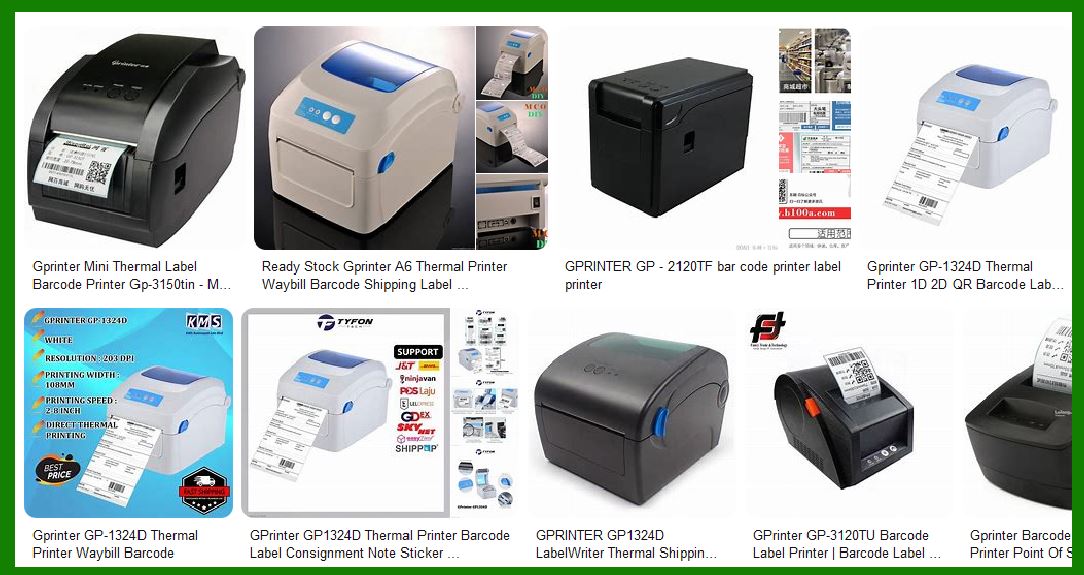
Desktop barcode label printers are compact and suitable for small to medium-sized businesses. They are ideal for printing labels, receipts, and tags. Some popular models include: |
Gprinter GP-1124D: A versatile printer with a 203 DPI resolution, suitable for various labeling needs. Gprinter GP-1324D: Known for its high-speed printing and durability, making it suitable for high-volume printing tasks. |
2.2 Industrial Barcode Label Printers |
Industrial barcode label printers are designed for heavy-duty printing tasks in large-scale operations. They offer robust performance and can handle high-volume printing. Notable models include: |
Gprinter GP-1424T: Offers high-resolution printing and is built to withstand harsh industrial environments. Gprinter GP-1434T: Known for its reliability and ability to print large quantities of labels quickly. |
2.3 Mobile Barcode Label Printers |
Mobile barcode label printers are portable and designed for on-the-go printing. They are commonly used in logistics and field services. Key models include: |
Gprinter GP-1124M: A compact and lightweight printer that offers wireless connectivity for easy mobile printing. Gprinter GP-1324M: Known for its durability and long battery life, making it ideal for field operations. |

|
3. Key Features of Gprinter Barcode Label Printers |
Gprinter barcode label printers come with a range of features that enhance their functionality and usability. Some of the key features include: |
3.1 High-Resolution Printing |
Gprinter barcode label printers offer high-resolution printing, typically ranging from 203 DPI to 300 DPI. This ensures that the printed labels are clear and easy to read, which is crucial for barcode scanning. |
3.2 Connectivity Options |
These printers come with various connectivity options, including USB, Ethernet, Wi-Fi, and Bluetooth. This allows for flexible integration with different systems and devices, making it easy to print labels from various sources. |
3.3 User-Friendly Interface |
Gprinter barcode label printers are designed with user-friendly interfaces, including LCD screens and intuitive control panels. This makes it easy for users to operate the printers and configure settings as needed. |
3.4 Durability and Reliability |
Gprinter printers are built to last, with robust construction that can withstand daily use in demanding environments. They are known for their reliability, ensuring consistent performance over time. |

|
4. Applications of Gprinter Barcode Label Printers |
Gprinter barcode label printers are used in a wide range of applications across various industries. Some common applications include: |
4.1 Retail |
In the retail industry, Gprinter barcode label printers are used for printing price tags, shelf labels, and product labels. They help streamline inventory management and improve the accuracy of pricing and product information. |
4.2 Logistics and Warehousing |
In logistics and warehousing, these printers are used for printing shipping labels, pallet labels, and inventory tags. They help improve the efficiency of warehouse operations and ensure accurate tracking of goods. |
4.3 Healthcare |
In the healthcare industry, Gprinter barcode label printers are used for printing patient wristbands, medication labels, and lab sample labels. They help enhance patient safety and improve the accuracy of medical records. |
4.4 Manufacturing |
In manufacturing, these printers are used for printing product labels, serial number labels, and compliance labels. They help ensure that products are properly labeled and meet regulatory requirements. |

|
5. Advantages of Using Gprinter Barcode Label Printers |
There are several advantages to using Gprinter barcode label printers, including: |
5.1 Cost-Effective |
Gprinter barcode label printers offer a cost-effective solution for businesses of all sizes. They provide high-quality printing at an affordable price, making them a popular choice for many organizations. |
5.2 Easy to Use |
These printers are designed to be easy to use, with intuitive interfaces and straightforward setup processes. This reduces the learning curve for new users and helps improve productivity. |
5.3 Versatile |
Gprinter barcode label printers are versatile and can be used for a wide range of printing tasks. Whether you need to print labels, receipts, or tags, these printers can handle the job. |
5.4 High-Quality Output |
Gprinter printers produce high-quality output, with clear and crisp printing that ensures barcodes are easily scannable. This is essential for maintaining accuracy in various applications. |

|
6. Technical Specifications of Gprinter Barcode Label Printers |
The technical specifications of Gprinter barcode label printers vary depending on the model. Some common specifications include: |
6.1 Print Speed |
Gprinter barcode label printers offer varying print speeds, typically ranging from 4 inches per second (IPS) to 8 IPS. Higher-end models may offer even faster print speeds. |
6.2 Print Resolution |
The print resolution of Gprinter printers ranges from 203 DPI to 300 DPI. Higher resolution models provide sharper and more detailed printing. |
6.3 Media Compatibility |
These printers are compatible with a wide range of media types, including thermal paper, labels, and tags. They can handle different media widths and lengths, providing flexibility for various printing needs. |
6.4 Connectivity |
Gprinter barcode label printers come with multiple connectivity options, including USB, Ethernet, Wi-Fi, and Bluetooth. This allows for easy integration with different systems and devices. |
|
7. Maintenance and Support for Gprinter Barcode Label Printers |
Proper maintenance and support are essential for ensuring the longevity and performance of Gprinter barcode label printers. Some key aspects of maintenance and support include: |
7.1 Regular Cleaning |
Regular cleaning of the printer, including the print head and rollers, helps maintain print quality and prevent issues such as paper jams and misprints. |
7.2 Firmware Updates |
Keeping the printer’s firmware up to date ensures that it operates smoothly and benefits from the latest features and improvements. |
7.3 Technical Support |
Gprinter offers technical support to help users troubleshoot and resolve any issues they may encounter. This includes online resources, user manuals, and customer service. |

|
8. Conclusion |
Gprinter barcode label printers are a reliable and cost-effective solution for businesses in various industries. With their high-quality printing, versatile features, and robust performance, they are an excellent choice for any organization looking to improve its labeling and printing processes. |
 cs@easiersoft.com