The history and development of barcode label printing technology is a fascinating journey that intertwines advancements in computing, engineering, and industry needs. Here's a detailed exploration of how barcode label printing technology evolved over time. |
|
1. Introduction to Barcodes and Label Printing |
Barcodes are ubiquitous in modern society, enabling rapid data capture and management across various industries. A barcode consists of a series of parallel lines, dots, or rectangles that represent data in a machine-readable form. The technology relies on a scanner to interpret the pattern and retrieve the associated information. |

|
2. Early Developments (1940s-1960s) |
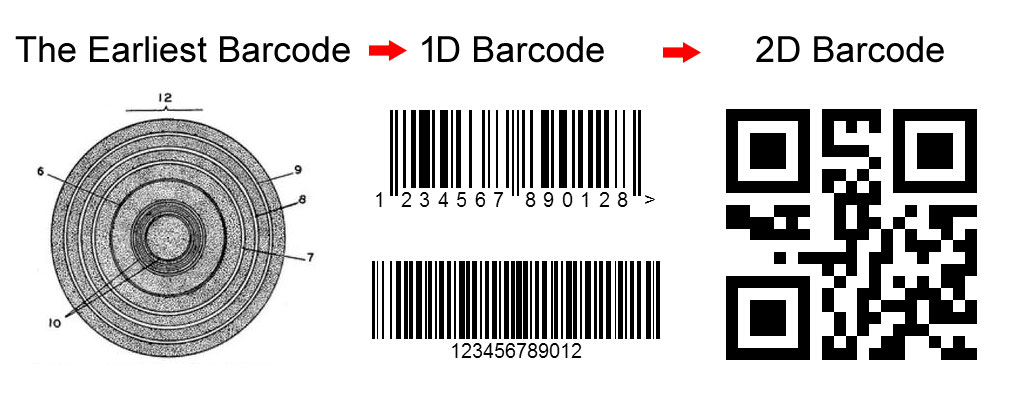
The concept of automated data capture dates back to the early 1940s when Bernard Silver and Norman Joseph Woodland first conceived the idea of encoding data in a machine-readable format. Their initial barcode design used concentric circles, a precursor to modern barcodes. |
In 1948, Bernard Silver and his partner Norman Joseph Woodland filed a patent application for a system that encoded data in concentric circles. This patent laid the groundwork for future developments in barcode technology. |

|
3. Emergence of Linear Barcodes (1970s-1980s) |
The linear barcode, also known as the 1D barcode, gained prominence in the 1970s. The Universal Product Code (UPC), developed by IBM and adopted by the retail industry in 1973, was a pivotal moment. The UPC used a series of vertical bars and spaces to encode product information, revolutionizing inventory management and retail operations. |
Key Developments: |
IBM's Contribution: IBM played a crucial role in standardizing barcode technology, developing printing and scanning systems that could reliably read and reproduce barcodes. Technological Advancements: Laser printing and thermal transfer printing emerged as dominant technologies for producing high-quality barcode labels. Thermal printers, in particular, became popular due to their simplicity and reliability. |

|
4. Expansion and Diversification (1990s-2000s) |
The 1990s saw the proliferation of barcode usage beyond retail. Industries such as healthcare, manufacturing, and logistics adopted barcodes for inventory tracking, asset management, and process optimization. This expansion led to the development of specialized barcode formats tailored to specific applications. |
Technological Innovations: |
2D Barcodes: In the late 1990s and early 2000s, 2D barcodes like QR codes and Data Matrix codes gained popularity. These barcodes could store more data in a smaller space and were used for applications requiring more information than traditional 1D barcodes could provide. Color Printing: Advances in color printing technology enabled the printing of high-resolution barcodes with additional graphics and information, enhancing their functionality and visual appeal. |

|
5. Modern Advances (2010s-Present) |
The 2010s marked a period of further innovation in barcode technology and label printing: |
Mobile Integration: The widespread adoption of smartphones equipped with barcode scanning capabilities expanded the use of barcodes for consumer engagement and mobile payments. Cloud-Based Solutions: Cloud computing and IoT (Internet of Things) integration enabled real-time data access and synchronization, enhancing the efficiency of barcode-driven systems. Environmental Considerations: The shift towards sustainable practices led to the development of eco-friendly barcode label materials and printing methods, such as direct thermal printing that eliminates the need for ink or toner. |

|
6. Technological Components of Barcode Label Printing |
Printing Technologies: |
Thermal Transfer Printing: Uses a heated ribbon to transfer ink onto the label. It offers durability and resistance to environmental conditions. Direct Thermal Printing: Uses heat-sensitive paper that darkens when exposed to heat, eliminating the need for ink or toner cartridges. Inkjet and Laser Printing: Suitable for color barcodes and labels requiring high resolution and graphic capabilities. |
Label Materials: |
Paper Labels: Economical and suitable for general-purpose applications. Synthetic Labels: Durable and resistant to moisture, chemicals, and tearing, ideal for harsh environments. Specialty Materials: Includes tamper-evident, RFID-enabled, and eco-friendly labels designed for specific requirements. |

|
7. Applications Across Industries |
Barcodes and barcode label printing technology find applications in diverse sectors: |
Retail: Inventory management, point-of-sale transactions, and product tracking. Healthcare: Patient identification, medication administration, and laboratory specimen tracking. Logistics and Transportation: Package tracking, supply chain management, and asset tracking. Manufacturing: Quality control, work-in-progress tracking, and inventory optimization. |

|
8. Challenges and Future Trends |
Challenges: |
Integration Complexity: Ensuring compatibility between different barcode systems and IT infrastructures. Security Concerns: Preventing barcode fraud and ensuring data integrity. Regulatory Compliance: Meeting industry-specific standards and labeling requirements. |
Future Trends: |
Artificial Intelligence (AI): AI-driven analytics for real-time data insights and predictive maintenance. Blockchain Integration: Using blockchain technology for secure and transparent supply chain management. Augmented Reality (AR): Combining barcodes with AR for enhanced consumer engagement and product information. |

|
9. Conclusion |
Barcode label printing technology has evolved significantly since its inception, driven by advancements in printing technology, computing power, and industry demands. From linear barcodes to sophisticated 2D codes, barcodes have transformed how businesses operate and interact with consumers. As technology continues to evolve, barcode label printing will play a crucial role in enhancing efficiency, accuracy, and sustainability across various sectors. |
This detailed overview highlights the historical milestones, technological innovations, and future prospects of barcode label printing technology, underscoring its enduring impact on modern industry and commerce. |
 cs@easiersoft.com