1. Overview of Honeywell Barcode Label Printers |
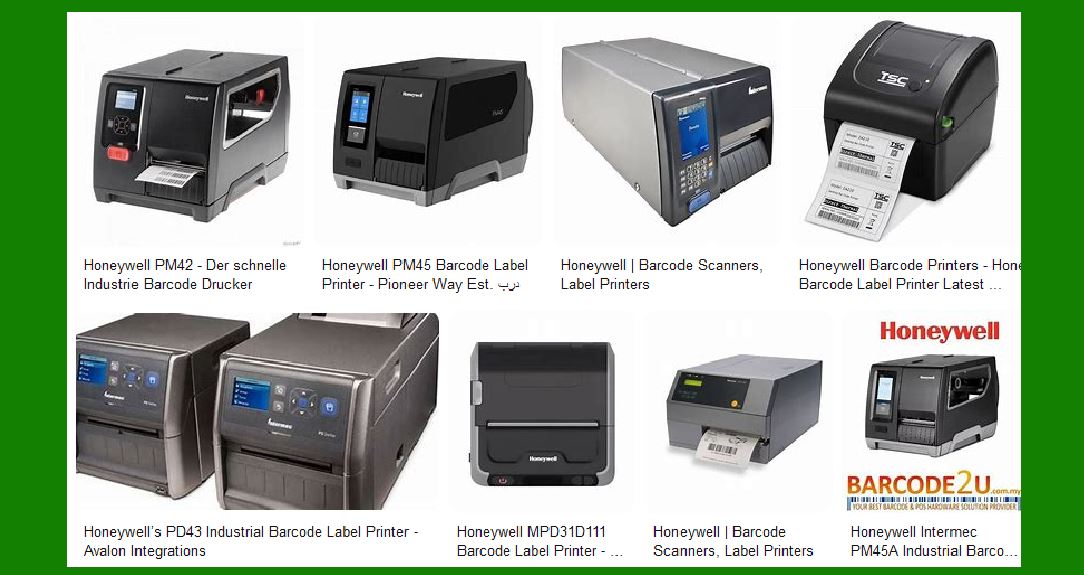
Honeywell is a well-known manufacturer of barcode label printers, offering a wide range of models designed to meet various printing needs. Their printers are known for their reliability, durability, and advanced features that cater to different industries, including retail, healthcare, manufacturing, and logistics. Honeywell’s barcode label printers are designed to provide high-quality printing solutions for labels, tags, and tickets, ensuring efficient and accurate tracking and identification of products and assets. |
|
2. Types of Honeywell Barcode Label Printers |
Honeywell offers several types of barcode label printers, each designed for specific applications and environments: |
2.1. Desktop Printers |
Desktop printers are compact and ideal for low to medium-volume printing tasks. They are commonly used in office environments, retail stores, and small businesses. Honeywell’s desktop printers are known for their ease of use, quick setup, and reliable performance. |
2.2. Industrial Printers |
Industrial printers are built for high-volume printing tasks and are designed to withstand harsh environments. These printers are commonly used in manufacturing plants, warehouses, and distribution centers. Honeywell’s industrial printers are known for their durability, high-speed printing, and advanced connectivity options. |
2.3. Mobile Printers |
Mobile printers are designed for on-the-go printing tasks and are commonly used by field workers, delivery drivers, and retail staff. These printers are portable, lightweight, and offer wireless connectivity options, making them ideal for printing labels and receipts on the move. |
2.4. RFID Printers |
RFID printers are designed to print and encode RFID tags, which are used for advanced tracking and identification applications. These printers are commonly used in supply chain management, asset tracking, and inventory control. Honeywell’s RFID printers offer high precision and reliability in encoding RFID tags. |

|
3. Key Features of Honeywell Barcode Label Printers |
Honeywell barcode label printers come with a range of features that enhance their performance and usability: |
3.1. High Print Quality |
Honeywell printers are known for their high print quality, producing clear and crisp barcodes, text, and graphics. This ensures that labels are easily readable and scannable, reducing the risk of errors in tracking and identification. |
3.2. Durability and Reliability |
Honeywell printers are built to last, with robust construction and high-quality components. This makes them suitable for use in demanding environments where reliability is crucial. Many models feature metal frames and rugged designs to withstand heavy use and harsh conditions. |
3.3. Advanced Connectivity Options |
Honeywell printers offer a variety of connectivity options, including USB, Ethernet, Wi-Fi, and Bluetooth. This allows for easy integration with existing systems and networks, enabling seamless data transfer and remote management. |
3.4. User-Friendly Interface |
Many Honeywell printers come with intuitive interfaces, including touchscreens and easy-to-navigate menus. This makes them easy to set up and operate, reducing the need for extensive training and minimizing downtime. |
3.5. Versatility |
Honeywell printers are versatile and can handle a wide range of media types, including labels, tags, tickets, and receipts. They support various printing technologies, such as direct thermal and thermal transfer, allowing users to choose the best method for their specific needs. |

|
4. Popular Honeywell Barcode Label Printer Models |
Honeywell offers a variety of barcode label printer models, each designed to meet specific requirements. Some of the popular models include: |
4.1. Honeywell PC42t Desktop Printer |
The Honeywell PC42t is a compact and affordable desktop printer designed for low to medium-volume printing tasks. It offers easy setup and operation, making it ideal for small businesses and retail environments. The PC42t supports both direct thermal and thermal transfer printing, providing flexibility in media choices. |
4.2. Honeywell PM45 Industrial Printer |
The Honeywell PM45 is a high-performance industrial printer designed for demanding applications. It offers fast print speeds, high print quality, and advanced connectivity options. The PM45 is built to withstand harsh environments and is suitable for use in manufacturing, warehousing, and logistics. |
4.3. Honeywell RP4 Mobile Printer |
The Honeywell RP4 is a rugged mobile printer designed for on-the-go printing tasks. It offers wireless connectivity options, including Wi-Fi and Bluetooth, making it ideal for field workers and delivery drivers. The RP4 is lightweight and portable, ensuring ease of use in various mobile applications. |
4.4. Honeywell PX940 RFID Printer |
The Honeywell PX940 is an advanced RFID printer designed for high-precision printing and encoding of RFID tags. It offers high print quality and reliability, making it suitable for supply chain management and asset tracking applications. The PX940 features integrated RFID technology, ensuring accurate and efficient encoding of RFID tags. |

|
5. Applications of Honeywell Barcode Label Printers |
Honeywell barcode label printers are used in a wide range of applications across various industries: |
5.1. Retail |
In retail environments, Honeywell printers are used for printing price tags, shelf labels, and receipts. They help streamline operations and improve inventory management by providing accurate and readable labels. |
5.2. Healthcare |
In healthcare settings, Honeywell printers are used for printing patient wristbands, medication labels, and laboratory samples. They ensure accurate identification and tracking of patients and medical supplies, enhancing patient safety and operational efficiency. |
5.3. Manufacturing |
In manufacturing plants, Honeywell printers are used for printing product labels, shipping labels, and work-in-progress tags. They help improve production efficiency and traceability by providing clear and durable labels. |
5.4. Logistics and Warehousing |
In logistics and warehousing, Honeywell printers are used for printing shipping labels, pallet labels, and inventory tags. They help streamline operations and improve accuracy in tracking and managing inventory. |
5.5. Field Services |
In field services, Honeywell mobile printers are used for printing receipts, service tickets, and delivery labels. They enable field workers to print documents on the go, improving efficiency and customer service. |

|
6. Advantages of Using Honeywell Barcode Label Printers |
Using Honeywell barcode label printers offers several advantages: |
6.1. Improved Efficiency |
Honeywell printers help improve operational efficiency by providing fast and reliable printing solutions. They reduce the time and effort required for manual labeling tasks, allowing employees to focus on more critical activities. |
6.2. Enhanced Accuracy |
Honeywell printers produce high-quality labels with clear and readable barcodes, reducing the risk of errors in tracking and identification. This enhances accuracy in inventory management, asset tracking, and other applications. |
6.3. Cost Savings |
Honeywell printers are designed for durability and reliability, reducing the need for frequent replacements and repairs. This helps lower maintenance costs and ensures a high return on investment. |
6.4. Flexibility |
Honeywell printers offer a wide range of features and connectivity options, making them suitable for various applications and environments. They can handle different media types and printing technologies, providing flexibility in label printing tasks. |
6.5. Easy Integration |
Honeywell printers are designed for easy integration with existing systems and networks. They offer advanced connectivity options and support multiple print languages, ensuring seamless data transfer and compatibility with various software applications. |

|
7. Conclusion |
Honeywell barcode label printers are reliable, durable, and versatile printing solutions designed to meet the needs of various industries. With a wide range of models and advanced features, Honeywell printers provide high-quality printing solutions for labels, tags, and tickets. They help improve operational efficiency, accuracy, and cost savings, making them an ideal choice for businesses looking to enhance their labeling and tracking processes. |
 cs@easiersoft.com