1. Introduction to Intermec Barcode Label Printers |
Intermec, a brand under Honeywell, is renowned for its high-quality barcode label printers. These printers are designed to meet the needs of various industries, including retail, transportation, logistics, manufacturing, field service, and healthcare. Intermec printers are known for their durability, reliability, and advanced features that enhance productivity and efficiency. |
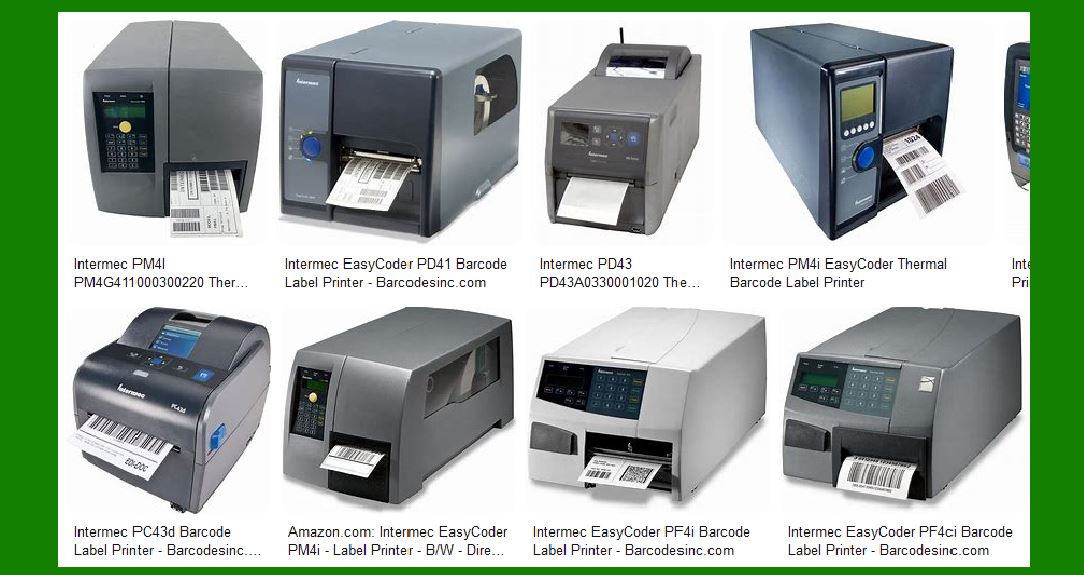
|
2. Types of Intermec Barcode Label Printers |
Intermec offers a wide range of barcode label printers to cater to different requirements. These include: |
2.1 Desktop Printers |
Desktop printers are compact and ideal for low to mid-volume printing tasks. They are commonly used in office environments, retail stores, and small warehouses. Examples include the Intermec PC23d and PC43d printers, which offer direct thermal printing and are known for their user-friendly design and ease of use. |
2.2 Industrial Printers |
Industrial printers are built for high-volume printing in demanding environments. They are robust and can handle large print jobs with ease. The Intermec PM43 and PX6i are examples of industrial printers that offer both direct thermal and thermal transfer printing options. These printers are equipped with advanced features such as RFID capabilities and multiple connectivity options. |
2.3 Mobile Printers |
Mobile printers are designed for on-the-go printing needs. They are lightweight, portable, and can be used in various field applications. The Intermec PB22 and PB50 are popular mobile printers that provide reliable performance and are compatible with various mobile devices. |

|
3. Key Features of Intermec Barcode Label Printers |
Intermec barcode label printers come with a range of features that make them suitable for different applications. Some of the key features include: |
3.1 Printing Technology |
Intermec printers use both direct thermal and thermal transfer printing technologies. Direct thermal printing is ideal for short-term labeling needs, while thermal transfer printing is suitable for long-lasting labels that can withstand harsh conditions. |
3.2 Connectivity Options |
Intermec printers offer multiple connectivity options, including USB, Ethernet, Wi-Fi, and Bluetooth. This ensures seamless integration with various systems and devices, making it easier to manage and print labels from different sources. |
3.3 User-Friendly Interface |
Many Intermec printers come with intuitive interfaces, such as touchscreens and easy-to-navigate menus. This simplifies the printing process and reduces the learning curve for new users. |
3.4 Durability and Reliability |
Intermec printers are built to last, with rugged designs that can withstand tough environments. They are known for their reliability, ensuring consistent performance even in demanding conditions. |
3.5 Advanced Features |
Some Intermec printers come with advanced features such as RFID printing, real-time clock, and label verification. These features enhance the functionality of the printers and provide additional value to users. |

|
4. Popular Intermec Barcode Label Printers |
Here are some of the popular models of Intermec barcode label printers: |
4.1 Intermec PC23d |
The Intermec PC23d is a compact desktop printer that offers direct thermal printing. It is designed for ease of use, with a simple interface and tool-free maintenance. The PC23d is ideal for low to mid-volume printing tasks and is commonly used in healthcare, retail, and office environments. |
4.2 Intermec PM43 |
The Intermec PM43 is an industrial printer that provides both direct thermal and thermal transfer printing options. It is known for its durability and reliability, making it suitable for high-volume printing in demanding environments. The PM43 comes with a range of connectivity options and advanced features such as RFID printing and a real-time clock. |
4.3 Intermec PB22 |
The Intermec PB22 is a mobile printer designed for on-the-go printing needs. It is lightweight, portable, and provides reliable performance in various field applications. The PB22 is compatible with multiple mobile devices and offers Bluetooth and Wi-Fi connectivity options. |

|
5. Applications of Intermec Barcode Label Printers |
Intermec barcode label printers are used in a variety of industries and applications. Some of the common applications include: |
5.1 Retail |
In the retail industry, Intermec printers are used for printing price tags, shelf labels, and receipts. They help streamline operations and improve efficiency in retail stores. |
5.2 Transportation and Logistics |
In transportation and logistics, Intermec printers are used for printing shipping labels, tracking labels, and inventory labels. They help ensure accurate tracking and management of goods throughout the supply chain. |
5.3 Manufacturing |
In manufacturing, Intermec printers are used for printing product labels, compliance labels, and work-in-progress labels. They help improve traceability and quality control in manufacturing processes. |
5.4 Healthcare |
In healthcare, Intermec printers are used for printing patient wristbands, specimen labels, and medication labels. They help improve patient safety and streamline operations in healthcare facilities. |

|
6. Benefits of Using Intermec Barcode Label Printers |
Using Intermec barcode label printers offers several benefits, including: |
6.1 Improved Efficiency |
Intermec printers help improve efficiency by streamlining the printing process and reducing downtime. They are designed for fast and reliable performance, ensuring that labels are printed quickly and accurately. |
6.2 Cost Savings |
Intermec printers are built to last, reducing the need for frequent replacements and repairs. They also offer cost-effective printing solutions, with options for both direct thermal and thermal transfer printing. |
6.3 Enhanced Accuracy |
Intermec printers provide high-quality printing, ensuring that labels are clear and easy to read. This helps improve accuracy in labeling and reduces the risk of errors. |
6.4 Versatility |
Intermec printers are versatile and can be used in a variety of applications and industries. They offer multiple connectivity options and advanced features, making them suitable for different printing needs. |

|
7. Conclusion |
Intermec barcode label printers are a reliable and efficient solution for various labeling needs. With a range of models and features, they cater to different industries and applications. Whether you need a compact desktop printer, a robust industrial printer, or a portable mobile printer, Intermec has a solution to meet your requirements. Their printers are known for their durability, reliability, and advanced features, making them a valuable addition to any business. |
 cs@easiersoft.com