1. Introduction to Metapace Barcode Label Printers |
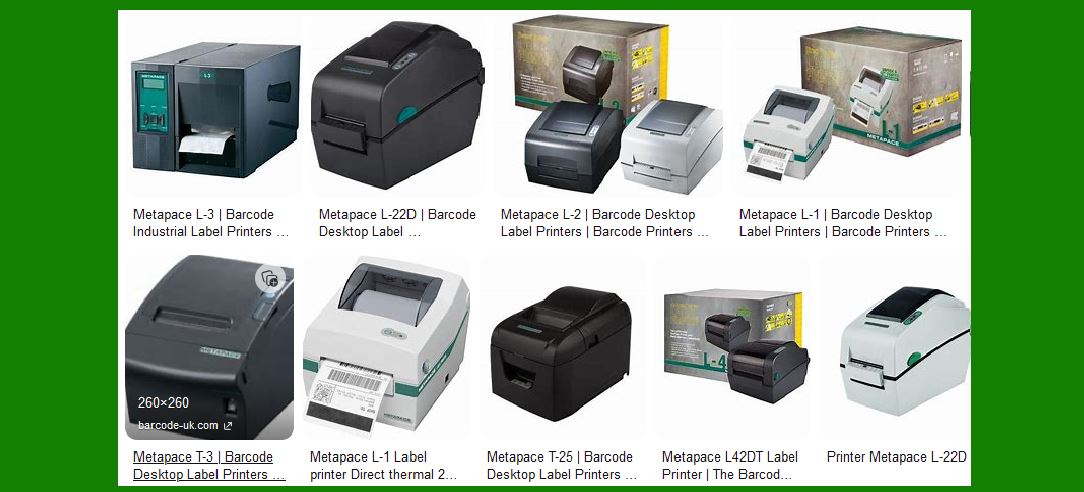
Metapace is a well-known brand in the field of barcode label printers, offering a range of products designed to meet various business needs. Their printers are known for their reliability, efficiency, and ease of use. Metapace barcode label printers are widely used in retail, logistics, healthcare, and other industries where accurate and fast label printing is essential. |
|
2. Key Features of Metapace Barcode Label Printers |
Metapace barcode label printers come with a variety of features that make them suitable for different applications. Some of the key features include: |
High Print Speed: Metapace printers are capable of printing labels at high speeds, which is crucial for businesses that need to print large volumes of labels quickly. High Resolution: These printers offer high-resolution printing, ensuring that barcodes and text are clear and easy to read. Durability: Metapace printers are built to last, with robust construction that can withstand the demands of a busy work environment. Ease of Use: The printers are designed to be user-friendly, with intuitive interfaces and easy setup processes. Versatility: Metapace printers can handle a wide range of label sizes and types, making them suitable for various applications. |

|
3. Metapace L-22D Barcode Label Printer |
One of the popular models in the Metapace lineup is the L-22D. This printer is designed for desktop use and is ideal for applications in retail, pharmacies, warehouses, and postal services. Here are some detailed specifications and features of the L-22D: |
Print Technology: The L-22D uses direct thermal printing technology, which eliminates the need for ink or toner. Print Speed: It can print at a speed of up to 152 mm per second, making it one of the faster printers in its class. Resolution: The printer offers a resolution of 203 dpi (dots per inch), ensuring high-quality prints. Media Handling: The L-22D can handle media widths of up to 60 mm and print widths of up to 54 mm. Interfaces: It comes with multiple interface options, including USB, RS232, and Ethernet, allowing for flexible connectivity. Memory: The printer is equipped with 64 MB of RAM and 128 MB of Flash memory, providing ample storage for label formats and graphics. Software Compatibility: The L-22D is compatible with various label design software, making it easy to create and print custom labels. |

|
4. Metapace L-2 Thermal Label Printer |
Another notable model is the Metapace L-2, which is designed for professional label applications. This printer is known for its fast printing speed and large ribbon supply. Here are some of its key features: |
Print Technology: The L-2 uses thermal transfer printing, which is suitable for printing durable labels that can withstand harsh conditions. Print Speed: It can print at speeds of up to 152 mm per second, ensuring quick label production. Ribbon Supply: The printer can accommodate ribbons up to 300 meters long, reducing the need for frequent replacements. Interfaces: Standard interfaces include serial, parallel, and USB, with an optional Ethernet interface available. Cutter Option: An optional cutter is available for the L-2, allowing for precise cutting of labels. |

|
5. Applications of Metapace Barcode Label Printers |
Metapace barcode label printers are versatile and can be used in a variety of applications. Some common uses include: |
Retail: In retail environments, Metapace printers are used for printing price tags, shelf labels, and product labels. Logistics: In logistics and warehousing, these printers are used for printing shipping labels, inventory labels, and tracking labels. Healthcare: In healthcare settings, Metapace printers are used for printing patient wristbands, prescription labels, and laboratory labels. Manufacturing: In manufacturing, these printers are used for printing product labels, serial number labels, and quality control labels. |

|
6. Advantages of Using Metapace Barcode Label Printers |
There are several advantages to using Metapace barcode label printers, including: |
Reliability: Metapace printers are known for their reliability, with a low failure rate and long lifespan. Cost-Effectiveness: These printers offer a good balance of performance and cost, making them a cost-effective choice for businesses. Flexibility: With support for various label sizes and types, Metapace printers can be used for a wide range of applications. Ease of Maintenance: The printers are designed for easy maintenance, with user-replaceable parts and straightforward troubleshooting processes. |

|
7. Technical Support and Resources |
Metapace provides comprehensive technical support and resources for their barcode label printers. This includes: |
Driver Downloads: Drivers for Metapace printers are available for download from the Metapace website, ensuring compatibility with various operating systems. User Manuals: Detailed user manuals are available to help users set up and operate their printers. Technical Support: Metapace offers technical support through various channels, including phone, email, and online chat. Warranty: Metapace printers come with a standard warranty, providing peace of mind for users. |

|
8. Conclusion |
Metapace barcode label printers are a reliable and versatile choice for businesses in various industries. With their high print speed, high resolution, and ease of use, these printers can help businesses improve their labeling processes and increase efficiency. Whether you need a printer for retail, logistics, healthcare, or manufacturing, Metapace has a model that can meet your needs. |
 cs@easiersoft.com