1. Introduction to Nanjing Barway Technology Co., Ltd. |
Nanjing Barway Technology Co., Ltd., established in 2007, is a prominent player in the barcode and RFID industry. The company specializes in the development of barcode and RFID application management software, integration of barcode and RFID hardware, and the production of barcode consumables. Their product range includes barcode printers, barcode scanners, data collection terminals, and POS terminals. With over 15 years of experience, Nanjing Barway has built a reputation for providing high-quality products and services to various industries, including manufacturing, retail, logistics, and public utilities. |
|
2. Product Range and Specializations |
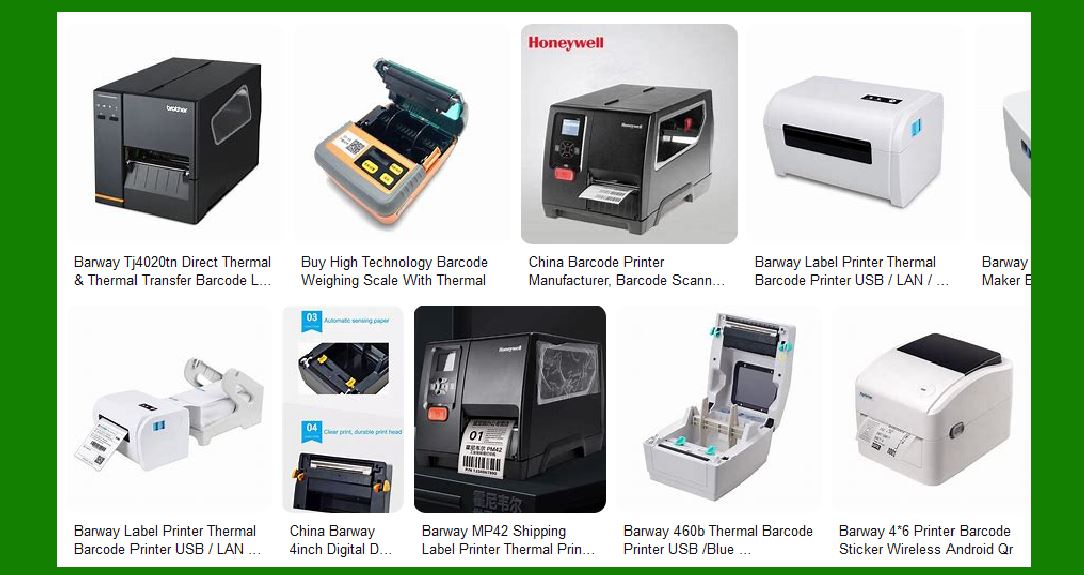
Nanjing Barway offers a diverse range of barcode printers designed to meet the needs of different industries. Their product lineup includes desktop, industrial, and portable barcode printers. Each type of printer is engineered to deliver high performance, reliability, and ease of use. The company also provides customized solutions to cater to specific customer requirements, ensuring seamless integration with existing systems. |

|
3. Desktop Barcode Printers |
Desktop barcode printers from Nanjing Barway are compact, user-friendly, and ideal for small to medium-sized businesses. These printers are designed for low to medium volume printing tasks and are perfect for applications such as retail, healthcare, and office environments. Key features of desktop barcode printers include: |
High-Speed Printing: Capable of printing at speeds up to 127mm/s. Ease of Use: Simple installation and operation with minimal maintenance. Versatility: Supports various label sizes and types, including thermal transfer and direct thermal printing. Connectivity: Multiple interface options such as USB, Bluetooth, and Ethernet for easy integration. |

|
4. Industrial Barcode Printers |
Industrial barcode printers from Nanjing Barway are built to withstand harsh environments and are suitable for high-volume printing tasks. These printers are commonly used in manufacturing, logistics, and warehousing. Key features of industrial barcode printers include: |
Durability: Robust construction to handle tough industrial conditions. High Performance: Capable of printing large volumes of labels quickly and accurately. Advanced Features: Equipped with features such as automatic label detection, print head temperature control, and large memory capacity. Connectivity: Supports various connectivity options, including USB, Ethernet, and Wi-Fi. |

|
5. Portable Barcode Printers |
Portable barcode printers from Nanjing Barway are designed for mobile applications, providing flexibility and convenience for on-the-go printing. These printers are ideal for field service, retail, and logistics applications. Key features of portable barcode printers include: |
Compact and Lightweight: Easy to carry and use in various locations. Wireless Connectivity: Supports Bluetooth and Wi-Fi for seamless mobile printing. Battery Life: Long-lasting battery for extended use without frequent recharging. Durability: Built to withstand drops and rough handling in mobile environments. |

|
6. Key Models and Specifications |
Nanjing Barway offers several key models of barcode printers, each with unique specifications to cater to different needs. Some of the popular models include: |
XP-350B Label Printer: A desktop thermal label printer with high-speed printing, large-capacity paper handling, and multiple interface options. XP-365B Thermal Label Printer: An advanced desktop printer with features such as self-temperature control print head, smooth paper output, and accurate printing. Industrial Color Label Printer: Designed for industrial use, this printer offers high-speed, high-quality color label printing with robust construction. |

|
7. Technological Innovations |
Nanjing Barway is committed to technological innovation, continuously improving their products to meet the evolving needs of their customers. Some of the technological advancements in their barcode printers include: |
Self-Temperature Control Print Head: Extends the life of the print head by automatically adjusting the temperature based on usage. Automatic Label Detection: Ensures accurate printing by detecting the position and size of the label. Print Mileage Memory: Monitors printer usage and provides alerts for maintenance and replacement of consumables. High-Resolution Printing: Delivers clear and precise labels with high-resolution print heads. |

|
8. Software and Integration |
Nanjing Barway provides comprehensive software solutions to complement their hardware products. Their software offerings include barcode and RFID application management software, which integrates seamlessly with their printers and other hardware. Key features of their software solutions include: |
User-Friendly Interface: Easy to use with intuitive controls and features. Compatibility: Supports various operating systems and integrates with existing enterprise systems. Customization: Allows for customization to meet specific business requirements. Data Management: Provides robust data management capabilities for tracking and reporting. |

|
9. Customer Support and Service |
Nanjing Barway is dedicated to providing excellent customer support and service. They offer a range of services to ensure customer satisfaction, including: |
Technical Support: Available to assist with installation, troubleshooting, and maintenance. Training: Provides training for customers to ensure they can effectively use their products. Warranty and Repairs: Offers warranty and repair services to address any issues that may arise. Consultation: Provides consultation services to help customers choose the right products and solutions for their needs. |

|
10. Applications and Use Cases |
Nanjing Barway barcode printers are used in a wide range of applications across various industries. Some common use cases include: |
Retail: Printing price tags, shelf labels, and receipts. Healthcare: Printing patient wristbands, prescription labels, and laboratory labels. Manufacturing: Printing product labels, inventory labels, and shipping labels. Logistics: Printing shipping labels, tracking labels, and warehouse labels. Public Utilities: Printing utility bills, service labels, and identification labels. |

|
11. Environmental Considerations |
Nanjing Barway is committed to environmental sustainability. Their barcode printers are designed with eco-friendly features, such as: |
Energy Efficiency: Low power consumption to reduce energy usage. Recyclable Materials: Use of recyclable materials in the construction of their printers. Reduced Waste: Features such as automatic label detection and smooth paper output to minimize label waste. |

|
12. Future Developments |
Nanjing Barway continues to innovate and develop new products to meet the changing needs of the market. Future developments may include: |
Enhanced Connectivity: Integration with IoT and cloud-based systems for improved connectivity and data management. Advanced Printing Technologies: Adoption of new printing technologies for higher quality and faster printing. Expanded Product Line: Introduction of new models and features to cater to a broader range of applications and industries. |

|
13. Conclusion |
Nanjing Barway Technology Co., Ltd. is a leading provider of barcode printers and related solutions. With a strong focus on quality, innovation, and customer satisfaction, they offer a comprehensive range of products to meet the needs of various industries. Their commitment to technological advancement and environmental sustainability ensures that they remain at the forefront of the barcode and RFID industry. |
 cs@easiersoft.com