1. Introduction to Niimbot |
Niimbot is a leading provider of label printers and intelligent identification solutions. Established in China, Niimbot has developed a strong reputation for its innovative products and comprehensive services. The company focuses on three major product systems: intelligent hardware, printing cloud services, and enterprise performance management. These systems provide users with a one-stop service for item identification and management. |
|
2. Product Range |
Niimbot offers a variety of label printers designed to meet different needs. Some of the popular models include: |
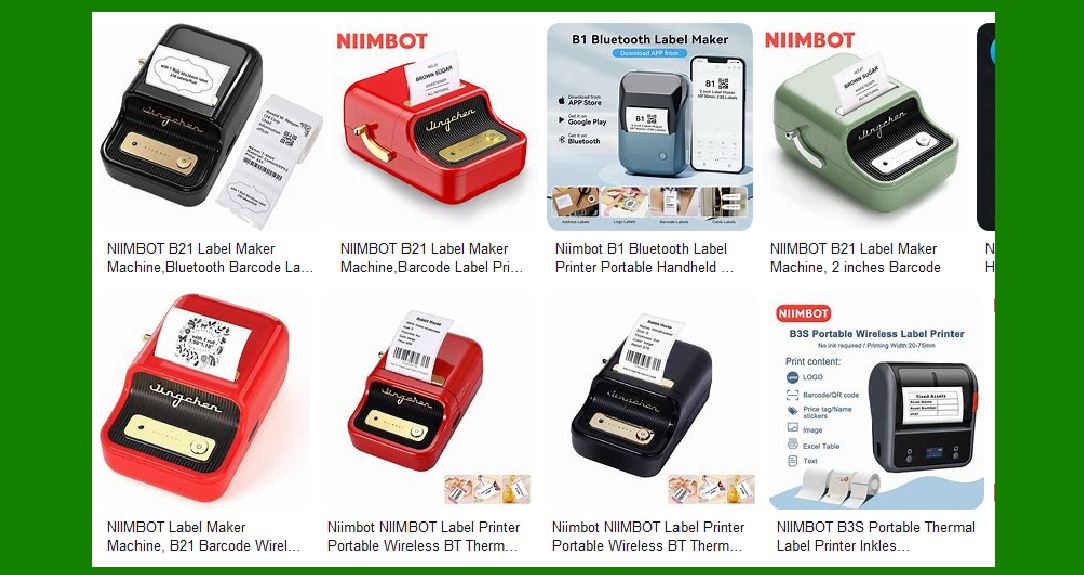
Niimbot B3S: A 3-inch label printer with tape, known for its multifunctional app support and wireless capabilities. Niimbot K3: A 3-inch thermal label maker with high-speed Bluetooth connection, ideal for small businesses. Niimbot D11: A compact and portable label printer, perfect for home and office use. |

|
3. Key Features |
3.1. Intelligent Hardware |
Niimbot’s label printers are equipped with advanced hardware features that ensure high performance and reliability. Key hardware features include: |
Thermal Printing Technology: This technology eliminates the need for ink or toner, reducing maintenance costs and ensuring clear, smudge-free prints. High-Speed Printing: Models like the K3 can print at speeds up to 180mm/s, making them suitable for high-volume printing tasks. Wireless Connectivity: Many Niimbot printers support Bluetooth and Wi-Fi, allowing for easy connection to smartphones, tablets, and computers. |
3.2. Printing Cloud Services |
Niimbot’s cloud services enhance the functionality of their label printers by providing: |
Remote Printing: Users can print labels from anywhere using the Niimbot app, which supports a variety of content such as text, barcodes, QR codes, images, and Excel files. Data Management: The cloud platform allows for the storage and management of label templates and printing data, ensuring consistency and efficiency. |
3.3. Enterprise Performance Management |
Niimbot’s enterprise solutions include: |
Item Identification: Comprehensive tools for creating and managing labels for products, assets, and inventory. Lifecycle Management: Solutions for tracking items throughout their lifecycle, from production to disposal. |

|
4. Design and Usability |
Niimbot label printers are designed with user convenience in mind. Key design and usability features include: |
Compact and Portable: Models like the D11 are small and lightweight, making them easy to carry and use on the go. User-Friendly Interface: The Niimbot app offers an intuitive interface with a wide range of customization options, including over 30 fonts, 100+ borders, and 1500+ symbols. Durable Construction: Niimbot printers are built to withstand regular use, with robust materials and reliable components. |

|
5. Applications |
Niimbot label printers are versatile and can be used in various scenarios, including: |
Retail: For printing price tags, product labels, and promotional stickers. Warehouse Management: For labeling inventory, shelves, and storage bins. Office: For organizing files, equipment, and office supplies. Home: For labeling personal items, kitchen containers, and craft supplies. |

|
6. Compatibility |
Niimbot printers are compatible with a wide range of devices and operating systems. Key compatibility features include: |
Cross-Platform Support: The Niimbot app is available for both iOS and Android devices, as well as Windows and Mac computers. Third-Party Integration: Niimbot printers can be integrated with other software and systems, such as inventory management and point-of-sale systems. |

|
7. Performance and Reliability |
Niimbot printers are known for their high performance and reliability. Key performance features include: |
High Resolution: Niimbot printers offer high-resolution printing, ensuring clear and detailed labels. Long Battery Life: Models like the B3S come with a built-in 2200mAh rechargeable battery, providing up to one week of standby time on a full charge. Consistent Output: Niimbot printers are designed to deliver consistent print quality, even with extended use. |

|
8. Customer Support and Service |
Niimbot provides comprehensive customer support and service, including: |
Help Center: An online help center with FAQs, user manuals, and troubleshooting guides. Service Policy: Clear service policies, including warranty information and return procedures. Customer Support: Dedicated customer support via email and phone, ensuring prompt assistance with any issues. |

|
9. Environmental Impact |
Niimbot is committed to reducing its environmental impact through: |
Eco-Friendly Materials: Using recyclable materials in the construction of their printers and consumables. Energy Efficiency: Designing printers that consume less power and have longer battery life. Waste Reduction: Promoting the use of thermal printing technology, which reduces the need for ink and toner cartridges. |

|
10. Conclusion |
Niimbot barcode label printers offer a comprehensive solution for various labeling needs. With their advanced hardware, cloud services, and enterprise management solutions, Niimbot provides users with a reliable and efficient way to manage item identification and data. Whether for retail, warehouse management, office, or home use, Niimbot printers deliver high performance, ease of use, and environmental sustainability. |
 cs@easiersoft.com