1. Introduction to Novexx Solutions |
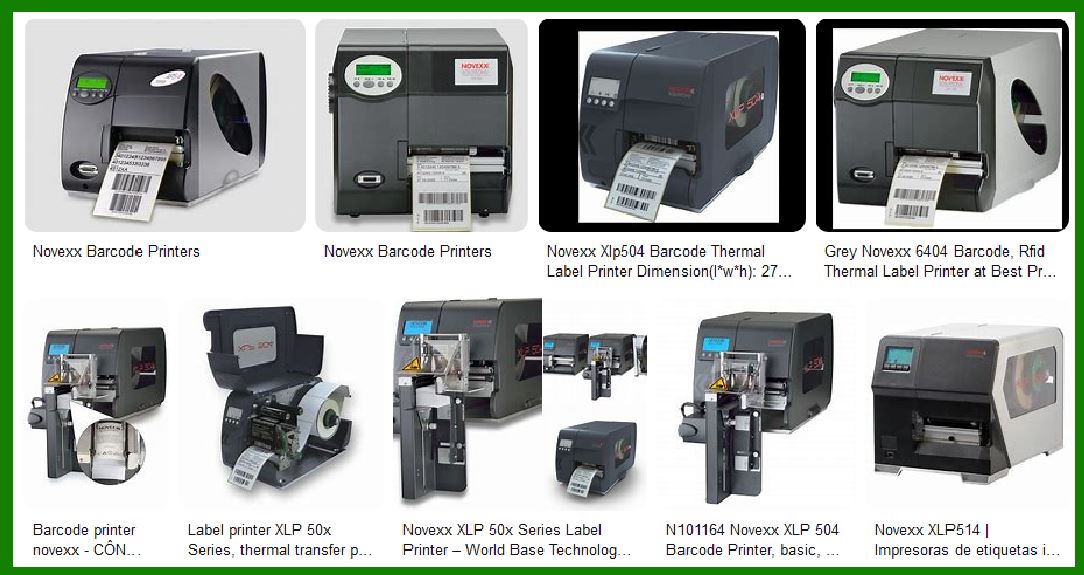
Novexx Solutions is a renowned name in the field of industrial labeling and printing solutions. With a history of innovation and excellence, Novexx Solutions offers a wide range of products designed to meet the diverse needs of various industries. Their barcode label printers are known for their reliability, high performance, and versatility. |
|
2. Overview of Novexx Barcode Label Printers |
Novexx barcode label printers are designed to cater to different industrial applications, from low to high print volumes. These printers are equipped with advanced features to ensure high-quality printing, efficiency, and ease of use. The main models include the XLP 60x series and the XLP 51x series, each tailored to specific needs. |
|
3. XLP 60x Series |
3.1. General Description |
The XLP 60x series is designed for high print volumes and maximum speed. It is suitable for demanding industrial applications where efficiency and reliability are paramount. |
3.2. Key Features |
Print Speed: Up to 400 mm/s, making it one of the fastest printers in its category. Print Width: Available in 4' to 6' print widths, accommodating various label sizes. Print Resolution: Options for 200, 300, and 600 dpi, ensuring high-quality prints. Printing Technology: Supports both thermal direct and thermal transfer printing methods. Ribbon Save Function: Helps in reducing ribbon consumption, leading to cost savings. Display Options: Available with key- or touch-display for user-friendly operation. Additional Options: Can be equipped with a knife, rewinder, applicator, or dispenser for enhanced functionality. |
3.3. Applications |
The XLP 60x series is versatile and can be used in various industries, including: |
Food Industry: For labeling food products with high precision. Pharmaceutical Industry: Ensuring compliance with stringent labeling requirements. Personal Care: For labeling cosmetics and personal care products. Chemical Industry: Handling the labeling of hazardous materials. Logistics and Supply Chain: For efficient tracking and management of goods. Automotive Industry: Labeling parts and components with durability. Textile Industry: For labeling garments and textiles. |

|
4. XLP 51x Series |
4.1. General Description |
The XLP 51x series is designed for low to medium print volumes, offering a balance between performance and cost. It is ideal for businesses looking for a reliable and cost-effective labeling solution. |
4.2. Key Features |
Print Speed: Up to 250 mm/s, suitable for moderate printing needs. Print Width: Available in 4' and 6' print widths. Print Resolution: Options for 200, 300, and 600 dpi. Printing Technology: Supports both thermal direct and thermal transfer printing methods. Best Price-Performance Ratio: Offers excellent value for money. Additional Options: Can be equipped with a knife, rewinder, applicator, dispenser, or textile-cutter-stacker. |
4.3. Applications |
The XLP 51x series is suitable for various industries, including: |
Food Industry: For labeling food products with accuracy. Pharmaceutical Industry: Ensuring compliance with labeling standards. Personal Care: For labeling cosmetics and personal care items. Chemical Industry: Handling the labeling of chemicals safely. Logistics and Supply Chain: For efficient tracking and management. Automotive Industry: Labeling automotive parts and components. Textile Industry: For labeling garments and textiles. |
|
5. Print & Apply Systems |
Novexx Solutions also offers integrated print and apply systems, combining printing and labeling in one seamless process. These systems are designed for high-speed, high-volume applications, ensuring efficiency and accuracy. |
5.1. XPA 93x Series |
High Performance: Designed for demanding applications with high throughput. Versatility: Can handle various label sizes and materials. Ease of Integration: Easily integrates into existing production lines. |
5.2. XDM & XPM 94x Series |
Powerful Print Modules: Ensuring high-quality prints at high speeds. Durability: Built to withstand harsh industrial environments. Flexibility: Suitable for a wide range of applications. |

|
6. Software Solutions |
Novexx Solutions provides comprehensive software solutions to complement their hardware. These software tools enhance the functionality and ease of use of their printers. |
6.1. NiceLabel Software |
Label Design: User-friendly interface for designing labels. Data Management: Efficiently manages data for printing. Integration: Seamlessly integrates with existing systems. |
|
7. Labels and Ribbons |
Novexx Solutions offers a wide range of labels and ribbons to ensure optimal performance of their printers. These consumables are designed to work seamlessly with Novexx printers, providing high-quality prints and durability. |
7.1. Labels |
Variety: Available in different sizes, materials, and adhesives. Quality: Ensures clear and durable prints. Customization: Custom labels can be designed to meet specific needs. |
7.2. Ribbons |
Types: Available in various types, including wax, resin, and wax-resin. Durability: Ensures long-lasting prints. Compatibility: Designed to work perfectly with Novexx printers. |

|
8. Service and Support |
Novexx Solutions is committed to providing excellent service and support to their customers. They offer a range of services to ensure the smooth operation of their printers. |
8.1. Service Contracts |
Maintenance: Regular maintenance to keep printers in optimal condition. Repairs: Prompt repair services to minimize downtime. Upgrades: Upgrading printers to the latest technology. |
8.2. Training |
User Training: Training programs to help users operate printers efficiently. Technical Training: Advanced training for technical staff. |
8.3. Support |
Customer Support: Dedicated support team to assist with any issues. Online Resources: Access to manuals, drivers, and other resources. |

|
9. Conclusion |
Novexx Solutions offers a comprehensive range of barcode label printers designed to meet the diverse needs of various industries. With advanced features, high performance, and excellent support, Novexx printers are a reliable choice for businesses looking to enhance their labeling processes. |
 cs@easiersoft.com