1. Introduction to Postek Electronics |
Postek Electronics, a prominent player in the barcode and RFID label printing industry, is known for its innovative and reliable printing solutions. Established with a vision to provide high-quality and efficient printing solutions, Postek has grown to become a trusted name in various industries, including retail, manufacturing, logistics, healthcare, and more. |
|
2. Product Range Overview |
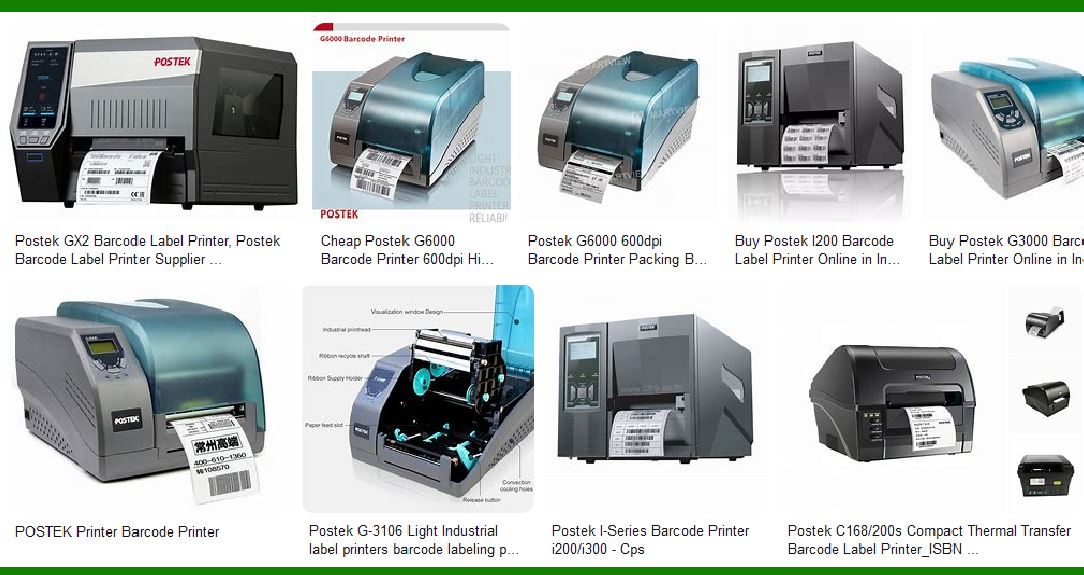
Postek offers a diverse range of barcode label printers designed to meet the needs of different industries and applications. Their product lineup includes industrial-grade printers, commercial-grade printers, and specialized RFID printers. Each series is engineered to deliver exceptional performance, durability, and ease of use. |

|
3. Industrial-Grade Printers |
3.1. OX Series |
The OX Series is Postek’s flagship line of industrial-grade barcode and RFID printers. These printers are built to withstand harsh environments and heavy-duty usage. Key features include: |
Robust Construction: The OX Series printers are designed with rugged parts and durable materials to ensure longevity and reliability. High-Speed Printing: Capable of printing at high speeds, these printers are ideal for high-volume printing tasks. RFID Compatibility: The OX Series supports a wide range of RFID tags, making it versatile for various applications. Advanced Encoding: Integrated with leading technology, these printers offer precise and efficient encoding capabilities. |
3.2. TX Series |
The TX Series is another line of industrial-grade printers from Postek, known for its high performance and reliability. Features include: |
Durable Design: Built to endure tough industrial conditions. High Resolution: Offers high-resolution printing for clear and precise labels. User-Friendly Interface: Equipped with an intuitive interface for easy operation. |

|
4. Commercial-Grade Printers |
4.1. C168 Series |
The C168 Series is designed for commercial applications where reliability and efficiency are paramount. Key features include: |
Compact Design: These printers have a compact footprint, making them suitable for space-constrained environments. Versatile Printing: Capable of printing a variety of label types and sizes. Cost-Effective: Provides a cost-effective solution for businesses needing reliable label printing. |
4.2. Q8 Series |
The Q8 Series is another commercial-grade printer line from Postek, known for its versatility and ease of use. Features include: |
Quick Setup: Easy to set up and start printing quickly. High Print Quality: Delivers high-quality prints suitable for various commercial applications. Connectivity Options: Offers multiple connectivity options for seamless integration with existing systems. |

|
5. Specialized RFID Printers |
Postek also offers specialized RFID printers that cater to the growing demand for RFID technology in various industries. These printers are designed to provide accurate and efficient RFID encoding and printing. |
5.1. OX Series RFID Printers |
The OX Series RFID printers are equipped with advanced RFID technology to ensure precise encoding and compatibility with a wide range of RFID tags. Key features include: |
Integrated RFID Verifier: An optional RFID verifier module ensures 100% accurate encoding. High-Speed RFID Printing: Capable of high-speed RFID printing, making them suitable for high-volume applications. |

|
6. Technology and Innovation |
Postek is committed to innovation and continuously integrates the latest technology into its products. Some of the technological advancements in Postek printers include: |
HEAT Technology: A proprietary heating technology that enhances print quality and efficiency. ADAPT Technology: Advanced technology that ensures compatibility with various label materials and printing conditions. |

|
7. Applications and Use Cases |
Postek barcode label printers are used in a wide range of applications across different industries. Some common use cases include: |
Retail: For printing price tags, inventory labels, and promotional labels. Manufacturing: For product labeling, tracking, and inventory management. Logistics: For shipping labels, tracking labels, and warehouse management. Healthcare: For patient identification, specimen labeling, and asset tracking. |

|
8. Customer Support and Services |
Postek provides comprehensive customer support and services to ensure the smooth operation of their printers. This includes: |
Technical Support: Available to assist with hardware and software issues. Product Training: Training programs to help users get the most out of their printers. Maintenance Services: Regular maintenance services to keep printers in optimal condition. |

|
9. Conclusion |
Postek Electronics has established itself as a leader in the barcode and RFID label printing industry through its commitment to quality, innovation, and customer satisfaction. Their diverse range of printers caters to various needs and applications, making them a reliable choice for businesses looking for efficient and durable printing solutions. |
 cs@easiersoft.com