1. Introduction to Primera Technology, Inc. |
Primera Technology, Inc. is a leading manufacturer of specialty printing equipment. Established in 1998, the company is headquartered in Plymouth, Minnesota, USA. Primera is renowned for its innovative and high-quality printing solutions, including color label printers, label applicators, disc publishers, and more. Their products are widely used across various industries such as manufacturing, retail, healthcare, and logistics. |
|
2. Overview of Primera Barcode Label Printers |
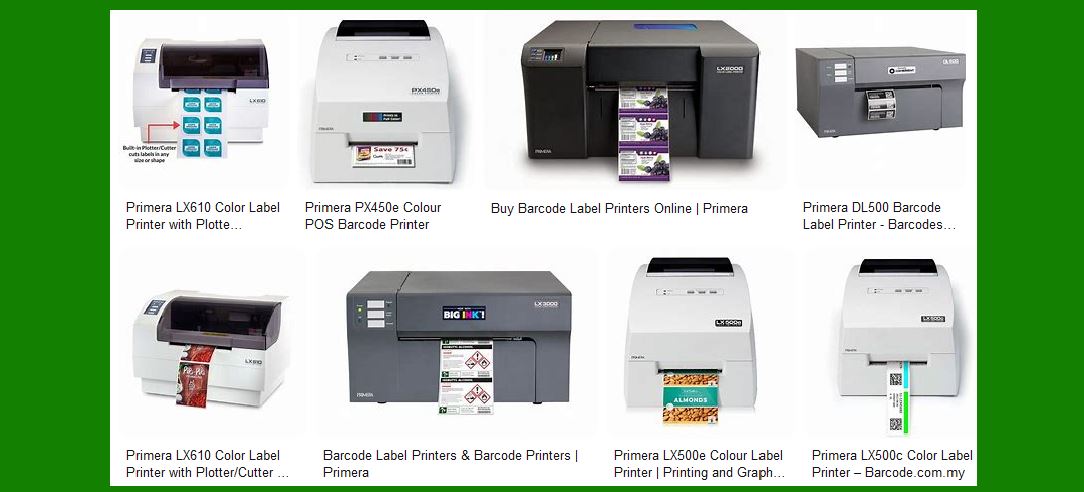
Primera barcode label printers are designed to produce high-quality, durable labels for a variety of applications. These printers are known for their reliability, ease of use, and advanced features. Primera offers a range of models to cater to different needs, from small businesses to large enterprises. |
|
3. Key Features of Primera Barcode Label Printers |
High Resolution Printing: Primera barcode label printers utilize advanced inkjet technology to deliver high-resolution prints up to 4800 dpi. This ensures that barcodes, text, and graphics are sharp and clear. Durability: The labels produced by Primera printers are resistant to water, chemicals, abrasion, and UV light. This makes them suitable for harsh environments and long-term use. Versatility: Primera printers can handle a wide range of label materials, including paper, polyester, and vinyl. They can print labels in various sizes and shapes, making them ideal for diverse applications. Ease of Use: These printers are designed with user-friendly interfaces and software, making them easy to set up and operate. They also support various connectivity options, including USB, Ethernet, and Wi-Fi. Cost Efficiency: Primera barcode label printers are designed to minimize waste and reduce costs. They offer low cost per label and eliminate the need for pre-printed labels, reducing inventory and obsolescence. |

|
4. Popular Models of Primera Barcode Label Printers |
LX500: The LX500 is a compact and affordable color label printer suitable for small businesses. It offers high-resolution printing and can handle a variety of label materials. The LX500 is ideal for printing product labels, barcodes, and more. LX910: The LX910 is a versatile color label printer that offers fast printing speeds and high-quality output. It can print labels up to 8 inches wide and is suitable for medium to large businesses. The LX910 is perfect for printing product labels, shipping labels, and more. LX2000: The LX2000 is a high-performance color label printer designed for industrial applications. It offers high-resolution printing, fast speeds, and durable labels. The LX2000 is ideal for printing large volumes of labels for manufacturing, logistics, and other industries. Catalyst Laser Label Marking System: The Catalyst is a unique industrial barcode printer that uses laser technology to produce extremely durable labels. It is suitable for applications that require labels to withstand harsh conditions, such as asset tagging, vehicle labeling, and more. |
|
5. Applications of Primera Barcode Label Printers |
Manufacturing: Primera barcode label printers are widely used in manufacturing for product labeling, inventory management, and quality control. The durable labels can withstand harsh environments and provide reliable identification and tracking. Retail: In the retail industry, Primera printers are used for product labeling, price tags, and shelf labels. The high-quality prints ensure that barcodes are easily scannable, improving efficiency at the point of sale. Healthcare: Primera barcode label printers are used in healthcare for patient identification, lab sample labeling, and medication tracking. The durable labels ensure accurate and reliable information, enhancing patient safety. Logistics: In logistics, Primera printers are used for shipping labels, pallet labels, and tracking labels. The high-resolution prints ensure that barcodes are easily readable, improving efficiency in the supply chain. Food and Beverage: Primera printers are used for labeling food and beverage products, providing high-quality, attractive labels that enhance product presentation and comply with regulatory requirements. |

|
6. Advantages of Using Primera Barcode Label Printers |
High Quality: Primera printers deliver high-resolution prints that ensure barcodes are easily readable and graphics are sharp and clear. Durability: The labels produced by Primera printers are resistant to water, chemicals, abrasion, and UV light, making them suitable for harsh environments. Versatility: Primera printers can handle a wide range of label materials and sizes, making them suitable for diverse applications. Cost Efficiency: Primera printers offer low cost per label and eliminate the need for pre-printed labels, reducing inventory and obsolescence. Ease of Use: Primera printers are designed with user-friendly interfaces and software, making them easy to set up and operate. |

|
7. Technical Specifications of Popular Primera Models |
LX500: Print Resolution: Up to 4800 dpi Print Speed: Up to 2.5 inches per second Maximum Print Width: 4.25 inches Connectivity: USB 2.0 Dimensions: 10.4' W x 7.1' H x 15.5' D Weight: 7.5 lbs |
LX910: Print Resolution: Up to 4800 dpi Print Speed: Up to 4.5 inches per second Maximum Print Width: 8 inches Connectivity: USB 2.0, Ethernet Dimensions: 17.25' W x 9.1' H x 17.25' D Weight: 35 lbs |
LX2000: Print Resolution: Up to 4800 dpi Print Speed: Up to 6 inches per second Maximum Print Width: 8.25 inches Connectivity: USB 2.0, Ethernet, Wi-Fi Dimensions: 20.5' W x 11.5' H x 20.5' D Weight: 45 lbs |
Catalyst Laser Label Marking System: Print Technology: Laser Maximum Print Width: 4.2 inches Maximum Print Length: 12 inches Connectivity: USB 2.0, Ethernet Dimensions: 24' W x 16' H x 24' D Weight: 75 lbs |

|
8. Software and Connectivity |
Primera barcode label printers come with intuitive software that makes designing and printing labels easy. The software supports various barcode formats, text, graphics, and variable data. Additionally, Primera printers offer multiple connectivity options, including USB, Ethernet, and Wi-Fi, ensuring seamless integration with existing systems. |

|
9. Maintenance and Support |
Primera provides comprehensive support and maintenance services for their barcode label printers. This includes online resources, technical support, and warranty services. Regular maintenance ensures that the printers operate efficiently and have a long lifespan. |

|
10. Environmental Considerations |
Primera is committed to sustainability and environmental responsibility. Their printers are designed to minimize waste and energy consumption. Additionally, Primera offers recycling programs for used cartridges and other consumables. |

|
11. Customer Testimonials and Case Studies |
Many businesses across various industries have successfully implemented Primera barcode label printers. Customer testimonials and case studies highlight the reliability, quality, and efficiency of Primera printers. These real-world examples demonstrate how Primera printers can meet diverse labeling needs. |

|
12. Conclusion |
Primera barcode label printers are a reliable and versatile solution for businesses of all sizes. With high-resolution printing, durable labels, and user-friendly features, Primera printers can meet the demands of various industries. Whether you need to print product labels, shipping labels, or asset tags, Primera has a printer that can deliver high-quality results. |
 cs@easiersoft.com