1. Introduction to Printronix Barcode Label Printers |
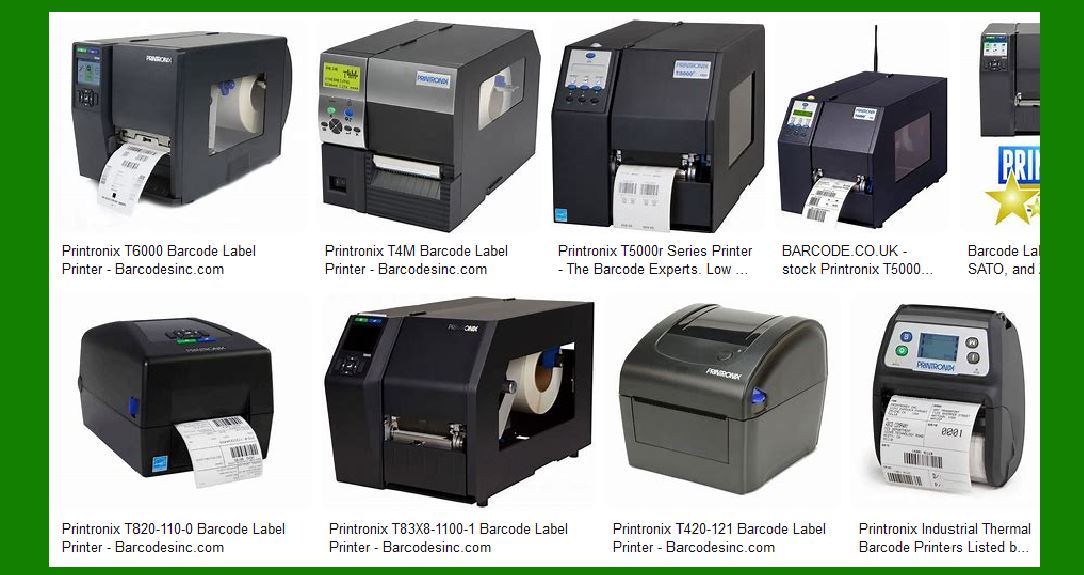
Printronix is a well-established name in the field of industrial printing, known for its reliable and innovative solutions. The company offers a wide range of barcode label printers designed to meet the needs of various industries, including manufacturing, logistics, retail, and healthcare. Printronix printers are renowned for their durability, high performance, and ability to handle large volumes of printing tasks. |
|
2. Types of Printronix Barcode Label Printers |
Printronix offers several types of barcode label printers, each designed for specific applications and environments. The main types include: |
2.1. Industrial Printers |
Industrial printers are built to withstand harsh environments and are ideal for high-volume printing tasks. They are commonly used in manufacturing, logistics, and warehousing. |
2.2. Desktop Printers |
Desktop printers are compact and designed for lower volume printing tasks. They are suitable for office environments, retail, and healthcare settings. |
2.3. Mobile Printers |
Mobile printers are portable and designed for on-the-go printing needs. They are commonly used in logistics, retail, and field service applications. |
2.4. RFID Printers |
RFID printers are specialized devices that can print and encode RFID tags. They are used in applications that require tracking and inventory management. |

|
3. Key Features of Printronix Barcode Label Printers |
Printronix barcode label printers come with a variety of features that enhance their performance and usability. Some of the key features include: |
3.1. High Print Quality |
Printronix printers are known for their high print quality, which ensures that barcodes are easily readable and scannable. This is crucial for maintaining accuracy in inventory management and tracking. |
3.2. Durability |
Printronix printers are built to last, with robust construction that can withstand harsh industrial environments. This durability reduces downtime and maintenance costs. |
3.3. Versatility |
Printronix offers a wide range of printers that can handle different types of media, including labels, tags, and receipts. This versatility makes them suitable for various applications. |
3.4. Connectivity Options |
Printronix printers come with multiple connectivity options, including USB, Ethernet, and wireless. This ensures that they can easily integrate into existing IT infrastructure. |
3.5. Ease of Use |
Printronix printers are designed with user-friendly interfaces and easy-to-load media systems, making them simple to operate and maintain. |

|
4. Popular Models of Printronix Barcode Label Printers |
Printronix offers several popular models, each with its own set of features and capabilities. Some of the most notable models include: |
4.1. Printronix T8000 |
The T8000 is an industrial thermal barcode printer known for its high performance and reliability. It offers high-resolution printing, fast print speeds, and a rugged design that can withstand harsh environments. |
4.2. Printronix T6000 |
The T6000 is another industrial printer that offers high-speed printing and advanced features such as RFID encoding. It is designed for high-volume printing tasks and can handle a wide range of media types. |
4.3. Printronix T4000 |
The T4000 is a compact industrial printer that offers high performance in a smaller footprint. It is ideal for applications where space is limited but high-quality printing is required. |
4.4. Printronix M4L2 |
The M4L2 is a mobile printer designed for on-the-go printing needs. It offers wireless connectivity, long battery life, and a rugged design that can withstand drops and harsh conditions. |

|
5. Applications of Printronix Barcode Label Printers |
Printronix barcode label printers are used in a variety of applications across different industries. Some of the common applications include: |
5.1. Manufacturing |
In manufacturing, Printronix printers are used for labeling products, parts, and components. This helps in tracking inventory, managing production processes, and ensuring quality control. |
5.2. Logistics and Warehousing |
In logistics and warehousing, Printronix printers are used for labeling packages, pallets, and shipping containers. This helps in tracking shipments, managing inventory, and improving efficiency in the supply chain. |
5.3. Retail |
In retail, Printronix printers are used for printing price tags, shelf labels, and receipts. This helps in managing inventory, pricing products accurately, and improving customer service. |
5.4. Healthcare |
In healthcare, Printronix printers are used for printing patient wristbands, medication labels, and lab samples. This helps in ensuring patient safety, managing inventory, and improving efficiency in healthcare facilities. |

|
6. Advantages of Using Printronix Barcode Label Printers |
There are several advantages to using Printronix barcode label printers, including: |
6.1. Reliability |
Printronix printers are known for their reliability, which ensures that they can handle high-volume printing tasks without frequent breakdowns. This reduces downtime and maintenance costs. |
6.2. High Performance |
Printronix printers offer high performance, with fast print speeds and high-resolution printing. This ensures that barcodes are easily readable and scannable, which is crucial for maintaining accuracy in inventory management and tracking. |
6.3. Versatility |
Printronix printers are versatile and can handle different types of media, including labels, tags, and receipts. This makes them suitable for various applications across different industries. |
6.4. Ease of Use |
Printronix printers are designed with user-friendly interfaces and easy-to-load media systems, making them simple to operate and maintain. This reduces the learning curve and improves efficiency. |
6.5. Connectivity Options |
Printronix printers come with multiple connectivity options, including USB, Ethernet, and wireless. This ensures that they can easily integrate into existing IT infrastructure. |
|
7. Printronix Printer Consumables |
Printronix offers a range of consumables that are designed to work seamlessly with their printers. These consumables include: |
7.1. Labels and Tags |
Printronix offers a variety of labels and tags that are designed for different applications. These include standard labels, synthetic labels, and RFID tags. |
7.2. Ribbons |
Printronix offers a range of ribbons that are designed to work with their thermal transfer printers. These ribbons are available in different formulations to suit different printing needs. |
7.3. Printheads |
Printronix offers replacement printheads that are designed to work with their printers. These printheads are easy to install and ensure high-quality printing. |

|
8. Support and Services |
Printronix offers a range of support and services to help customers get the most out of their printers. These include: |
8.1. Technical Support |
Printronix offers technical support to help customers troubleshoot and resolve any issues with their printers. This support is available through phone, email, and online resources. |
8.2. Maintenance Services |
Printronix offers maintenance services to help customers keep their printers in optimal condition. These services include regular maintenance, repairs, and replacement of parts. |
8.3. Training |
Printronix offers training programs to help customers learn how to use their printers effectively. These programs include on-site training, online training, and training manuals. |

|
9. Environmental Considerations |
Printronix is committed to sustainability and offers several environmentally friendly options for their printers. These include: |
9.1. Energy Efficiency |
Printronix printers are designed to be energy efficient, which helps reduce their environmental impact. This includes features such as low power consumption and energy-saving modes. |
9.2. Eco-Friendly Consumables |
Printronix offers eco-friendly consumables, such as labels and ribbons made from recycled materials. This helps reduce waste and minimize the environmental impact of printing. |
9.3. Recycling Programs |
Printronix offers recycling programs for their printers and consumables. This includes programs for recycling used printheads, ribbons, and labels. |

|
10. Conclusion |
Printronix barcode label printers are a reliable and versatile solution for a wide range of printing needs. With their high performance, durability, and ease of use, they are an excellent choice for businesses in various industries. Whether you need a printer for high-volume industrial printing or a compact desktop printer for office use, Printronix has a solution that can meet your needs. Their commitment to quality and sustainability makes them a trusted partner for businesses looking to improve their printing processes and reduce their environmental impact. |
 cs@easiersoft.com