1. Introduction to Rongta Technology |
Rongta Technology is a prominent manufacturer specializing in the development and production of various types of printers, including barcode label printers. Established in 2009, Rongta has rapidly grown to become a key player in the global market, known for its innovative solutions and high-quality products. The company offers a wide range of printing devices designed to meet the diverse needs of businesses across different industries. |
|
2. Types of Rongta Barcode Label Printers |
Rongta offers several types of barcode label printers, each designed for specific applications and environments. These include: |
2.1. Desktop Barcode Label Printers |
Desktop barcode label printers are compact and designed for use in office or retail environments. They are ideal for printing labels, receipts, and tags. Key models include: |
RP211 2-inch Thermal Label Printer: This model features a simple and elegant appearance, fast printing speeds, and support for both label and receipt printing. It is compatible with TSPL/ESC/POS commands. RP310 3-inch Thermal Label Printer: Known for its fast printing speed and integrated design, this printer supports Bluetooth and USB interfaces, making it suitable for shipping label printing. |
2.2. Portable Barcode Label Printers |
Portable barcode label printers are designed for mobility and convenience. They are often used in logistics, warehousing, and field service applications. Key models include: |
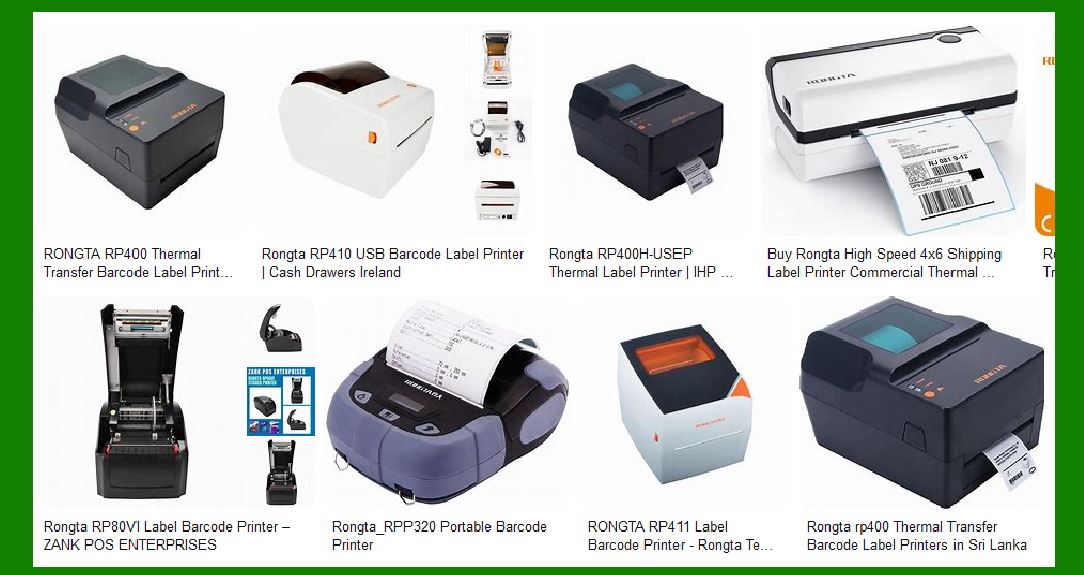
RPP320 3-inch Portable Label Printer: This model supports various intelligent terminals and PDA printing. It is waterproof, dustproof (IP54 certified), and can withstand falls from up to 2 meters. RPP04 4-inch Handheld Portable Label Printer: Known for its reliable quality and strong battery life, this printer supports fast charging and has a small, convenient design. |
2.3. Industrial Barcode Label Printers |
Industrial barcode label printers are built for high-volume printing in demanding environments such as manufacturing and logistics. Key models include: |
RP400 Thermal Transfer Barcode Label Printer: This model features high speed, excellent stability, and durability. It supports multiple interfaces, including parallel, serial, and USB. RP422 120mm Shipping Label Printer: Designed for express, logistics, and warehousing applications, this printer has a fast printing speed of up to 150mm/s and a compact, space-saving design. |

|
3. Key Features of Rongta Barcode Label Printers |
Rongta barcode label printers are known for their advanced features and reliable performance. Some of the key features include: |
3.1. High Printing Speed |
Many Rongta printers offer high printing speeds, significantly reducing waiting times and improving efficiency. For example, the RP310 can print at speeds of up to 150mm/s. |
3.2. Durability and Reliability |
Rongta printers are built to withstand harsh environments. Models like the RPP320 are IP54 certified, making them resistant to water and dust. They can also withstand drops from significant heights. |
3.3. Versatile Connectivity |
Rongta printers support various connectivity options, including USB, Bluetooth, Wi-Fi, and serial interfaces. This versatility ensures compatibility with different devices and systems. |
3.4. Easy Operation and Maintenance |
Rongta printers are designed for ease of use, with features like simple paper loading, automatic paper detection, and user-friendly interfaces. Maintenance is also straightforward, with easy access to replaceable parts. |
3.5. Advanced Printing Capabilities |
Rongta printers support a wide range of printing options, including one-dimensional and two-dimensional barcodes, QR codes, images, and text. They also offer features like automatic correction and re-printing functions. |

|
4. Applications of Rongta Barcode Label Printers |
Rongta barcode label printers are used in various industries and applications, including: |
4.1. Retail |
In retail environments, Rongta printers are used for printing price tags, product labels, and receipts. Their compact design and fast printing speeds make them ideal for busy retail settings. |
4.2. Logistics and Warehousing |
In logistics and warehousing, Rongta printers are used for printing shipping labels, inventory tags, and tracking labels. Their durability and reliability ensure they can handle the demands of these environments. |
4.3. Healthcare |
In healthcare, Rongta printers are used for printing patient wristbands, medication labels, and laboratory samples. Models like the RPW210 wristband printer are specifically designed for healthcare applications. |
4.4. Manufacturing |
In manufacturing, Rongta printers are used for printing product labels, serial numbers, and compliance labels. Their high-speed printing and robust design make them suitable for industrial use. |

|
5. Detailed Specifications of Key Models |
Here are the detailed specifications of some key Rongta barcode label printer models: |
5.1. RP211 2-inch Thermal Label Printer |
Printing Method: Direct thermal Resolution: 203 DPI Printing Speed: Up to 100mm/s Max Print Width: 56mm Interface: USB, Bluetooth (optional) Dimensions: 200mm x 150mm x 120mm Weight: 1.2kg |
5.2. RPP320 3-inch Portable Label Printer |
Printing Method: Direct thermal Resolution: 203 DPI Printing Speed: Up to 90mm/s Max Print Width: 72mm Interface: Bluetooth, USB Battery: 7.4V, 2000mAh Dimensions: 110mm x 105mm x 58mm Weight: 0.5kg |
5.3. RP400 Thermal Transfer Barcode Label Printer |
Printing Method: Thermal transfer Resolution: 203 DPI Printing Speed: Up to 127mm/s Max Print Width: 104mm Interface: Parallel, Serial, USB Dimensions: 280mm x 230mm x 180mm Weight: 2.5kg |

|
6. Advantages of Using Rongta Barcode Label Printers |
Rongta barcode label printers offer several advantages, making them a preferred choice for many businesses: |
6.1. Cost-Effective |
Rongta printers are competitively priced, offering excellent value for money. Their durability and reliability also mean lower maintenance costs over time. |
6.2. High Performance |
With features like high printing speeds, advanced connectivity options, and robust construction, Rongta printers deliver high performance in various applications. |
6.3. User-Friendly Design |
Rongta printers are designed with the user in mind, featuring easy-to-use interfaces, simple paper loading mechanisms, and straightforward maintenance procedures. |
6.4. Versatility |
Rongta printers can handle a wide range of printing tasks, from simple labels to complex barcodes and images. This versatility makes them suitable for various industries and applications. |

|
7. Conclusion |
Rongta barcode label printers are a reliable and efficient solution for businesses looking to improve their labeling and printing processes. With a wide range of models to choose from, Rongta offers printers that cater to different needs and environments. Whether you need a compact desktop printer for a retail setting or a rugged portable printer for field use, Rongta has a solution that will meet your requirements. |
 cs@easiersoft.com