1. Introduction to Sato Barcode Label Printers |
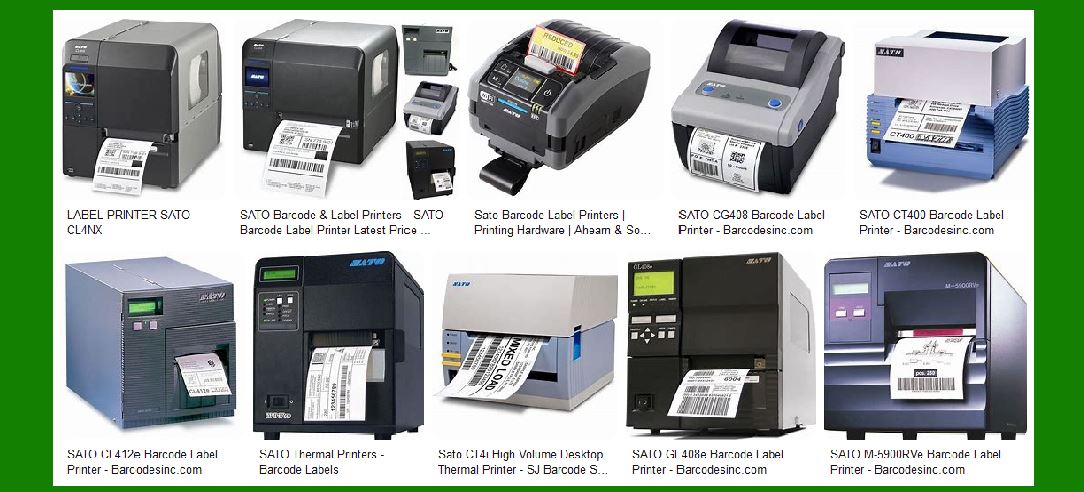
Sato is a renowned name in the field of barcode label printing, known for its innovative solutions and reliable performance. The company offers a wide range of printers designed to meet the diverse needs of industries such as manufacturing, logistics, retail, healthcare, and more. Sato’s printers are known for their durability, high-quality output, and advanced features that enhance productivity and efficiency. |
|
2. Types of Sato Barcode Label Printers |
Sato offers several types of barcode label printers, each designed for specific applications and environments. These include: |
2.1. Industrial Printers |
Industrial printers are built for high-volume printing in demanding environments. They are robust, reliable, and capable of handling large print jobs with ease. Key models include: |
CL4NX Plus: A 4-inch industrial thermal printer with RFID options, known for its high-speed printing and user-friendly interface. CL6NX Plus: A 6-inch version of the CL4NX, offering similar features but with a wider print width. SG112-ex: A 10.5-inch industrial thermal printer designed for large label printing, ideal for applications requiring wide labels. |
2.2. Desktop Printers |
Desktop printers are compact and suitable for lower volume printing needs. They are ideal for office environments and small businesses. Key models include: |
CT4-LX Series: A series of 4-inch desktop thermal printers with RFID options, known for their compact size and high performance. WS2: A 2-inch thermal printer designed for healthcare applications, offering easy maintenance and high-quality printing. WS4 Series: A 4-inch desktop barcode printer that combines ease of use with reliable performance. |
2.3. Mobile Printers |
Mobile printers are designed for on-the-go printing, making them ideal for field operations and mobile workforce applications. Key models include: |
PW4NX: A 4-inch mobile thermal printer known for its rugged design and reliable performance. PW2NX: A 2-inch mobile thermal printer that offers portability and ease of use. PV4: A 4-inch mobile thermal printer designed for high-quality printing in mobile environments. PV3: A 3-inch mobile thermal printer that balances portability with performance. |
2.4. Specialty Printers |
Specialty printers are designed for specific applications that require unique printing capabilities. Key models include: |
FX3-LX: A specialty thermal printer with a user-friendly touchscreen interface, ideal for food labeling and other specialized applications. GY4 Series: A two-sided thermal printer designed for printing on both sides of a label, useful for applications like ticketing and labeling. TG3 Series: A tag and label thermal printer known for its versatility and high-quality output. |

|
3. Key Features of Sato Barcode Label Printers |
Sato barcode label printers come with a range of features that enhance their functionality and usability. Some of the key features include: |
3.1. High-Resolution Printing |
Many Sato printers offer high-resolution printing capabilities, ensuring that barcodes, text, and graphics are sharp and clear. This is particularly important for applications where readability and accuracy are critical. |
3.2. RFID Capabilities |
Several Sato printers come with RFID options, allowing for the encoding and printing of RFID tags. This is useful for applications that require tracking and inventory management. |
3.3. User-Friendly Interfaces |
Sato printers are designed with user-friendly interfaces, including touchscreens and intuitive controls. This makes them easy to operate and reduces the learning curve for new users. |
3.4. Durability and Reliability |
Sato printers are built to withstand harsh environments and heavy use. They are known for their durability and reliable performance, making them a trusted choice for industrial applications. |
3.5. Connectivity Options |
Sato printers offer a range of connectivity options, including USB, Ethernet, and wireless connections. This ensures that they can be easily integrated into existing systems and networks. |

|
4. Applications of Sato Barcode Label Printers |
Sato barcode label printers are used in a variety of industries and applications. Some of the key applications include: |
4.1. Manufacturing |
In manufacturing, Sato printers are used for labeling products, components, and packaging. They help ensure that items are properly identified and tracked throughout the production process. |
4.2. Logistics and Warehousing |
In logistics and warehousing, Sato printers are used for printing shipping labels, inventory labels, and pallet labels. They help improve accuracy and efficiency in the supply chain. |
4.3. Retail |
In retail, Sato printers are used for printing price tags, shelf labels, and promotional labels. They help enhance the shopping experience and streamline store operations. |
4.4. Healthcare |
In healthcare, Sato printers are used for printing patient wristbands, specimen labels, and medication labels. They help improve patient safety and ensure accurate identification. |
4.5. Food and Beverage |
In the food and beverage industry, Sato printers are used for printing food labels, nutritional information, and expiration dates. They help ensure compliance with regulations and improve food safety. |

|
5. Popular Models and Their Specifications |
Let’s take a closer look at some of the popular Sato barcode label printer models and their specifications: |
5.1. CL4NX Plus |
Print Method: Direct thermal / Thermal transfer Print Resolution: 203 dpi, 305 dpi, 609 dpi Print Speed: Up to 14 ips Print Width: Up to 4.1 inches Connectivity: USB, Ethernet, Bluetooth, Wi-Fi Features: RFID option, user-friendly interface, high-speed printing |
5.2. CT4-LX Series |
Print Method: Direct thermal / Thermal transfer Print Resolution: 203 dpi, 305 dpi Print Speed: Up to 8 ips Print Width: Up to 4.1 inches Connectivity: USB, Ethernet, Bluetooth, Wi-Fi Features: Compact size, high performance, RFID option |
5.3. PW4NX |
Print Method: Direct thermal Print Resolution: 203 dpi Print Speed: Up to 5 ips Print Width: Up to 4 inches Connectivity: USB, Bluetooth, Wi-Fi Features: Rugged design, portable, reliable performance |

|
6. Advanced Technologies in Sato Printers |
Sato incorporates several advanced technologies in their printers to enhance performance and functionality. Some of these technologies include: |
6.1. RFID Technology |
Sato’s RFID-enabled printers allow for the encoding and printing of RFID tags, which are used for tracking and inventory management. This technology helps improve accuracy and efficiency in various applications. |
6.2. IoT Integration |
Sato printers can be integrated with IoT (Internet of Things) systems, allowing for remote monitoring and management. This helps in predictive maintenance and reduces downtime. |
6.3. High-Resolution Printing |
Sato’s high-resolution printing technology ensures that barcodes, text, and graphics are sharp and clear. This is particularly important for applications where readability and accuracy are critical. |
6.4. User-Friendly Interfaces |
Sato printers feature user-friendly interfaces, including touchscreens and intuitive controls. This makes them easy to operate and reduces the learning curve for new users. |

|
7. Maintenance and Support |
Sato offers comprehensive maintenance and support services to ensure that their printers operate smoothly and efficiently. These services include: |
7.1. Technical Support |
Sato provides technical support to help users troubleshoot and resolve any issues with their printers. This includes phone support, online resources, and on-site assistance. |
7.2. Maintenance Services |
Sato offers maintenance services to keep printers in optimal condition. This includes regular inspections, cleaning, and replacement of worn parts. |
7.3. Training Programs |
Sato provides training programs to help users get the most out of their printers. This includes training on operation, maintenance, and troubleshooting. |

|
8. Conclusion |
Sato barcode label printers are known for their reliability, high-quality output, and advanced features. They are used in a variety of industries and applications, from manufacturing and logistics to retail and healthcare. With a wide range of models and options, Sato offers solutions to meet the diverse needs of businesses. Whether you need a rugged industrial printer, a compact desktop printer, or a portable mobile printer, Sato has a solution that can help improve efficiency and productivity. |
 cs@easiersoft.com