1. Introduction to Star Micronics |
Star Micronics is a global leader in the manufacturing of Point of Sale (POS) hardware, including barcode label printers. The company has a rich history of innovation and quality, providing solutions that cater to various industries such as retail, hospitality, healthcare, and logistics. Star Micronics’ barcode label printers are known for their reliability, versatility, and advanced features. |
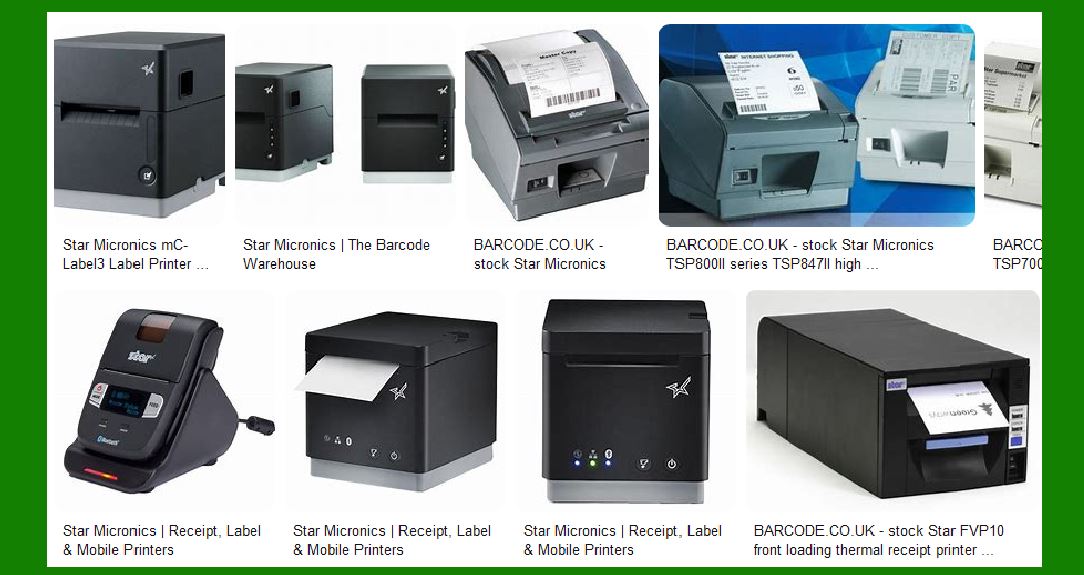
|
2. Product Range |
Star Micronics offers a diverse range of barcode label printers designed to meet different needs and applications. These include desktop printers, portable printers, and specialized printers for specific tasks. |
2.1 Desktop Printers |
Desktop printers from Star Micronics are compact, efficient, and suitable for high-volume printing tasks. They are ideal for environments where space is limited but high-quality printing is required. |
2.2 Portable Printers |
Portable printers are designed for mobility and convenience. They are lightweight, easy to carry, and perfect for on-the-go printing needs, such as in retail environments, warehouses, and field services. |
2.3 Specialized Printers |
Star Micronics also offers specialized printers for niche applications. These include printers for food labeling, healthcare, and industrial uses. Each printer is designed with specific features to cater to the unique requirements of these industries. |

|
3. Key Features |
Star Micronics barcode label printers come with a range of features that enhance their functionality and usability. |
3.1 High-Quality Printing |
Star Micronics printers are known for their high-quality printing capabilities. They can produce clear, sharp, and durable labels that are easy to read and scan. |
3.2 Versatility |
These printers support a wide range of media types, including linerless labels, die-cut labels, continuous labels, and receipts. This versatility makes them suitable for various applications. |
3.3 Connectivity Options |
Star Micronics printers offer multiple connectivity options, including USB, Ethernet, Bluetooth, and Wi-Fi. This ensures seamless integration with different systems and devices. |
3.4 Easy Maintenance |
The printers are designed for easy maintenance, with features such as tool-free part replacement and user-friendly interfaces. This reduces downtime and ensures smooth operation. |
3.5 Environmental Considerations |
Star Micronics is committed to sustainability. Their printers are designed to be energy-efficient and support eco-friendly media options, such as linerless labels. |

|
4. Popular Models |
Several models from Star Micronics have gained popularity due to their performance and reliability. |
4.1 TSP700II |
The TSP700II is a versatile thermal printer that supports various media types, including labels, receipts, and tickets. It offers high-speed printing and multiple connectivity options, making it suitable for a wide range of applications. |
4.2 TSP800II |
The TSP800II is known for its wide-format printing capabilities. It can print labels up to 112mm wide, making it ideal for applications that require larger labels, such as shipping and logistics. |
4.3 mC-Label3 |
The mC-Label3 is a compact and efficient label printer designed for retail and hospitality environments. It supports linerless labels and offers easy maintenance features, such as tool-free part replacement. |

|
5. Applications |
Star Micronics barcode label printers are used in various industries and applications. |
5.1 Retail |
In retail, these printers are used for price labeling, shelf labeling, and promotional labeling. Their high-quality printing ensures that labels are clear and easy to read, enhancing the shopping experience. |
5.2 Hospitality |
In the hospitality industry, Star Micronics printers are used for food labeling, order labeling, and guest management. Their reliability and ease of use make them a valuable tool in fast-paced environments. |
5.3 Healthcare |
In healthcare, these printers are used for patient identification, specimen labeling, and medication labeling. Their ability to produce durable and accurate labels is crucial in ensuring patient safety. |
5.4 Logistics |
In logistics, Star Micronics printers are used for shipping labels, inventory labels, and tracking labels. Their high-speed printing and wide-format capabilities make them ideal for this industry. |

|
6. Technology |
Star Micronics barcode label printers incorporate advanced technology to enhance their performance and functionality. |
6.1 Thermal Printing |
Most Star Micronics printers use thermal printing technology, which provides fast and high-quality printing. Thermal printers are also more reliable and require less maintenance compared to other printing technologies. |
6.2 CloudPRNT |
CloudPRNT is a technology developed by Star Micronics that allows printers to receive print jobs directly from a remote server. This enables seamless integration with online ordering systems and other cloud-based applications. |
6.3 StarPRNT Emulation |
StarPRNT emulation is a common control method used across Star Micronics printers. It simplifies integration and ensures compatibility with various software and systems. |

|
7. Support and Services |
Star Micronics provides comprehensive support and services to ensure the optimal performance of their printers. |
7.1 Technical Support |
Star Micronics offers technical support through various channels, including phone, email, and online resources. Their support team is knowledgeable and responsive, helping users resolve any issues quickly. |
7.2 Warranty and Repairs |
Star Micronics printers come with a warranty that covers defects and malfunctions. The company also offers repair services to ensure that printers are always in good working condition. |
7.3 Software and Drivers |
Star Micronics provides a range of software and drivers to support their printers. These include development kits, utilities, and drivers for various operating systems, such as iOS, Android, and Windows. |

|
8. Environmental Impact |
Star Micronics is committed to reducing its environmental impact through various initiatives. |
8.1 Energy Efficiency |
Star Micronics printers are designed to be energy-efficient, reducing power consumption and lowering operating costs. |
8.2 Eco-Friendly Media |
The company supports the use of eco-friendly media, such as linerless labels, which reduce waste and environmental impact. |
8.3 Recycling Programs |
Star Micronics has recycling programs in place to ensure that their products are disposed of responsibly at the end of their lifecycle. |

|
9. Conclusion |
Star Micronics barcode label printers are a reliable and versatile solution for various industries and applications. Their high-quality printing, advanced features, and commitment to sustainability make them a valuable tool for businesses looking to improve their labeling processes. Whether you need a desktop printer for high-volume tasks, a portable printer for on-the-go printing, or a specialized printer for niche applications, Star Micronics has a solution to meet your needs. |
 cs@easiersoft.com