1. Introduction to Toshiba Tec Barcode Label Printers |
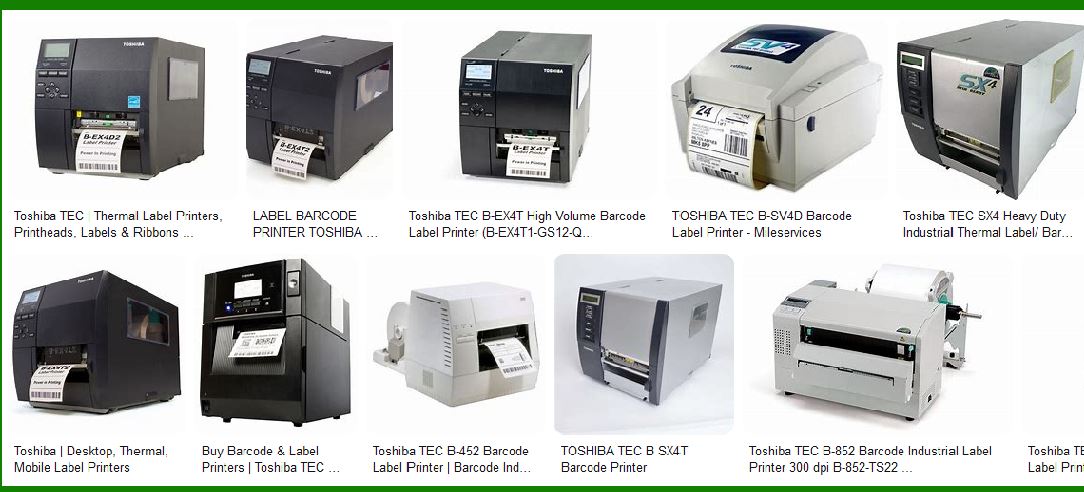
Toshiba Tec is a renowned manufacturer of barcode label printers, offering a wide range of models designed to meet various business needs. These printers are known for their reliability, high-quality printing, and ease of use. Toshiba Tec’s barcode label printers are used in various industries, including retail, manufacturing, logistics, and healthcare. |
|
2. Types of Toshiba Tec Barcode Label Printers |
Toshiba Tec offers several types of barcode label printers, each designed for specific applications and environments. The main categories include: |
2.1 Desktop Printers |
Desktop printers are compact and designed for low to medium volume printing. They are ideal for office environments and small businesses. Examples include: |
Toshiba B-FV4D: A compact and stylish desktop printer that offers high performance and flexibility. Toshiba B-FV4T: Similar to the B-FV4D but with additional features for more demanding applications. |
2.2 Industrial Printers |
Industrial printers are built for high-volume printing and are designed to withstand harsh environments. They are commonly used in manufacturing and logistics. Examples include: |
Toshiba B-EX4T1: A premium industrial printer that offers high-speed printing and advanced features. Toshiba B-SA4TM: Combines the functionality of an industrial printer with the compact footprint of a desktop printer. |
2.3 Portable Printers |
Portable printers are designed for mobile use, allowing users to print labels on the go. They are commonly used in retail and field service applications. Examples include: |
Toshiba B-FP3D: A robust and durable portable printer with easy operation and a full-color display. Toshiba B-EP4DL: A compact and lightweight mobile printer suitable for various portable applications. |
|
3. Key Features of Toshiba Tec Barcode Label Printers |
Toshiba Tec barcode label printers come with a variety of features that enhance their performance and usability. Some of the key features include: |
3.1 High-Quality Printing |
Toshiba Tec printers are known for their high-quality printing capabilities. They offer resolutions up to 300 dpi, ensuring clear and readable labels. The printers use thermal transfer and direct thermal printing technologies, which provide durable and long-lasting prints. |
3.2 Versatile Connectivity |
Toshiba Tec printers come with multiple connectivity options, including USB, Ethernet, and wireless LAN. This allows for easy integration into existing networks and systems. Some models also offer Bluetooth connectivity for mobile printing applications. |
3.3 User-Friendly Design |
The printers are designed with the user in mind, featuring easy-to-use interfaces and minimal maintenance requirements. Many models come with tool-less print head and platen replacement, reducing downtime and maintenance costs. |
3.4 Advanced Software Compatibility |
Toshiba Tec printers are compatible with various label design software, including Bartender UltraLite and NiceLabel. This allows users to create custom labels with ease. The printers also support multiple barcode symbologies, including 1D and 2D barcodes. |

|
4. Detailed Descriptions of Selected Models |
Here are detailed descriptions of some popular Toshiba Tec barcode label printer models: |
4.1 Toshiba B-SA4TM |
The Toshiba B-SA4TM is a versatile barcode label printer that combines the functionality of an industrial printer with the compact footprint of a desktop printer. Key features include: |
Printing Technology: Thermal transfer and direct thermal. Resolution: 203 dpi (8 dots/mm) standard, 300 dpi (11.8 dots/mm) optional. Print Width: Up to 104 mm (203 dpi), 105.7 mm (300 dpi). Print Speed: Up to 152.4 mm/sec (6 ips). Connectivity: USB 2.0, Ethernet, bidirectional parallel port, serial port (optional), wireless LAN (optional). Barcodes Supported: UPC/EAN/JAN, Code 39, Code 93, Code 128, EAN 128, NW7, MSI, Industrial 2 of 5, ITF, Postnet, RM4SCC, KIX-code, RSS14, Data Matrix, PDF 417, Maxicode, QR code, Micro PDF 417, CP Code. Dimensions: 238 mm (W) x 402 mm (D) x 332 mm (H). Weight: 15 kg (without media and ribbon). |
4.2 Toshiba B-EX4T1 |
The Toshiba B-EX4T1 is a high-performance industrial printer designed for demanding applications. Key features include: |
Printing Technology: Thermal transfer and direct thermal. Resolution: 203 dpi (8 dots/mm) standard, 300 dpi (11.8 dots/mm) optional. Print Width: Up to 104 mm (203 dpi), 105.7 mm (300 dpi). Print Speed: Up to 355 mm/sec (14 ips). Connectivity: USB 2.0, Ethernet, bidirectional parallel port, serial port (optional), wireless LAN (optional). Barcodes Supported: UPC/EAN/JAN, Code 39, Code 93, Code 128, EAN 128, NW7, MSI, Industrial 2 of 5, ITF, Postnet, RM4SCC, KIX-code, RSS14, Data Matrix, PDF 417, Maxicode, QR code, Micro PDF 417, CP Code. Dimensions: 278 mm (W) x 460 mm (D) x 310 mm (H). Weight: 17 kg (without media and ribbon). |
4.3 Toshiba B-FV4D |
The Toshiba B-FV4D is a compact desktop printer designed for low to medium volume printing. Key features include: |
Printing Technology: Direct thermal. Resolution: 203 dpi (8 dots/mm). Print Width: Up to 108 mm. Print Speed: Up to 152.4 mm/sec (6 ips). Connectivity: USB 2.0, Ethernet, serial port (optional), wireless LAN (optional). Barcodes Supported: UPC/EAN/JAN, Code 39, Code 93, Code 128, EAN 128, NW7, MSI, Industrial 2 of 5, ITF, Postnet, RM4SCC, KIX-code, RSS14, Data Matrix, PDF 417, Maxicode, QR code, Micro PDF 417, CP Code. Dimensions: 220 mm (W) x 279 mm (D) x 182 mm (H). Weight: 2.4 kg (without media). |
4.4 Toshiba B-FP3D |
The Toshiba B-FP3D is a portable printer designed for mobile applications. Key features include: |
Printing Technology: Direct thermal. Resolution: 203 dpi (8 dots/mm). Print Width: Up to 72 mm. Print Speed: Up to 127 mm/sec (5 ips). Connectivity: USB 2.0, Bluetooth, wireless LAN (optional). Barcodes Supported: UPC/EAN/JAN, Code 39, Code 93, Code 128, EAN 128, NW7, MSI, Industrial 2 of 5, ITF, Postnet, RM4SCC, KIX-code, RSS14, Data Matrix, PDF 417, Maxicode, QR code, Micro PDF 417, CP Code. Dimensions: 110 mm (W) x 162 mm (D) x 79 mm (H). Weight: 0.6 kg (without media). |
|
5. Applications of Toshiba Tec Barcode Label Printers |
Toshiba Tec barcode label printers are used in a wide range of applications across various industries. Some common applications include: |
5.1 Retail |
In the retail industry, Toshiba Tec printers are used for printing price tags, shelf labels, and promotional labels. The printers’ high-quality printing ensures that labels are clear and easy to read, which helps improve the shopping experience for customers. |
5.2 Manufacturing |
In manufacturing, Toshiba Tec printers are used for printing product labels, pallet labels, and shipping labels. The printers’ durability and high-speed printing capabilities make them ideal for the demanding environment of a manufacturing facility. |
5.3 Logistics |
In the logistics industry, Toshiba Tec printers are used for printing shipping labels, tracking labels, and inventory labels. The printers’ versatile connectivity options allow them to be easily integrated into warehouse management systems, improving efficiency and accuracy. |
5.4 Healthcare |
In healthcare, Toshiba Tec printers are used for printing patient wristbands, specimen labels, and medication labels. The printers’ high-quality printing ensures that labels are clear and easy to read, which helps improve patient safety and care. |

|
6. Maintenance and Support |
Toshiba Tec barcode label printers are designed to be low maintenance, with features such as tool-less print head and platen replacement. However, regular maintenance is still important to ensure optimal performance. Toshiba Tec offers a range of support services, including technical support, training, and repair services. |

|
7. Conclusion |
Toshiba Tec barcode label printers are a reliable and versatile solution for businesses of all sizes. With a wide range of models to choose from, businesses can find a printer that meets their specific needs. The printers has high-quality printing, versatile connectivity, and user-friendly design. |
 cs@easiersoft.com