1. Introduction to TSC Barcode Label Printers |
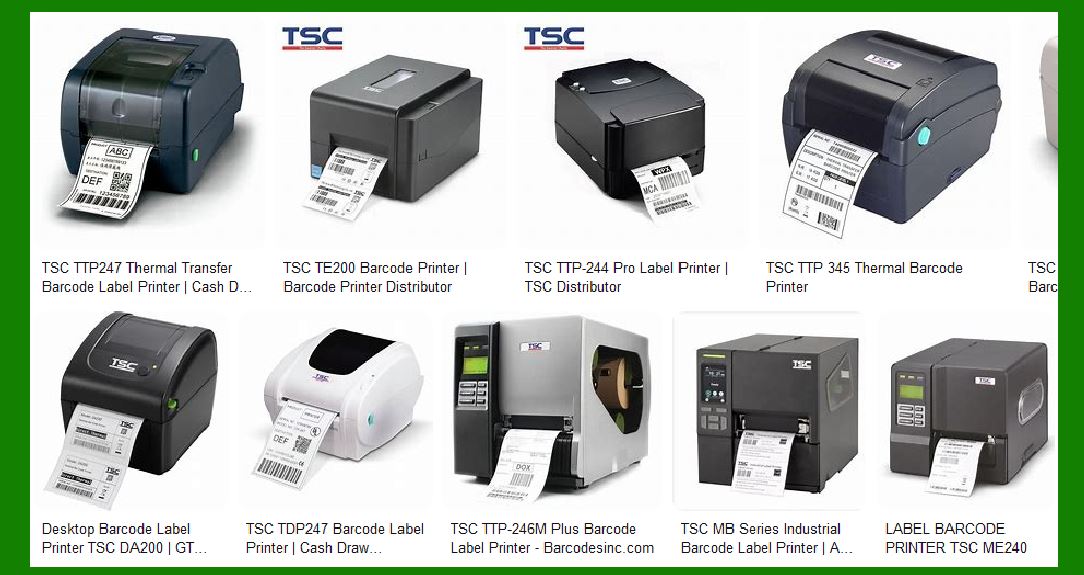
TSC Auto ID Technology Co., Ltd. (TSC) is a globally recognized manufacturer of barcode label printers. Established in 1991, TSC has sold over 5 million barcode printers worldwide, catering to various industries such as retail, logistics, healthcare, and manufacturing. TSC’s product line includes desktop, industrial, and mobile printers, each designed to meet specific printing needs with high performance, reliability, and cost-effectiveness. |
|
2. Desktop Barcode Printers |
Desktop barcode printers from TSC are compact, user-friendly, and ideal for small to medium-volume printing tasks. They are designed to fit in tight spaces while delivering high-quality prints. Key models include: |
2.1. TSC TDP-247 Series |
Features: The TDP-247 series offers 203 dpi resolution, a print speed of up to 7 inches per second, and a maximum print width of 4.25 inches. It supports various media types, including continuous, die-cut, black mark, and fan-fold labels. Applications: Suitable for retail, healthcare, and office environments where space is limited but high-quality printing is required. |
2.2. TSC DA210/DA220 Series |
Features: These models provide 203 dpi and 300 dpi resolution options, with print speeds up to 6 inches per second. They feature a user-friendly design with a large media capacity and easy media loading. Applications: Ideal for shipping, product labeling, and inventory management. |

|
3. Industrial Barcode Printers |
TSC’s industrial barcode printers are built for high-volume, demanding environments. They offer robust construction, high-speed printing, and advanced features to handle large-scale printing tasks. |
3.1. TSC MH240 Series |
Features: The MH240 series includes models with 203 dpi, 300 dpi, and 600 dpi resolutions. They offer print speeds up to 14 inches per second and a maximum print width of 4.09 inches. The printers come with a color touch display for easy operation and support various connectivity options, including USB, Ethernet, and Bluetooth. Applications: Suitable for manufacturing, logistics, and warehousing where high-speed and high-quality printing are essential. |
3.2. TSC MX240P Series |
Features: This series features 203 dpi, 300 dpi, and 600 dpi resolution options, with print speeds up to 18 inches per second. The MX240P printers are designed for heavy-duty applications and include a 4.3-inch color touch display, multiple connectivity options, and a durable metal construction. Applications: Ideal for high-volume printing in industrial settings, including automotive, electronics, and chemical industries. |

|
4. Mobile Barcode Printers |
TSC’s mobile barcode printers are designed for on-the-go printing needs. They are lightweight, durable, and equipped with long-lasting batteries to ensure continuous operation in dynamic environments. |
4.1. TSC Alpha-30L/Alpha-40L Series |
Features: These mobile printers offer 203 dpi resolution, print speeds up to 5 inches per second, and support for various media types. They include wireless connectivity options such as Bluetooth and Wi-Fi, and are built to withstand drops and harsh conditions. Applications: Perfect for retail, logistics, and field service applications where mobility and reliability are crucial. |

|
5. Specialty Printers |
TSC also offers specialty printers designed for specific applications, such as RFID printing and high-resolution printing for small labels. |
5.1. TSC TTP-286MT Series |
Features: The TTP-286MT series provides 203 dpi and 300 dpi resolution options, with a maximum print width of 8.5 inches. These printers are equipped with a color touch display, multiple connectivity options, and support for various media types. Applications: Ideal for printing wide-format labels, including compliance labels, brand marketing labels, and inventory management labels. |
5.2. TSC PEX-2000 Series |
Features: The PEX-2000 series is designed for automated labeling applications. It offers 203 dpi, 300 dpi, and 600 dpi resolution options, with print speeds up to 18 inches per second. The printers are compact, easy to integrate, and support various connectivity options. Applications: Suitable for manufacturing and logistics environments where automated labeling is required. |

|
6. Key Technologies and Features |
TSC barcode label printers incorporate several advanced technologies and features to enhance performance and usability. |
6.1. Thermal Transfer and Direct Thermal Printing |
Thermal Transfer: Uses a ribbon to transfer ink onto the label, providing durable and long-lasting prints. Ideal for applications requiring high durability, such as asset tracking and product labeling. Direct Thermal: Uses heat-sensitive media to produce prints without a ribbon. Suitable for short-term applications like shipping labels and receipts. |
6.2. Connectivity Options |
TSC printers support various connectivity options, including USB, Ethernet, Bluetooth, Wi-Fi, and serial ports. This flexibility ensures seamless integration with existing systems and easy data transfer. |
6.3. User-Friendly Design |
Many TSC printers feature color touch displays, easy media loading mechanisms, and intuitive interfaces to simplify operation and reduce downtime. |
6.4. Durability and Reliability |
TSC printers are built with robust materials and components to withstand harsh environments and continuous operation. They undergo rigorous testing to ensure long-term reliability and performance. |

|
7. Software and Integration |
TSC provides comprehensive software solutions and integration support to enhance the functionality of their printers. |
7.1. BarTender Software |
TSC printers are compatible with BarTender, a leading label design and printing software. BarTender offers a wide range of features, including label design, barcode generation, and database integration, to streamline the printing process. |
7.2. TSC Console |
TSC Console is a management software that allows users to monitor and control multiple printers from a single interface. It provides real-time status updates, remote configuration, and maintenance tools to optimize printer performance. |
7.3. SDKs and APIs |
TSC offers Software Development Kits (SDKs) and Application Programming Interfaces (APIs) to facilitate custom software development and integration with existing systems. These tools enable developers to create tailored solutions for specific printing needs. |

|
8. Applications and Industries |
TSC barcode label printers are used in various industries and applications, providing reliable and efficient printing solutions. |
8.1. Retail |
Applications: Price tags, shelf labels, product labels, and receipts. Benefits: Enhance inventory management, improve customer experience, and streamline operations. |
8.2. Logistics and Warehousing |
Applications: Shipping labels, pallet labels, inventory labels, and tracking labels. Benefits: Improve accuracy, reduce errors, and increase efficiency in the supply chain. |
8.3. Healthcare |
Applications: Patient wristbands, specimen labels, medication labels, and asset tracking. Benefits: Ensure patient safety, enhance traceability, and comply with regulatory requirements. |
8.4. Manufacturing |
Applications: Product labels, compliance labels, asset tracking, and work-in-progress labels. Benefits: Improve production efficiency, ensure quality control, and enhance traceability. |
8.5. Food and Beverage |
Applications: Nutrition labels, expiration date labels, ingredient labels, and packaging labels. Benefits: Ensure food safety, comply with labeling regulations, and enhance brand image. |

|
9. Environmental Considerations |
TSC is committed to sustainability and environmental responsibility. Their printers are designed to minimize waste and energy consumption, and they offer eco-friendly printing solutions. |
9.1. Eco-Friendly Printing |
TSC provides options for linerless labels, which eliminate the need for backing paper and reduce waste. They also offer printers with energy-saving features to minimize power consumption. |
9.2. Recycling Programs |
TSC encourages recycling of used printer components and consumables. They provide guidelines and support for proper disposal and recycling to reduce environmental impact. |

|
10. Customer Support and Services |
TSC offers comprehensive customer support and services to ensure optimal performance and satisfaction. |
10.1. Technical Support |
TSC provides technical support through various channels, including phone, email, and online resources. Their support team is available to assist with troubleshooting, maintenance, and repairs. |
10.2. Training and Resources |
TSC offers training programs and resources to help users get the most out of their printers. These include user manuals, video tutorials, and online courses covering installation, operation, and maintenance. |
10.3. Warranty and Maintenance |
TSC printers come with a standard warranty, and extended warranty options are available. They also offer maintenance services to keep printers in optimal condition and extend their lifespan. |

|
11. Conclusion |
TSC barcode label printers are known for their reliability, performance, and versatility. With a wide range of models and features, TSC provides solutions for various printing needs across different industries. Their commitment to quality, innovation, and customer satisfaction makes them a trusted choice for barcode printing solutions. |
 cs@easiersoft.com