1. Introduction to Unitech Barcode Label Printers |
Unitech is a well-known manufacturer of barcode scanners, mobile computers, and label printers. Their barcode label printers are designed to meet the needs of various industries, including retail, logistics, healthcare, and manufacturing. Unitech’s printers are known for their reliability, ease of use, and advanced features. |
|
2. Types of Unitech Barcode Label Printers |
Unitech offers a range of barcode label printers, including desktop, industrial, and mobile printers. Each type is designed to cater to specific needs and environments. |
2.1 Desktop Printers |
Desktop printers are compact and ideal for small to medium-sized businesses. They are designed for low to medium volume printing and are perfect for office environments. |
2.2 Industrial Printers |
Industrial printers are built for high-volume printing and are suitable for manufacturing and warehouse environments. They are robust and can handle large print jobs with ease. |
2.3 Mobile Printers |
Mobile printers are portable and designed for on-the-go printing. They are perfect for field service, retail, and logistics applications where mobility is essential. |

|
3. Key Features of Unitech Barcode Label Printers |
Unitech barcode label printers come with a variety of features that enhance their functionality and usability. |
3.1 High Print Quality |
Unitech printers offer high-resolution printing, ensuring that barcodes and labels are clear and easy to read. This is crucial for accurate scanning and data capture. |
3.2 Versatile Media Handling |
Unitech printers support a wide range of media types, including labels, tags, and receipts. This versatility makes them suitable for various applications. |
3.3 Connectivity Options |
Unitech printers come with multiple connectivity options, including USB, Bluetooth, and Wi-Fi. This allows for easy integration with existing systems and devices. |
3.4 User-Friendly Design |
Unitech printers are designed with the user in mind. They feature intuitive interfaces, easy media loading, and minimal maintenance requirements. |

|
4. Popular Unitech Barcode Label Printers |
Here are some of the popular models of Unitech barcode label printers: |
4.1 Unitech SP320 |
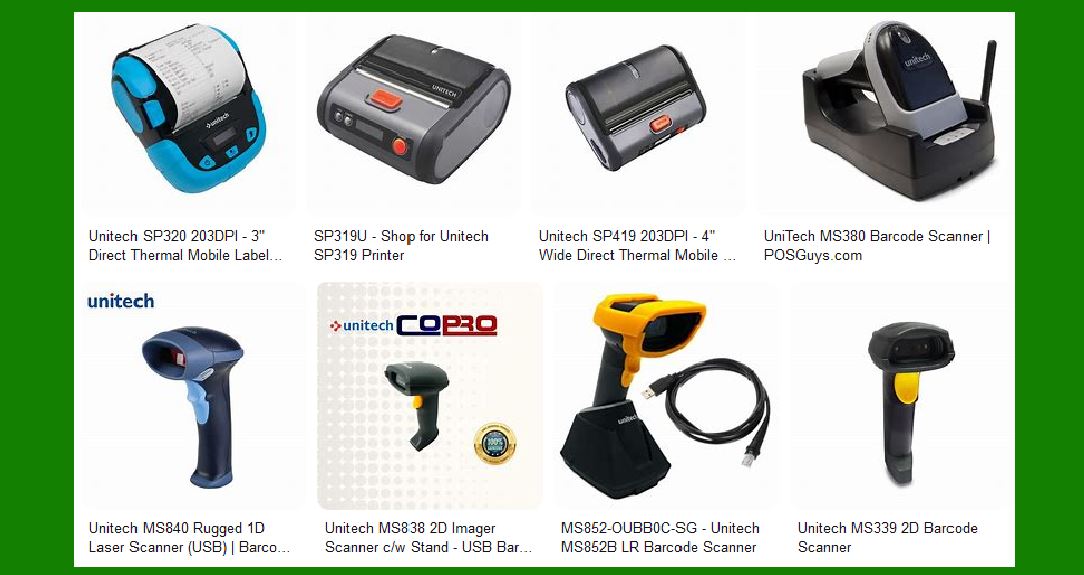
The SP320 is a Bluetooth mobile printer that supports label and thermal paper printing. It offers a maximum print speed of 90mm/s and supports up to 203dpi resolution. The SP320 is compatible with both Android and iOS devices, making it a versatile choice for mobile printing needs. |
4.2 Unitech SP419 |
The SP419 is a compact mobile Bluetooth printer designed for receipt and label printing. It supports printing formats up to 4 inches wide and offers adjustable paper width. The SP419 features low energy consumption and a fast-charging battery, making it ideal for mobile workers. |

|
5. Applications of Unitech Barcode Label Printers |
Unitech barcode label printers are used in various industries for different applications. |
5.1 Retail |
In retail, Unitech printers are used for price labeling, shelf-edge labeling, and inventory management. They help streamline operations and improve efficiency. |
5.2 Logistics |
In logistics, Unitech printers are used for shipping labels, tracking labels, and warehouse management. They ensure accurate tracking and timely delivery of goods. |
5.3 Healthcare |
In healthcare, Unitech printers are used for patient identification, lab sample labeling, and medication tracking. They help improve patient safety and streamline healthcare processes. |
5.4 Manufacturing |
In manufacturing, Unitech printers are used for product labeling, asset tracking, and inventory management. They help improve production efficiency and ensure accurate tracking of materials. |

|
6. Advantages of Using Unitech Barcode Label Printers |
There are several advantages to using Unitech barcode label printers: |
6.1 Reliability |
Unitech printers are known for their reliability and durability. They are built to withstand harsh environments and heavy usage. |
6.2 Ease of Use |
Unitech printers are designed to be user-friendly, with intuitive interfaces and easy media loading. This reduces the learning curve and minimizes downtime. |
6.3 Cost-Effective |
Unitech printers offer a good balance of performance and cost. They provide high-quality printing at an affordable price, making them a cost-effective choice for businesses. |
6.4 Versatility |
Unitech printers support a wide range of media types and connectivity options, making them versatile and adaptable to different applications. |

|
7. Conclusion |
Unitech barcode label printers are a reliable and cost-effective solution for businesses in various industries. With their high print quality, versatile media handling, and user-friendly design, they help improve efficiency and streamline operations. Whether you need a desktop, industrial, or mobile printer, Unitech has a model that will meet your needs. |
 cs@easiersoft.com