1. Introduction to Vipcolor Barcode Label Printers |
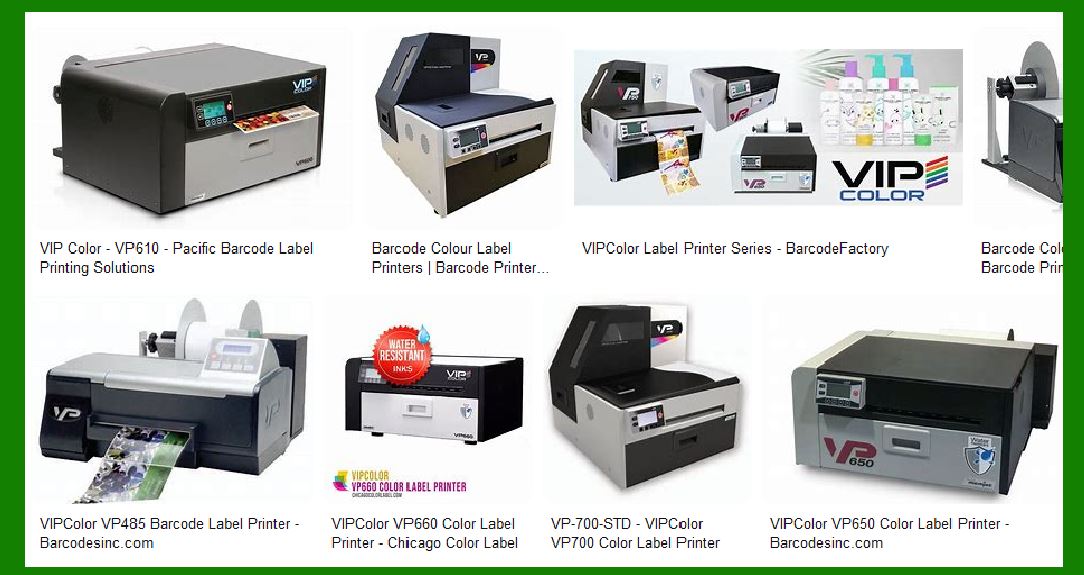
Vipcolor is a renowned brand in the field of color label printing, known for its high-quality, reliable, and versatile printers. These printers are designed to meet the needs of various industries, including manufacturing, retail, logistics, and healthcare. Vipcolor printers are particularly noted for their ability to produce vibrant, full-color labels on demand, which is essential for businesses that require high-quality labeling solutions. |
|
2. Key Features of Vipcolor Barcode Label Printers |
Vipcolor barcode label printers come with a range of features that make them suitable for different applications. Some of the key features include: |
2.1 High Print Resolution |
Vipcolor printers offer high print resolutions, typically up to 1600 x 1600 dpi. This ensures that the labels produced are sharp, clear, and professional-looking, which is crucial for product branding and identification. |
2.2 Fast Print Speeds |
These printers are capable of printing at high speeds, ranging from 6 to 12 inches per second, depending on the model. This makes them ideal for businesses that need to produce large volumes of labels quickly. |
2.3 Versatile Media Handling |
Vipcolor printers can handle a wide range of label sizes and materials, including paper, synthetic materials, and even waterproof labels. This versatility allows businesses to use the same printer for different labeling needs. |
2.4 Cost-Effective Printing |
Vipcolor printers are designed to be cost-effective, with features such as individual ink cartridges for each color (CYMK), which reduces waste and lowers printing costs. Additionally, the ability to print labels on demand eliminates the need for large inventories of pre-printed labels. |
|
3. Popular Models of Vipcolor Barcode Label Printers |
Vipcolor offers several models of barcode label printers, each designed to meet specific needs. Some of the popular models include: |
3.1 Vipcolor VP500 |
The VP500 is a budget-friendly model that is ideal for small to medium-sized businesses. It offers high-speed printing and can produce up to 100 labels in less than 10 minutes. The VP500 is known for its ease of use and reliability. |
3.2 Vipcolor VP550 |
The VP550 is designed for businesses that require waterproof labels. It offers the same high print resolution and speed as the VP500 but includes additional features for producing durable, water-resistant labels. This makes it suitable for applications in harsh environments. |
3.3 Vipcolor VP610 |
The VP610 is a versatile printer that can handle a wide range of label sizes and materials. It offers high-speed printing and is capable of producing up to 10,000 labels per day. The VP610 is ideal for businesses with high-volume labeling needs. |
3.4 Vipcolor VP660 |
The VP660 is similar to the VP610 but includes additional features for producing waterproof labels. It offers high print resolution and speed, making it suitable for businesses that need to produce high-quality, durable labels quickly. |
3.5 Vipcolor VP700 |
The VP700 is a high-performance printer designed for industrial applications. It offers the highest print speed and resolution in the Vipcolor range, making it suitable for businesses that need to produce large volumes of labels quickly and efficiently. |
3.6 Vipcolor VP750 |
The VP750 is the top-of-the-line model in the Vipcolor range. It offers the highest print resolution and speed, as well as additional features for producing waterproof labels. The VP750 is ideal for businesses that require the best in label printing technology. |

|
4. Applications of Vipcolor Barcode Label Printers |
Vipcolor barcode label printers are used in a variety of industries and applications. Some of the common uses include: |
4.1 Product Labeling |
Vipcolor printers are widely used for product labeling, where high-quality, full-color labels are essential for branding and product identification. These printers can produce labels with vibrant colors and sharp details, making them ideal for retail products. |
4.2 Inventory Management |
In warehouses and distribution centers, Vipcolor printers are used to produce labels for inventory management. These labels help in tracking and managing stock levels, ensuring that products are easily identifiable and traceable. |
4.3 Shipping and Logistics |
Vipcolor printers are also used in the shipping and logistics industry to produce labels for packages and shipments. These labels include important information such as shipping addresses, barcodes, and tracking numbers, which are essential for efficient logistics operations. |
4.4 Healthcare |
In the healthcare industry, Vipcolor printers are used to produce labels for medical supplies, patient records, and laboratory samples. These labels need to be durable and resistant to various environmental conditions, which Vipcolor printers can provide. |
4.5 Food and Beverage |
Vipcolor printers are used in the food and beverage industry to produce labels for products such as bottles, cans, and packaging. These labels need to be vibrant and eye-catching to attract customers, and Vipcolor printers are capable of producing high-quality labels that meet these requirements. |
|
5. Advantages of Using Vipcolor Barcode Label Printers |
There are several advantages to using Vipcolor barcode label printers, including: |
5.1 High-Quality Printing |
Vipcolor printers are known for their high print quality, which ensures that labels are sharp, clear, and professional-looking. This is essential for businesses that need to maintain a strong brand image. |
5.2 Cost Savings |
By printing labels on demand, businesses can reduce the cost of pre-printed labels and minimize waste. Vipcolor printers also use individual ink cartridges, which reduces the cost of consumables. |
5.3 Flexibility |
Vipcolor printers can handle a wide range of label sizes and materials, making them suitable for various applications. This flexibility allows businesses to use the same printer for different labeling needs. |
5.4 Ease of Use |
Vipcolor printers are designed to be user-friendly, with intuitive interfaces and easy-to-use software. This makes it easy for businesses to set up and operate the printers, reducing the need for extensive training. |
5.5 Durability |
Vipcolor printers are built to be durable and reliable, with robust construction and high-quality components. This ensures that the printers can withstand the demands of industrial and commercial environments. |

|
6. Conclusion |
Vipcolor barcode label printers are a versatile and reliable solution for businesses that need high-quality, full-color labels. With a range of models to choose from, Vipcolor printers can meet the needs of various industries and applications. Whether you need a budget-friendly printer for small batches or a high-performance printer for industrial applications, Vipcolor has a solution that can help you achieve your labeling goals. |
 cs@easiersoft.com