1. Introduction to Wasp Barcode Technologies |
Wasp Barcode Technologies is a leading provider of barcode solutions, including barcode printers, scanners, and software. The company is known for its high-quality products that cater to various industries, including retail, healthcare, manufacturing, and logistics. Wasp barcode printers are designed to deliver reliable and efficient printing solutions for businesses of all sizes. |
|
2. Types of Wasp Barcode Printers |
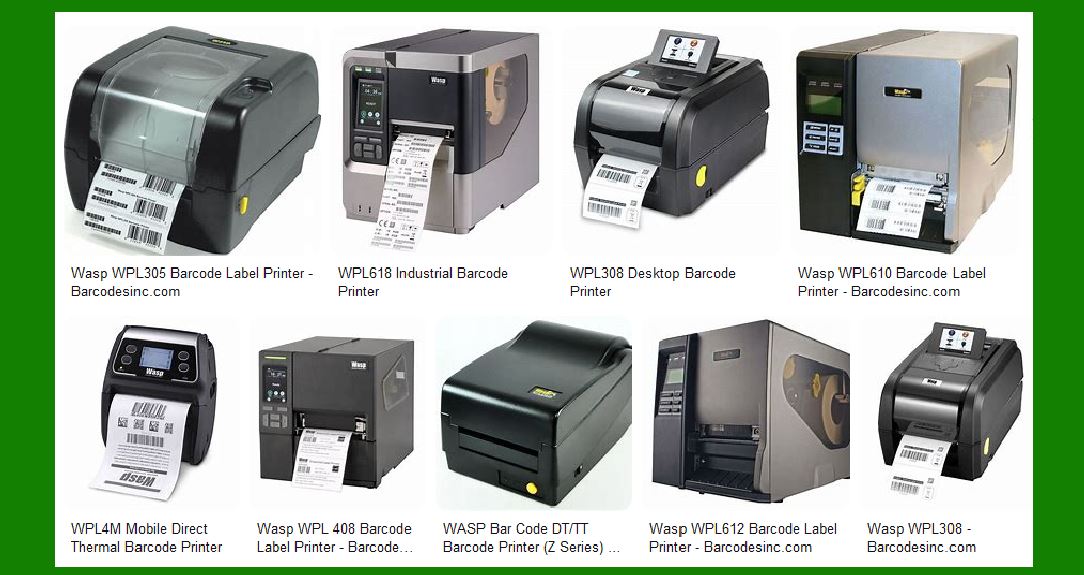
Wasp offers a range of barcode printers to meet different needs. These include desktop printers, industrial printers, and mobile printers. Each type is designed to handle specific printing volumes and environments. |
2.1 Desktop Barcode Printers |
Desktop barcode printers are compact and ideal for light to medium-duty printing tasks. They are commonly used in office environments, retail stores, and small warehouses. Wasp’s desktop printers are known for their ease of use and reliability. |
2.2 Industrial Barcode Printers |
Industrial barcode printers are built for heavy-duty printing tasks in demanding environments. They are designed to withstand harsh conditions and continuous use. These printers are suitable for large warehouses, manufacturing plants, and distribution centers. |
2.3 Mobile Barcode Printers |
Mobile barcode printers are portable and designed for on-the-go printing. They are commonly used in field service, retail, and logistics applications. These printers offer the flexibility to print labels and receipts anywhere, anytime. |

|
3. Key Features of Wasp Barcode Printers |
Wasp barcode printers come with a variety of features that enhance their performance and usability. Some of the key features include: |
3.1 Dual Printing Technology |
Many Wasp printers support both direct thermal and thermal transfer printing. Direct thermal printing is ideal for short-term labeling, while thermal transfer printing is suitable for long-lasting labels. |
3.2 High Print Resolution |
Wasp printers offer high print resolutions, typically 203 dpi or 300 dpi, ensuring clear and crisp barcode labels. |
3.3 Fast Print Speeds |
Wasp barcode printers are designed to deliver high-speed printing, which is essential for high-volume printing tasks. Print speeds can range from 5 inches per second to 12 inches per second, depending on the model. |
3.4 Connectivity Options |
Wasp printers come with various connectivity options, including USB, Ethernet, serial, and parallel ports. Some models also offer wireless connectivity options such as Wi-Fi and Bluetooth. |
3.5 User-Friendly Design |
Wasp barcode printers are designed with the user in mind. They feature easy-to-load media, intuitive interfaces, and compact designs that fit well in any workspace. |

|
4. Popular Wasp Barcode Printer Models |
Wasp offers several popular models that cater to different printing needs. Here are some of the most notable ones: |
4.1 WPL305 Desktop Barcode Printer |
The WPL305 is a compact and powerful desktop barcode printer designed for light to medium-duty printing. It supports both direct thermal and thermal transfer printing and offers a print speed of 5 inches per second. The WPL305 features a clamshell design for easy media loading and comes with USB, serial, and parallel connectivity options. |
4.2 WPL614 Industrial Barcode Printer |
The WPL614 is a heavy-duty industrial barcode printer designed for demanding environments. It supports both direct thermal and thermal transfer printing and offers a print speed of up to 12 inches per second. The WPL614 features a durable metal construction and comes with Ethernet connectivity for easy integration into networked environments. |
4.3 WPL4M Mobile Barcode Printer |
The WPL4M is a lightweight and portable mobile barcode printer designed for on-the-go printing. It supports direct thermal printing and offers optional Wi-Fi or wireless data transfer models. The WPL4M is ideal for field service, retail, and logistics applications. |

|
5. Applications of Wasp Barcode Printers |
Wasp barcode printers are used in a variety of applications across different industries. Some common applications include: |
5.1 Inventory Management |
Wasp barcode printers are widely used in inventory management to print labels for products, shelves, and bins. This helps businesses keep track of their inventory levels and streamline their operations. |
5.2 Asset Tracking |
Wasp printers are also used for asset tracking, allowing businesses to label and track their valuable assets. This is particularly useful in industries such as healthcare, manufacturing, and logistics. |
5.3 Retail Labeling |
In retail environments, Wasp barcode printers are used to print price tags, shelf labels, and product labels. This helps retailers manage their inventory and provide accurate pricing information to customers. |
5.4 Shipping and Receiving |
Wasp barcode printers are used in shipping and receiving departments to print shipping labels, packing slips, and receiving labels. This helps businesses ensure accurate and efficient handling of their shipments. |

|
6. Advantages of Using Wasp Barcode Printers |
There are several advantages to using Wasp barcode printers, including: |
6.1 Reliability |
Wasp barcode printers are known for their reliability and durability. They are built to withstand the rigors of daily use and deliver consistent performance. |
6.2 Ease of Use |
Wasp printers are designed to be user-friendly, with intuitive interfaces and easy-to-load media. This makes them accessible to users of all skill levels. |
6.3 Versatility |
Wasp offers a wide range of barcode printers to meet different needs, from desktop printers for light-duty tasks to industrial printers for heavy-duty applications. |
6.4 Cost-Effective |
Wasp barcode printers offer a cost-effective solution for businesses looking to implement barcode printing. They provide high-quality printing at an affordable price. |

|
7. Conclusion |
Wasp barcode printers are a reliable and efficient solution for businesses of all sizes. With a range of models to choose from, Wasp offers a barcode printer for every application, from light-duty desktop printing to heavy-duty industrial printing. Their user-friendly design, high print quality, and versatile features make them a popular choice for businesses looking to streamline their operations and improve their efficiency. |
 cs@easiersoft.com